03233A(E)-CHAPTER 3 10/30/03 4:04 PM Page 19
TV OPERATION
Setting the Clock
Setting the clock is necessary in ordeI to use the wn'io_ls timer f'eattn'es of" the TV.
Also, you can check the time ",_bile wat( hing the TV (just press the DISPLAYbHtton).
Option 1: Setting the Clock Manually
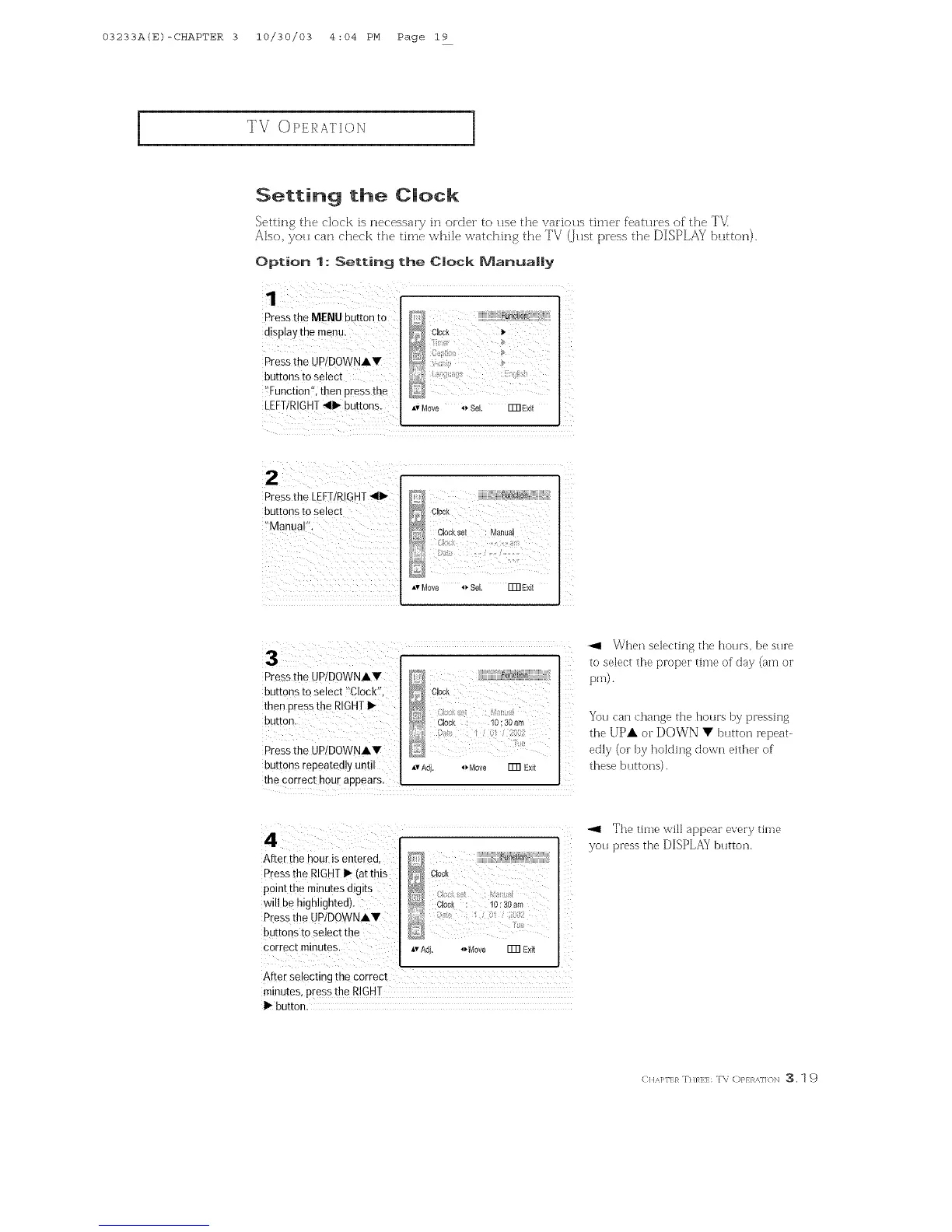
Press the MENU button to
display the menu.
Press the UP/DOWNAV
buttons to select
)!Function'!, then p[ess the
LEFT/RIGHT_11_buttons.
Av Move _ Sel. FFRExit
Press the LEFT/RIGHT411_
buttons to select
!,Manual,!.
cu0_ I
j_ Cockse Ma_lua
Av Move _ Sel FFRExit
:3
Press the UP!DOWNAY
buttons to select _%lock'f,
then press the RIGHTI_
button.
Press the UP/DOWNAV
buttons repeatedly until
_ Clock
......... Cbck : 10:30am
: 0:00;
D
Av Adj. _Move ITR Exit
the correct hour appears.
_Zhen selecting the hours, be sure
to select the proper time of day (am or
pro).
You can change the hours by pressing
the UpA or DOWN • button repeat-
edly (or by holding down either of
these buttons).
After the hour is entered,
Pressthe RIGHT I_ (at this
point the minutes digits
will be highlighted).
P[ess the UP/DOWNAV :
buttons _oselect the
correct minutes.
<
Clock
_,vAd}. 4_Move Fm Exit
After se!ecting the correct
minutes, Press the R!GHT
I_ button.
_1 The time will appear every time
you press the DISPLAY button.
(: HA]>rI:}_ :Dim:l:: T\ C)P} R,_,]]o],_ :3.1 9



 To Next Page