03233A(E)-CHAPTER 5 10/30/03 4:10 PM Page 5
VC]_ OPERATION
1
Using Memory Stop
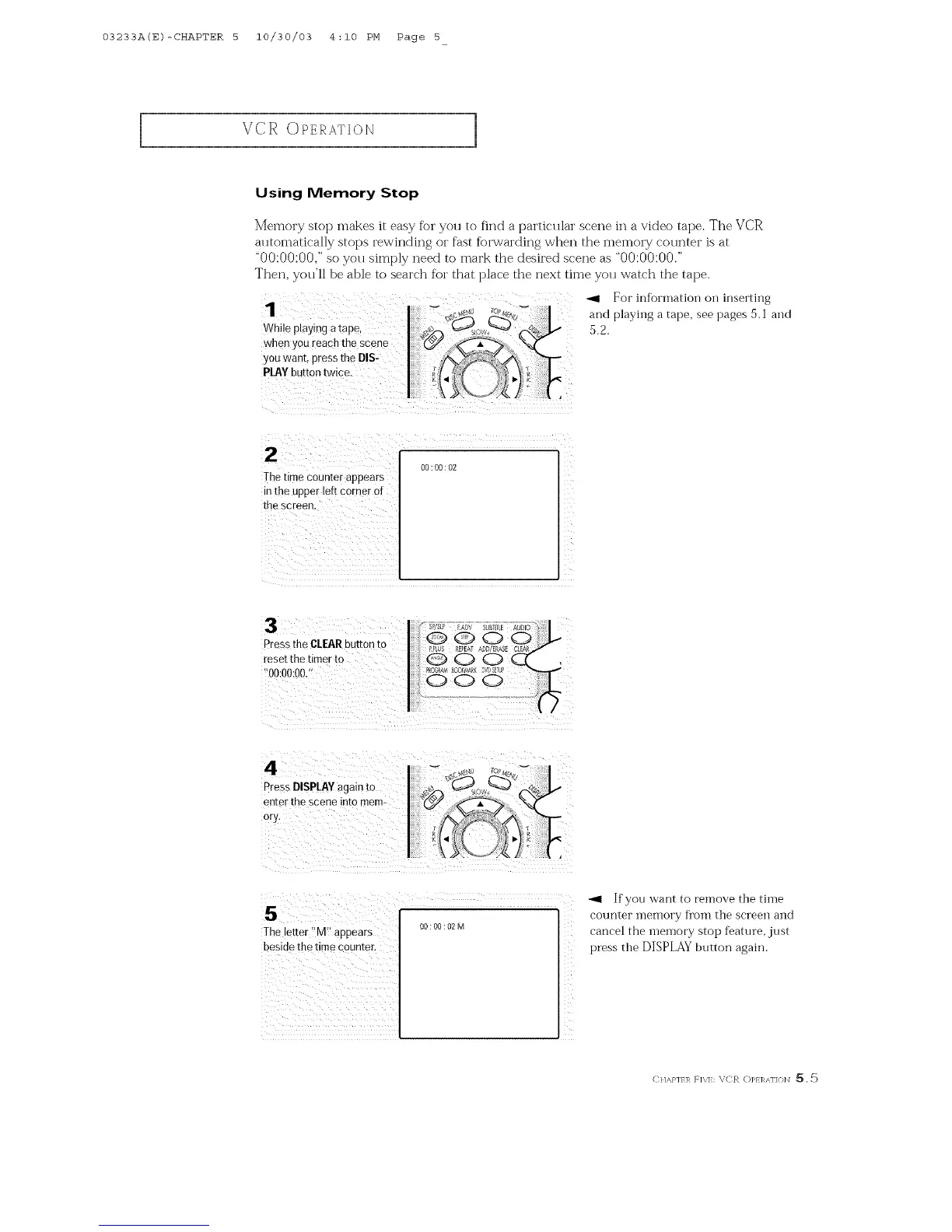
Memory stop makes it easy fi_r you to find a particular scene in a video tape. The VCR
alltomatically stops rewinding or fast fi)rwarding when the memory cotlnter is at
"00:00:00," so you simply need to mark the desired scene as "00:00:00."
Then, you'll be able to search for that place the next time you watch the tape.
-ql For information on inserting
and playing a tape, see pages 5.1 and
5.2.
lhe time Counterappears
in the upper left corner of
the screen.
00:00:02
Pressthe CLEARbutton ro
reset the timer to
00:00:00."
4
PressDISPLAYagain to
enter the scene into mem-
ory
5
The letter "M" appears
besioe the time counter,
O0:O0:02M
-_1 If yon want to remove the time
counter inenloi'y f]'Olll the screen alld
cancel the memory stop feature, just
press the DISPLAY button again.
CI/A,}']/]_ RX]k X,C_ ()PI]_AFI<}INI _,



 To Next Page