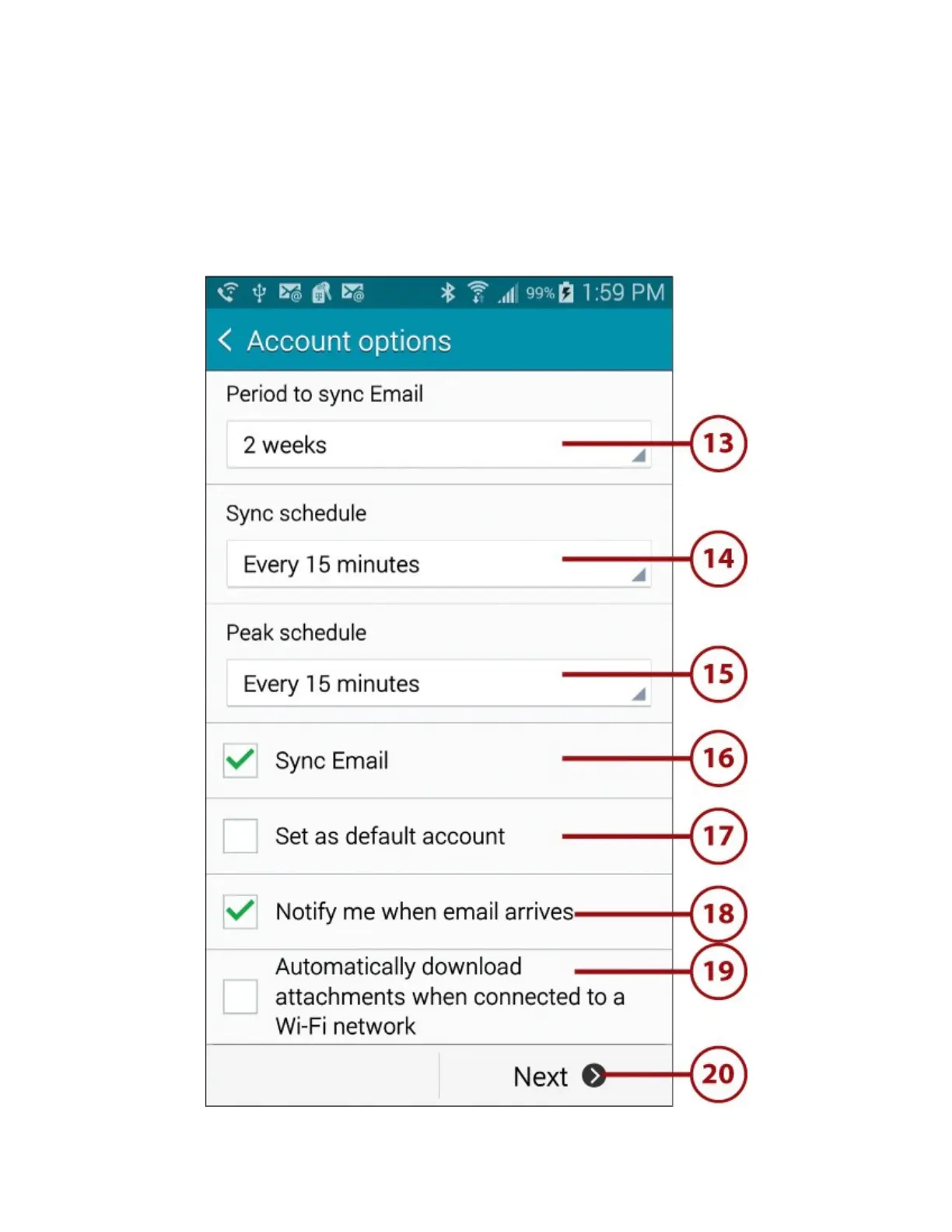
15.TaptochangethefrequencywithwhichemailfromthisaccountsynchronizestoyourGalaxy
Note4duringthepeakschedule.
16.TaptochecktheboxifyouwantemailtosynchronizebetweenthisaccountandyourGalaxy
Note4.
17.Taptochecktheboxifyouwantemailtobesentfromthisaccountbydefault.
18.Taptochecktheboxifyouwanttobenotifiedwhennewemailarrivesintothisaccount.
19.Taptochecktheboxifyouwantemailtobeautomaticallydownloadedwhenyouareconnected
toaWi-Finetwork.
20.TapNext.
21.Enterafriendlynameforthisaccount,suchasHomeEmail.
22.Enteryourfullnameorthenameyouwanttobedisplayedwhenpeoplereceiveemailssentfrom
thisaccount.














 To Next Page