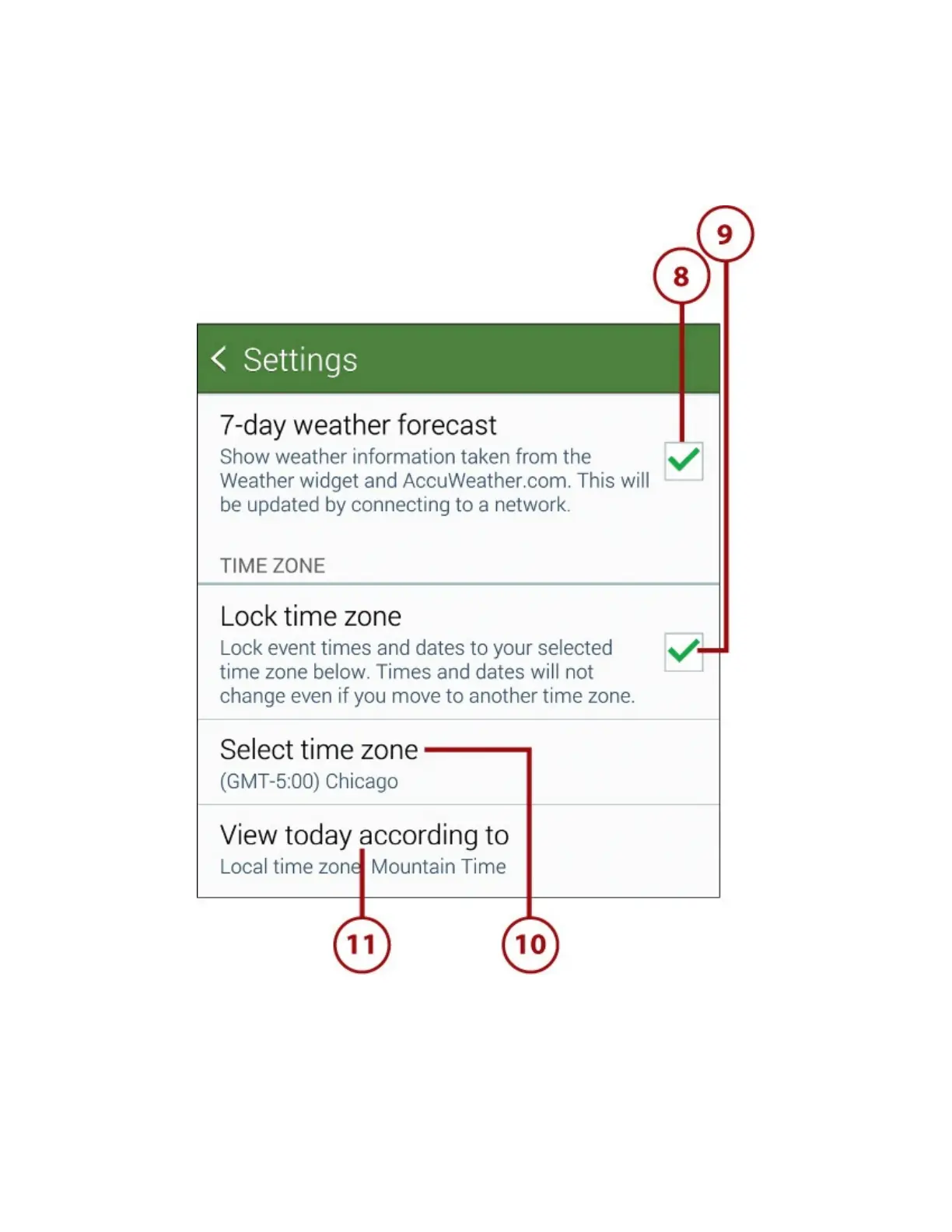
8.Checkthe7-DayWeatherForecastboxifyouwanttodisplaytheweatheronyourcalendar.
9.ChecktheLockTimeZoneboxwhenyouwanttoforceSPlannertouseyourhometimezoneor
anothertimezoneyouchoosewhendisplayingthecalendarandeventtimes.Youwoulddothis
whenyoutravelbutyouwanttokeepyourcalendaronyourhometimezone(oranothertime
zoneyouselect)insteadoflettingSPlannerchangeittowhichevertimezoneyoufindyourself
in.
10.TapSelectTimeZonetosetyourhometimezoneifyouenabledLockTimeZoneinstep9.
11.TaptheViewTodayAccordingTobuttontodisplaytheViewTodayAccordingToscreen.
12.TaptheFixedTimeZoneradiobuttonortheLocalTimeZoneradiobutton,asneeded.














 To Next Page