PushandOtherOptionsforGettingEmail
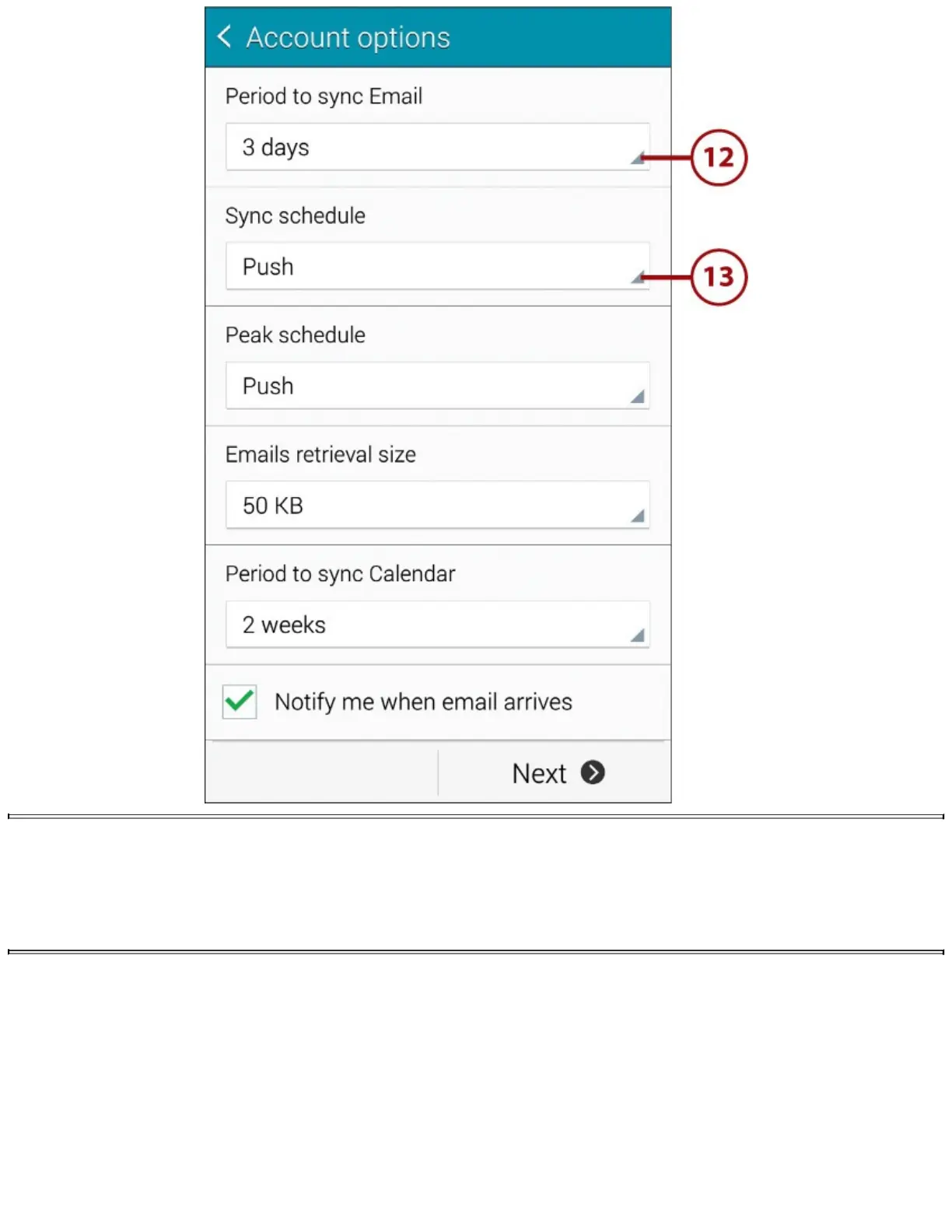
PushmeansthatasemailarrivesinyourInboxatwork,itisdeliveredtoyourphone.Youcanset
ittoManual,whichmeansthatyourGalaxyNote4checksforemailonlywhenyouopenthe
Emailapp.Youcanalsosetthedeliveryfrequencyfromevery5minutestoevery12hours.
14.TapPeakScheduletochoosehowoftenyourGalaxyNote4receivesExchangeemailduring
peakhours.Youmaywanttocheckemailmorefrequentlyduringpeakhoursthanoff-peakhours.
15.TapEmailsRetrievalSizetochoosethelargestemailsizetoretrieve.Youcanchoosefrom
0.5KBto100KB,chooseAlltoretrieveallmessagesnomatterhowbigtheyare,orchoose
Automatictousetheserver’ssettings.50KBor100KBisareasonablesizeunlessyougetvast
numbersofmessages.
16.TapPeriodtoSyncCalendartochoosehowlongaperiodofcalendarappointmentsto
synchronize.Yourchoicesare2weeks,1month,3months,6months,andAllCalendar.
17.ChecktheNotifyMeWhenEmailArrivesboxtoreceiveanotificationwhenemailmessages














 To Next Page