WhyRestrictBackgroundData?
Whenyou’reactivelyusinganapponyourGalaxyNote4viathecellularconnection,it’susually
obviouswhenit’stransferringdata.
Appscanalsotransferdatainthebackground.Forexample,youremailappstypicallycontinue
todownloadnewmessageswhenthey’reinthebackground,ortheSettingsappmaydownload
updatesthathavebecomeavailable.
Backgrounddatatransferisusuallyhelpful,butitcanadduptoaconsiderablepowerdrainon
yourdevice’sbattery.Sowhenyouneedtoekeoutbatterylife,itisagoodideatorestrict
backgrounddatatransfer.
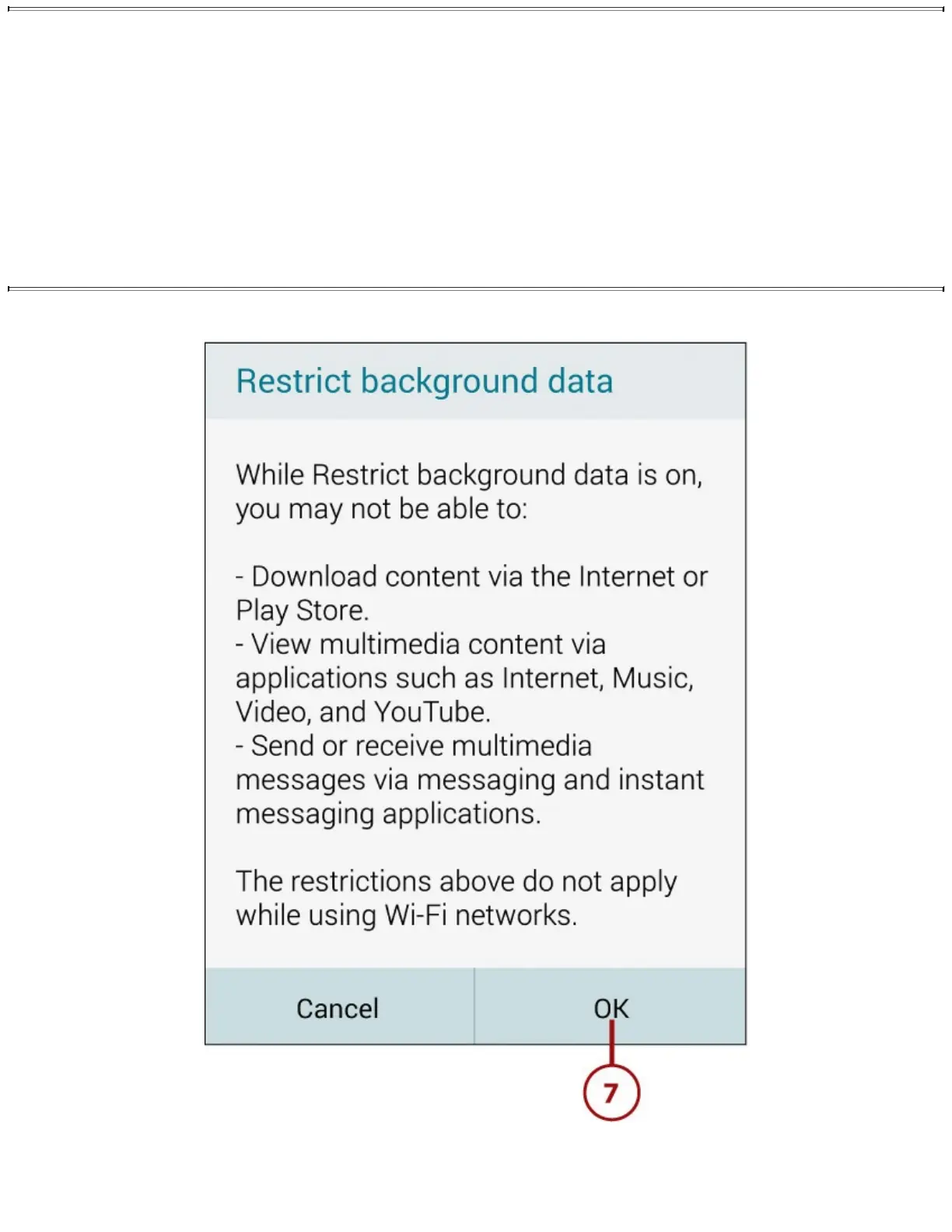
7.TaptheOKbuttontoclosethedialog.TheRestrictBackgroundDatacheckboxisnowchecked.
8.TapRestrictPerformancetodisplaytheRestrictPerformancescreen.














 To Next Page