Deactivate Call Forwarding
1. On the Edge screen, tap Phone. If the keypad is not shown, tap the Keypad tab at the top of
the screen.
–
or
–
From
home, tap
Phone. If
the
keypad is not shown, tap the Keypad
tab at the top of the
screen.
3. Tap
. A
tone plays to
confirm the deactivation of Call Forwarding.
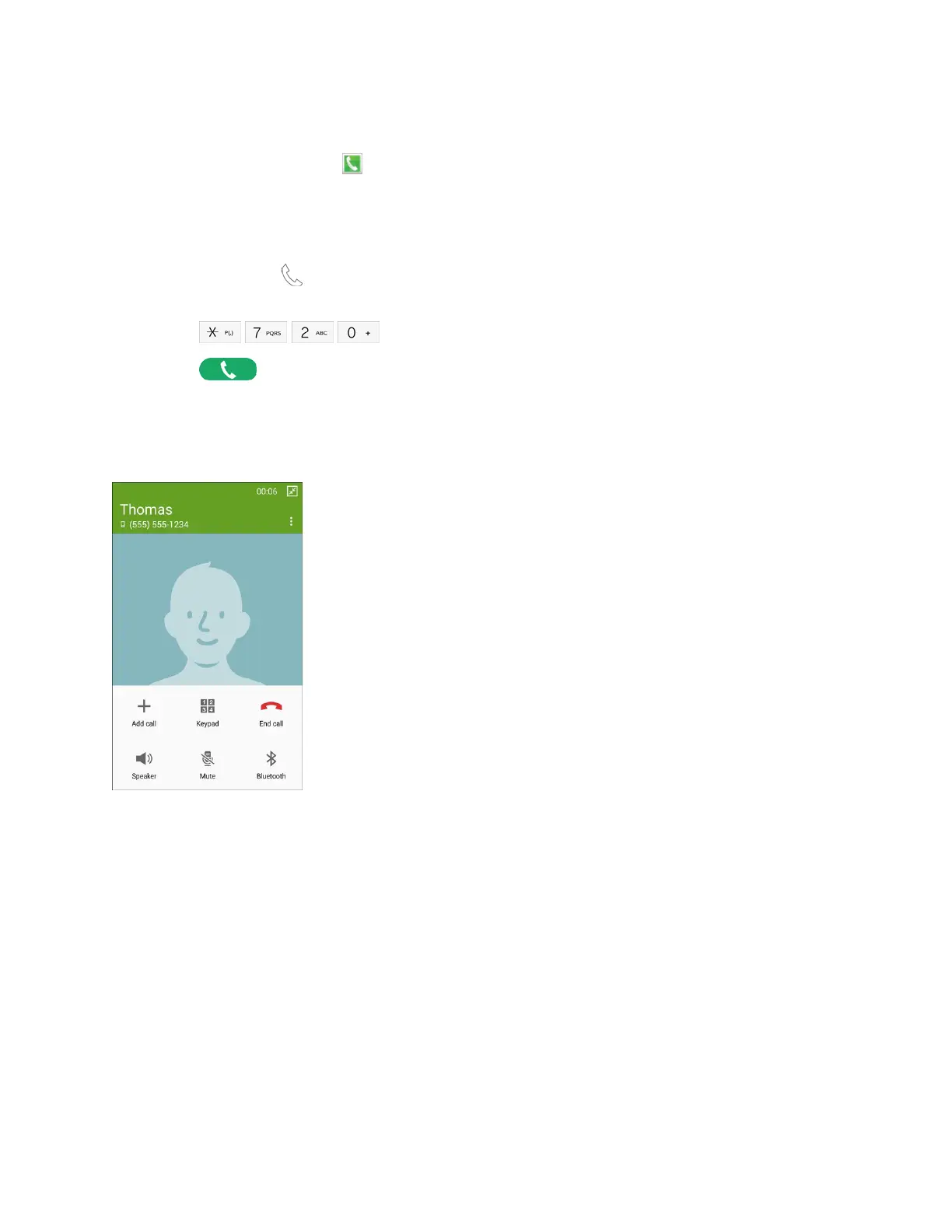
In-Call Options
While you are on a call, you can use options to find information or multitask during the call.
2. Tap .
● Add call: Display the Keypad to dial another call.
●
Keypad: Display the Keypad, where you can enter numbers to use DTMF (Dual Tone Multi-
Frequency). This can be useful if you need to enter an access code or other information while on
a call.
●
End call: Hang up
the call.
●
Speaker: Control whether the call audio plays through the speaker or the earpiece.
Warning:
Because of higher volume levels, do not place the phone near your ear while using the
speaker.
●
Mute: Control whether the other party can hear your side of the call.
● Bluetooth: Connect to a Bluetooth device, or disconnect from a device.
Phone Calls 46














 To Next Page