To do list
2) After changing to the option mode, fresh food compartment "0" , freezer compartment "0" will be displayed.
( Basically fresh food compartment "0", freezer "0" would be set at shipping process, but setting value could
be changed for the purpose of improving product at mass producing process.)
- If fresh food compartment "0" shows only, temperature reference value of freezer compartment will be set
and current freezer compartment temperature code will be displayed on the freezer temperature display.
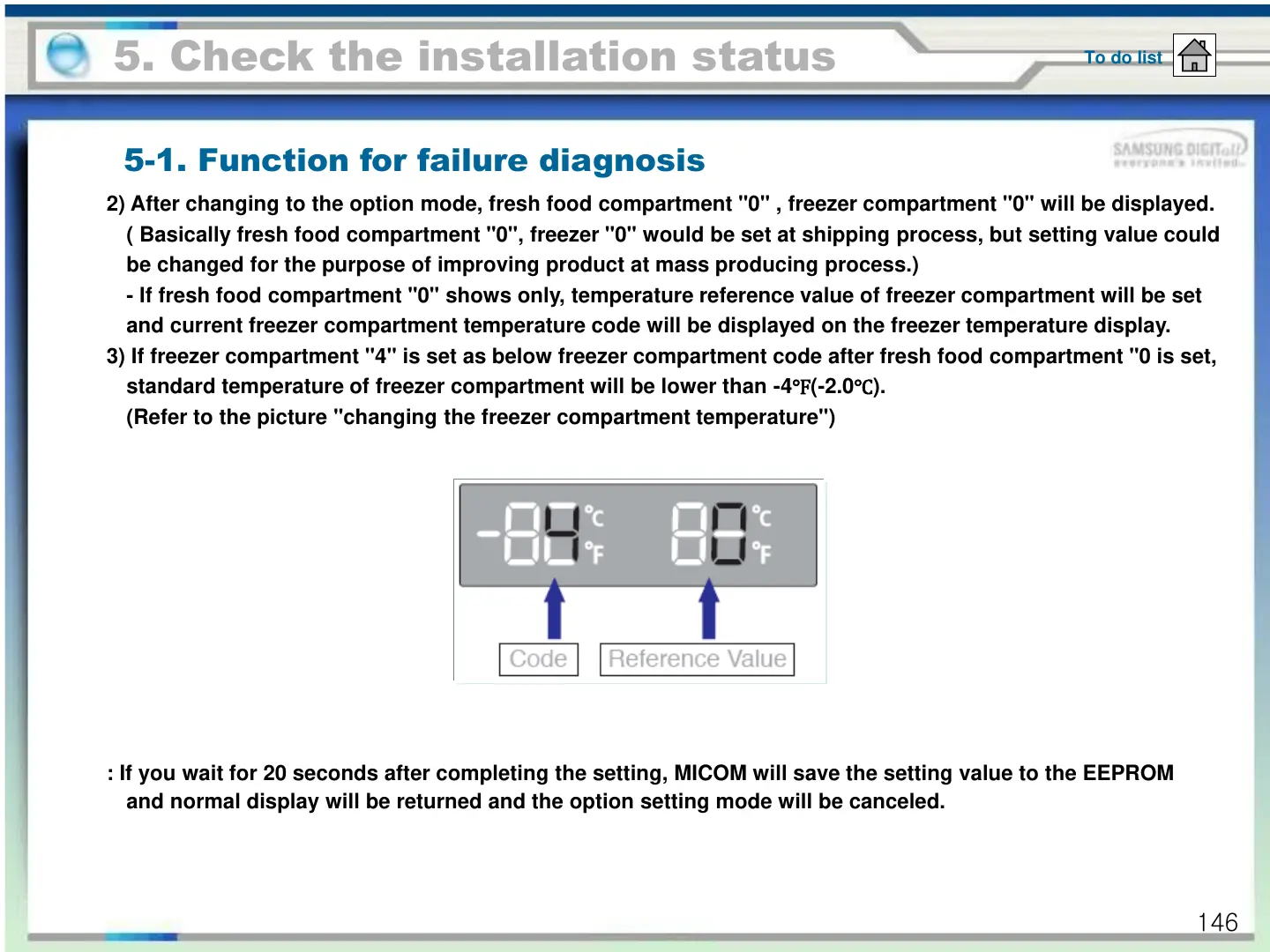
3) If freezer compartment "4" is set as below freezer compartment code after fresh food compartment "0 is set,
standard temperature of freezer compartment will be lower than -4
℉(-2.0℃).
(Refer to the picture "changing the freezer compartment temperature")
: If you wait for 20 seconds after completing the setting, MICOM will save the setting value to the EEPROM
and normal display will be returned and the option setting mode will be canceled.
5. Check the installation status
5-1. Function for failure diagnosis
146





 To Next Page