EasyManua.ls Logo

Samsung MKV190CL2B/E01 - Page 225

Samsung MKV190CL2B/E01
250 pages
Print Icon
To Next Page IconTo Next Page
To Previous Page IconTo Previous Page
Loading...
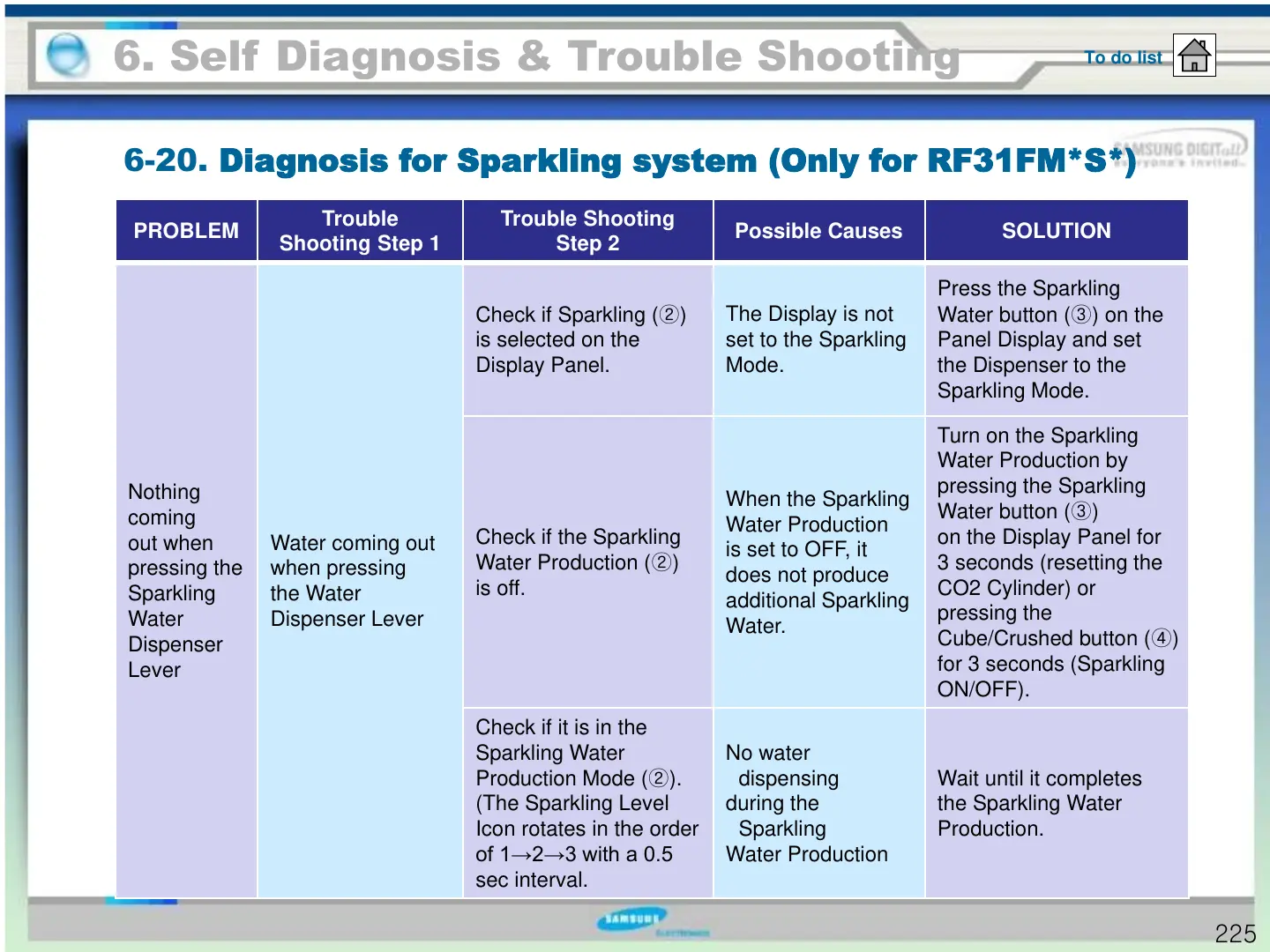
6-20. Diagnosis for Sparkling system (Only for RF31FM*S*)
6. Self Diagnosis & Trouble Shooting
To do list
225
PROBLEM
Trouble
Shooting Step 1
Trouble Shooting
Step 2
Possible Causes SOLUTION
Nothing
coming
out when
pressing the
Sparkling
Water
Dispenser
Lever
Water coming out
when pressing
the Water
Dispenser Lever
Check if Sparkling ()
is selected on the
Display Panel.
The Display is not
set to the Sparkling
Mode.
Press the Sparkling
Water button () on the
Panel Display and set
the Dispenser to the
Sparkling Mode.
Check if the Sparkling
Water Production ()
is off.
When the Sparkling
Water Production
is set to OFF, it
does not produce
additional Sparkling
Water.
Turn on the Sparkling
Water Production by
pressing the Sparkling
Water button ()
on the Display Panel for
3 seconds (resetting the
CO2 Cylinder) or
pressing the
Cube/Crushed button (
)
for 3 seconds (Sparkling
ON/OFF).
Check if it is in the
Sparkling Water
Production Mode ().
(The Sparkling Level
Icon rotates in the order
of 1→2→3 with a 0.5
sec interval.
No water
dispensing
during the
Sparkling
Water Production
Wait until it completes
the Sparkling Water
Production.
https://appliancetechmanuals.com

Table of Contents

Related product manuals