RF323TE**
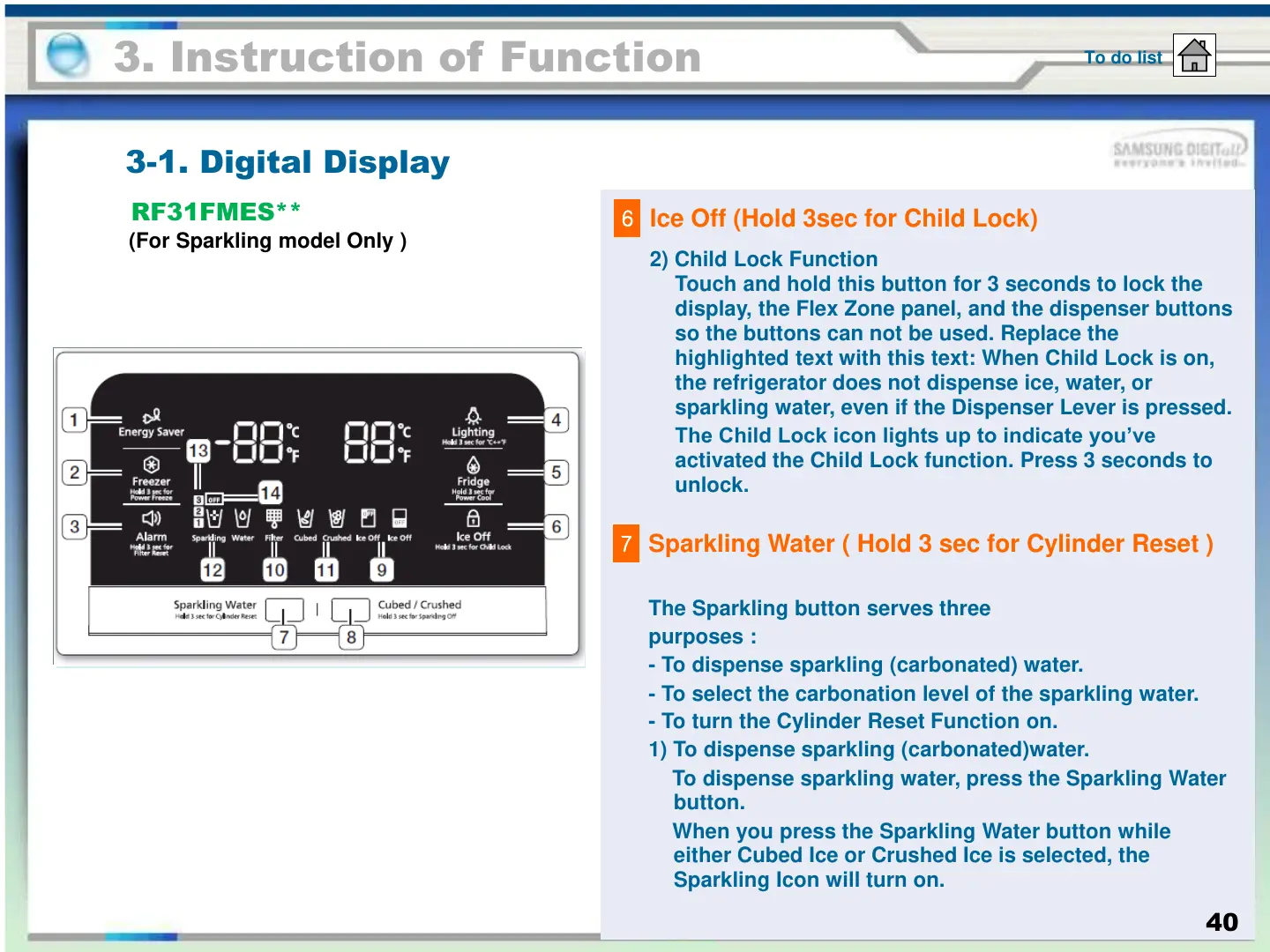
2) Child Lock Function
Touch and hold this button for 3 seconds to lock the
display, the Flex Zone panel, and the dispenser buttons
so the buttons can not be used. Replace the
highlighted text with this text: When Child Lock is on,
the refrigerator does not dispense ice, water, or
sparkling water, even if the Dispenser Lever is pressed.
The Child Lock icon lights up to indicate you’ve
activated the Child Lock function. Press 3 seconds to
unlock.
6
Ice Off (Hold 3sec for Child Lock)
3. Instruction of Function
3-1. Digital Display
To do list
RF31FMES**
(For Sparkling model Only )
40
The Sparkling button serves three
purposes :
- To dispense sparkling (carbonated) water.
- To select the carbonation level of the sparkling water.
- To turn the Cylinder Reset Function on.
1) To dispense sparkling (carbonated)water.
To dispense sparkling water, press the Sparkling Water
button.
When you press the Sparkling Water button while
either Cubed Ice or Crushed Ice is selected, the
Sparkling Icon will turn on.
7
Sparkling Water ( Hold 3 sec for Cylinder Reset )





 To Next Page