RF323TE**
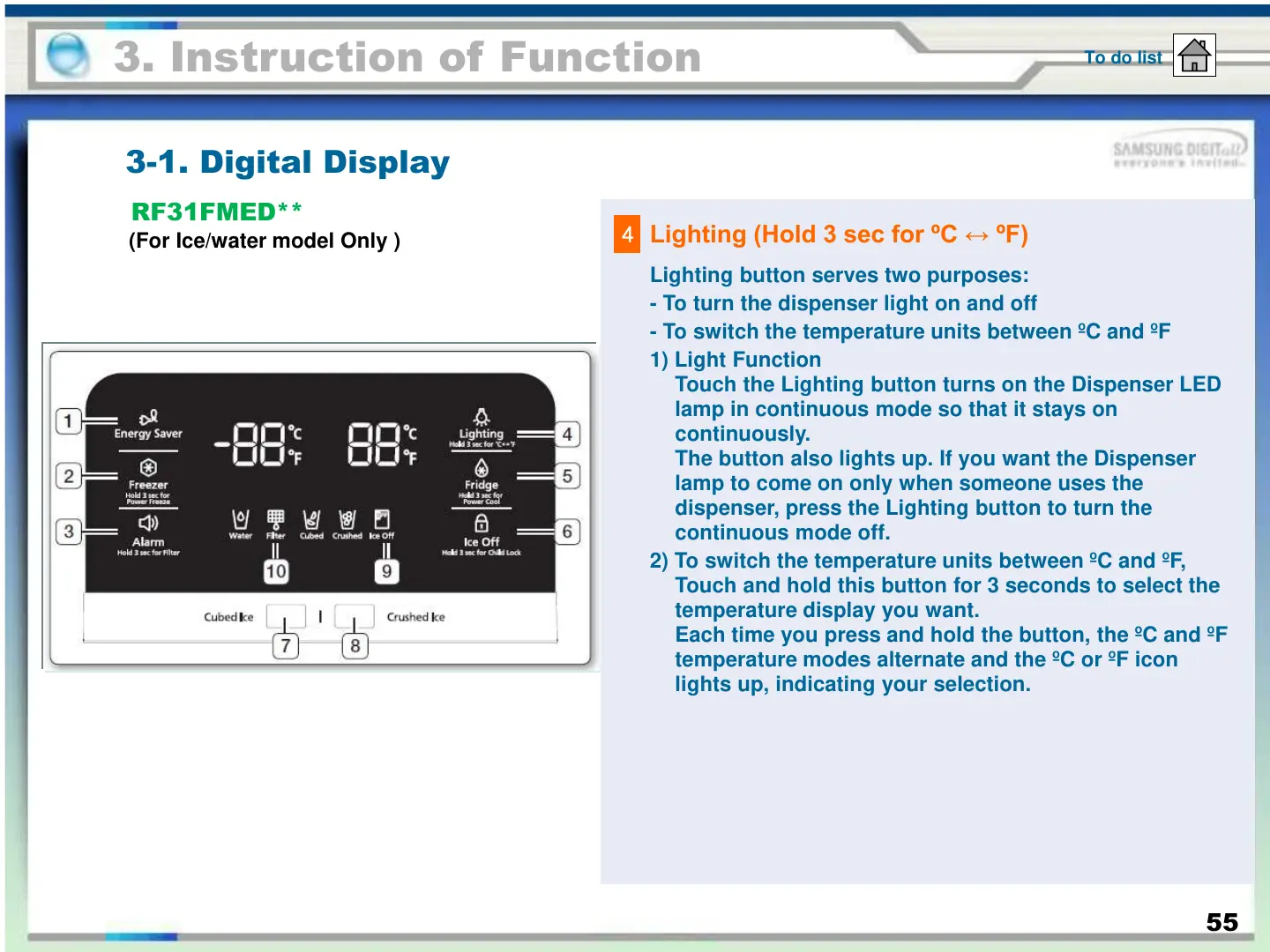
Lighting button serves two purposes:
- To turn the dispenser light on and off
- To switch the temperature units between ºC and ºF
1) Light Function
Touch the Lighting button turns on the Dispenser LED
lamp in continuous mode so that it stays on
continuously.
The button also lights up. If you want the Dispenser
lamp to come on only when someone uses the
dispenser, press the Lighting button to turn the
continuous mode off.
2) To switch the temperature units between ºC and ºF,
Touch and hold this button for 3 seconds to select the
temperature display you want.
Each time you press and hold the button, the ºC and ºF
temperature modes alternate and the ºC or ºF icon
lights up, indicating your selection.
4
Lighting (Hold 3 sec for ºC ↔ ºF)
3. Instruction of Function
3-1. Digital Display
To do list
RF31FMED**
(For Ice/water model Only )
55





 To Next Page