[ENGLISHI
Advanced Recording
• Setting the menu item
Power switch CAMERA PLAYER
Functions in menu
LCDADJUST,CUSTOMSET,
DIS, PIP,DIGITALZOOM,
PROGRAMAE, DSESELECT,
WHITEBALANCE,SHUTTER
SPEED,IRIS,REC MODE,
REC LAMP,WIND CUT,
AUDIO MODE,PHOTOMODE
DISPLAY,DATE/TIME,DEMO,
CLOCKSETTING
LCDADJUST,
PHOTO SEARCH,
AUD{O SELECT, SPEAKER,
REC MODE, DISPLAY,
DATE/TIME
• Setthe camcorderto CAMERA or PLAYER mode.
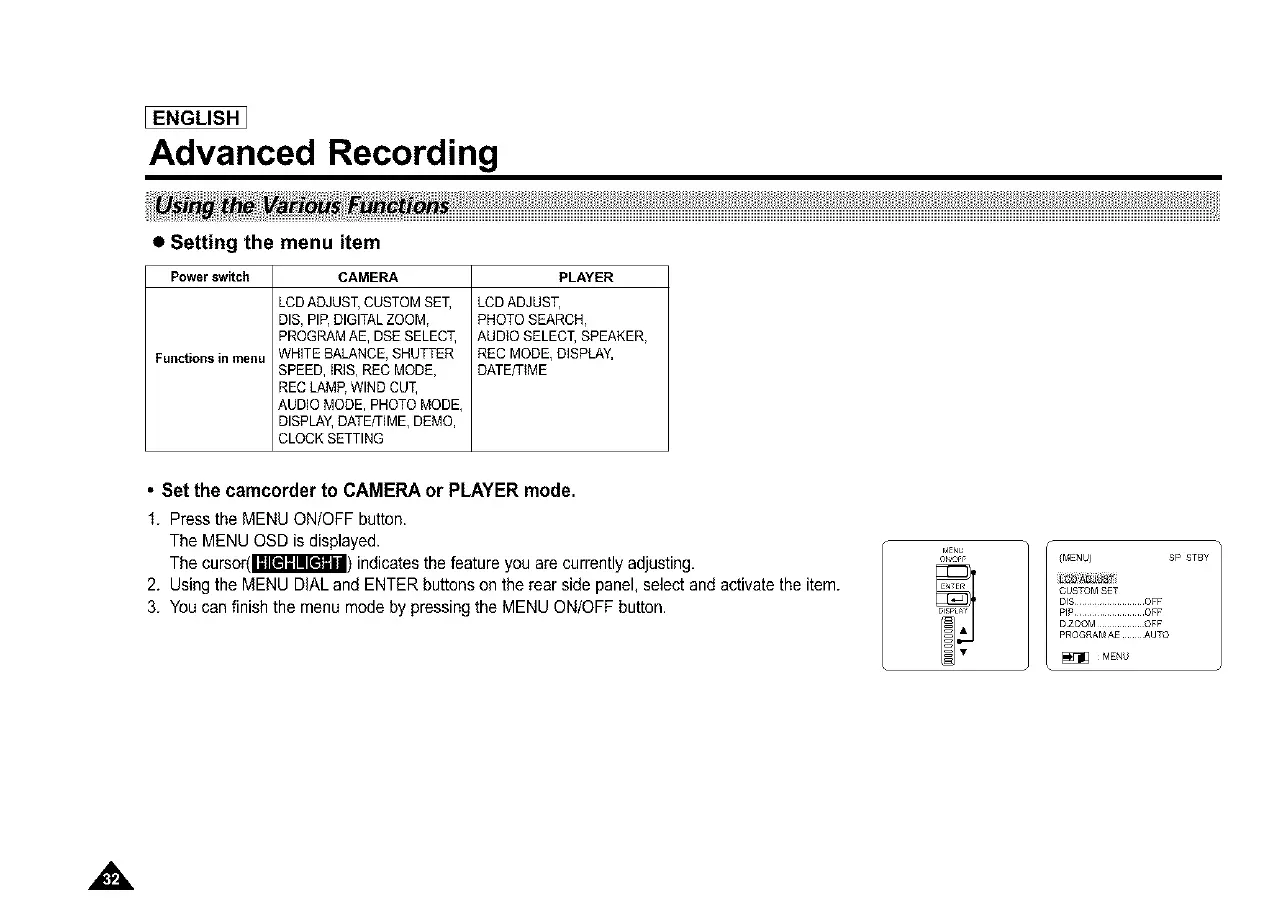
1. Press the MENU ON/OFF button.
The MENU OSD is displayed.
The cursor(Imr_l_lE'_ln'i) indicates the feature you are currently adjusting.
2. Using the MENU DIAL and ENTER buttons on the rear side panel,select and activate the item.
3. You can finish the menu mode by pressing the MENU ON/OFF button.
r,IENU
ON,OFF (MENU) SP STBY
CUSTOMSET
DIS............... OFF
DZO©M ......... OFF
PROG_AMAE AUTO
• _ ¸MENU



 To Next Page