[ENGLISH]
Advanced Recording
•P The FADE function works in CAMERA mode only.
•P You can give your films a professional lookby using special effects such as fade in at the beginningof a sequence or
fade out at the end of a sequence.
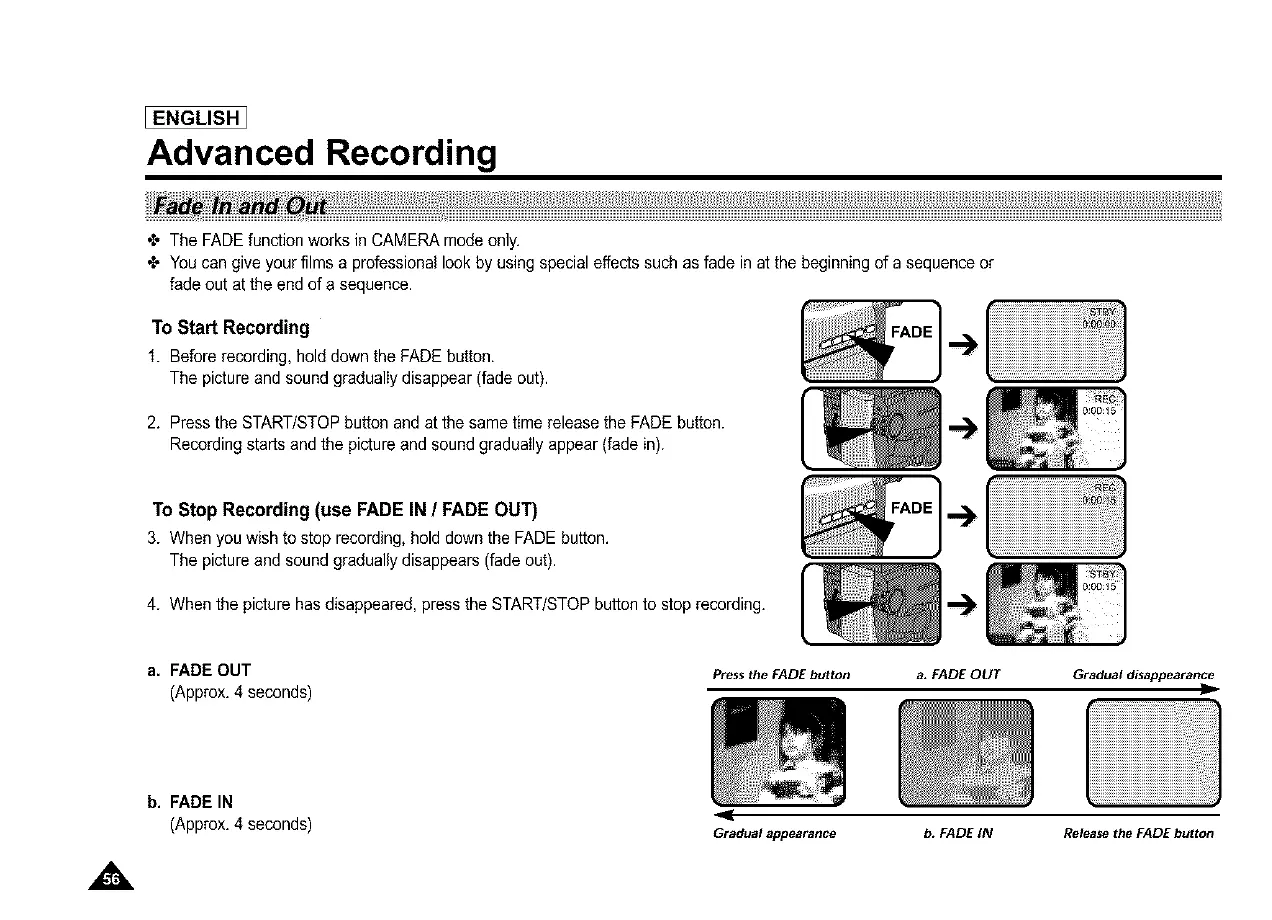
To Start Recording
1. Before recording, hold down the FADE button.
The picture and sound gradually disappear (fade out).
2. Press the START/STOPbutton and at the same time release the FADE button.
Recording starts and the picture and sound gradually appear (fade in).
To Stop Recording (use FADE IN / FADE OUT)
3. When you wish to stop recording, hold down the FADE button.
The picture and sound gradually disappears (fade out).
4. When the picture has disappeared, press the START/STOPbutton to stop recording.
a. FADE OUT
(Approx. 4 seconds)
Press the FADE button
a, FADEOUT Gradualdisappearance
D
b, FADE IN
(Approx. 4 seconds)
Gradual appearance
b, FADE IN Release the FADE button



 To Next Page