IENGLISHI
Advanced Recording
Digital Zoom
+ Zooms more than 22x are performed digitally.
+ The picture quality deteriorates the more you zoom in on the subject.
+ We recommend that you use the DIS feature with the DIGITALZOOM for picturestabiIity.
f. Set thecamcorder to CAMERA mode.
2. Press the MENU ON/OFF button.
• The menu listwill appear.
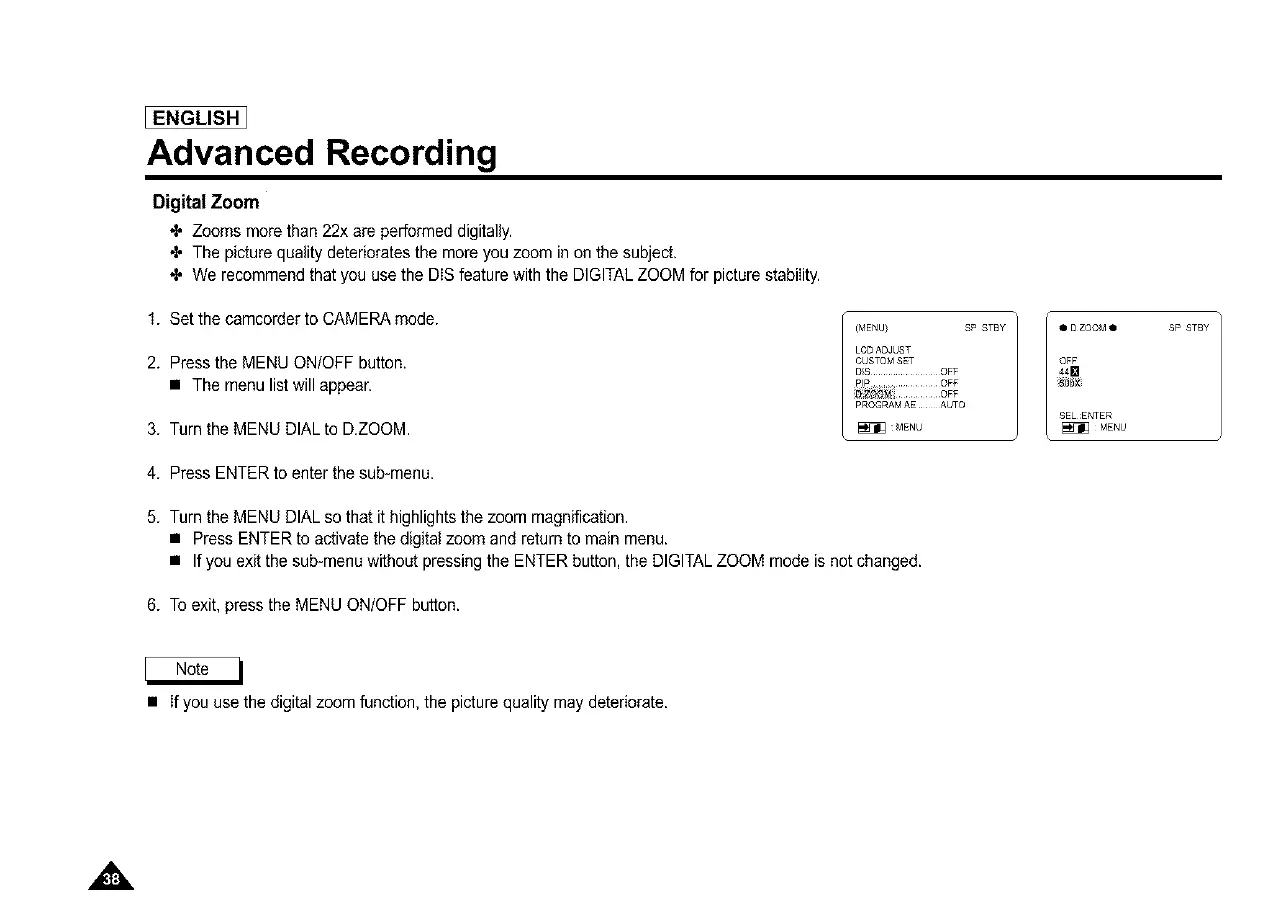
3. Turn the MENUDIAL to D.ZOOM
(MENU) SP STBY
LCDADJUST
CUSTOMSET
DIS ............... OFF
PIP ............... OFF
PROGRAMAE AUTO
MENU
• D ZOOM •
OFF
44D
SELENTER
_MENU
4. Press ENTERto enter the sub-menu.
5. Turn the MENUDIAL so that it highlightsthe zoom magnification.
• Press ENTER to activatethe digital zoom and returnto main menu.
• If you exit the sub-menu without pressing the ENTER button, the DIGITALZOOM mode is not changed.
6. To exit, press the MENU ON/OFF button.
SP STBY
• If you use the digital zoom function, the picturequality may deteriorate.
,&



 To Next Page