Advanced Recording
Selecting an effect
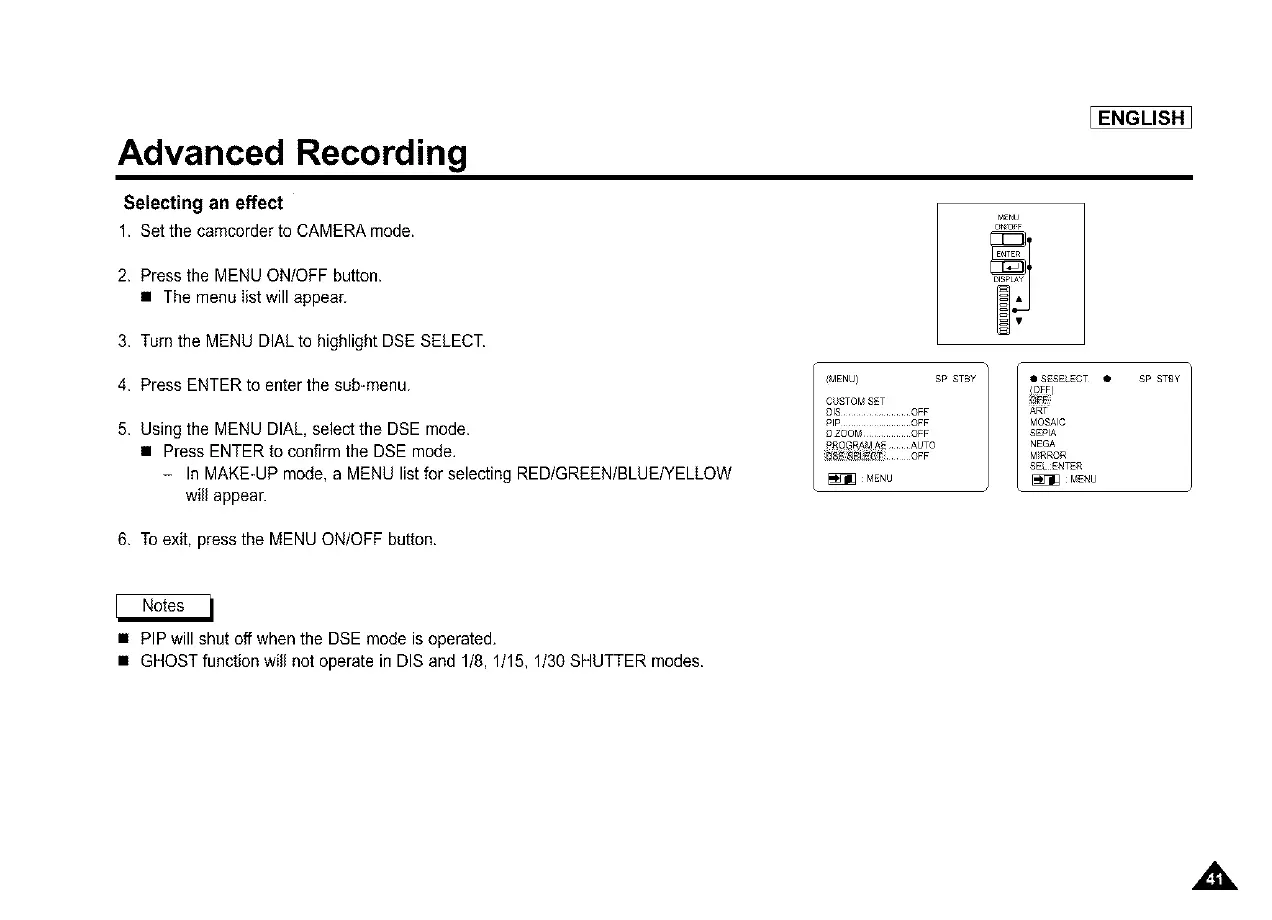
1. Setthe camcorderto CAMERAmode.
2. Press the MENU ON/OFF button.
• The menu list will appear.
3. Turn the MENU DIALto highlight DSE SELECT.
4. Press ENTER to enter the sub-menu.
5. Using the MENU DIAL, select the DSE mode.
• Press ENTER to confirm the DSE mode.
- In MAKE-UP mode, a MENU list for selecting REDIGREENIBLUEIYELLOW
will appear.
6. To exit, press the MENU ON/OFF button.
[ENGLISH_
MENU
/MENU) SP STBY m • SESELECT •
CL_STOM SET / i_i)
DIS .............. OFF ART
RIP ............... OFF MOSAIC
[_ZOOM ......... OFF SEPIA
£_Q_ R/_JI AE AUTO NEGA
_ 8_ OFF M)RROR
SEL ENTER
MENU _ MENU
SP STBY
• PIP will shut off when the DSE mode is operated.
• GHOST function will not operate in DIS and 1/8, 1/15, 1/30 SHUTTER modes.



 To Next Page