Playing back a Tape
IENGLISH_
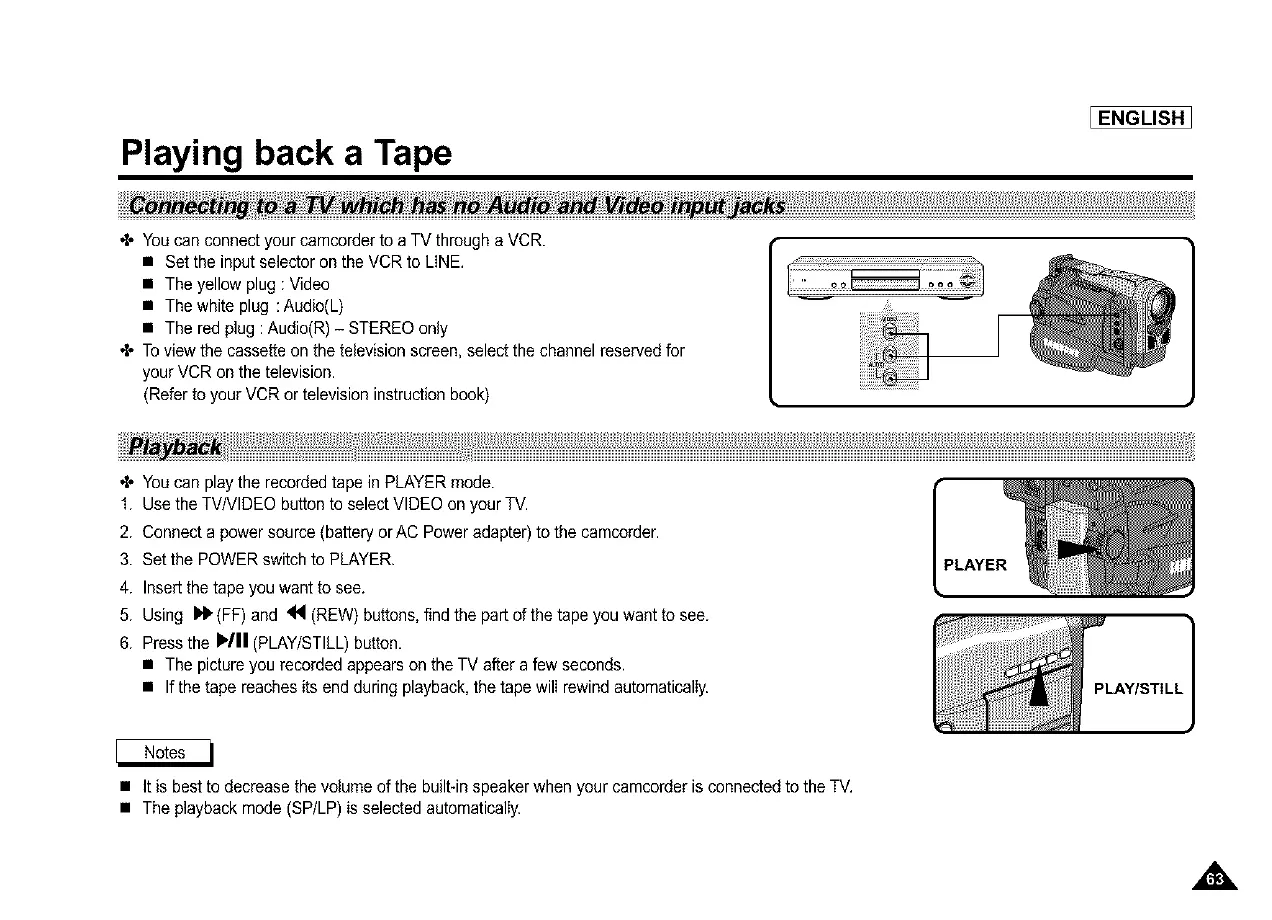
+ You can connect your camcorderto a TV through a VCR.
• Set the input selector on the VCR to LINE,
• The yellow plug : Video
• The white plug :Audio(L)
• The red plug :Audio(R) - STEREO only
+ To view the cassette on the television screen, select the channel reserved for
your VCR on the television.
(Refer to your VCR or television instruction book)
__ _H_)1)_::_::::: _ ................._ii
+ You can play the recorded tape in PLAYER mode.
1. Use the TV/VIDEO button to select VIDEO on your TV.
2. Connect a power source (battery orAC Poweradapter) to the camcorder.
3. Set the POWER switch to PLAYER.
4. Insertthe tape you want to see.
5. Using _ (FF) and _ (REW) buttons, find the part of the tape you want to see.
6. Press the IP/II (PLAY/STILL) button.
• The pictureyou recorded appears on the TV after a few seconds.
• Ifthetapereachesitsendduringplayback, thetapewil(rewindautomatical(y.
• It is best to decrease the volume of the built-inspeaker when your camcorder is connectedto the TV,
• The playback mode (SP/LP) is selected automatically.



 To Next Page