39
Using "PCoIP"?
2
2 Using "PCoIP"?
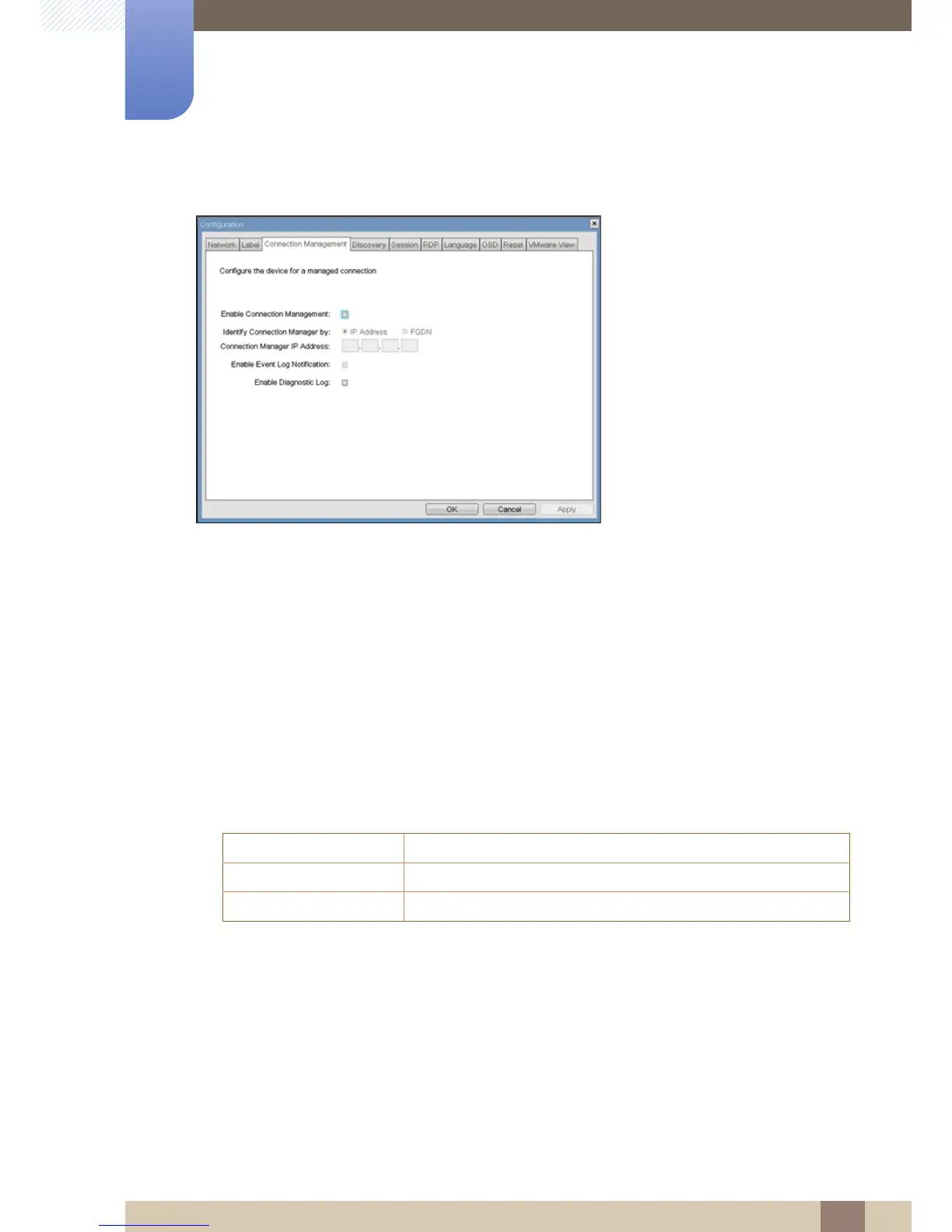
Figure 2-6: <Connection Management> Configuration
z <Enable Connection Management>
If the <Enable Connection Management> option is enabled, the device can be configured and
controlled by an external connection manager.
z <Identify Connection Manager By>
The <Identify Connection Manager By> selector allows the administrator to choose whether the
connection manager is identified by <IP address> or by Fully Qualified Domain Name (FQDN). If
connection management is disabled, this field is not required and is not editable.
Table 2-1 shows the configuration parameters available when either method is chosen. If an invalid
IP address or DNS name is entered, the OSD will prompt the administrator to correct it.
Table 2-1: Connection Manager Method
z <Enable Event Log Notification>
The <Enable Event Log Notification> field controls whether the PCoIP Host and Portal devices
send the contents of their event logs to the connection management server.
z <Enable Diagnostic Log>
The <Enable Diagnostic Log> field controls whether connection management specific debug
messages are written to the event log of the PCoIP Host and Portal devices.
METHOD DATA FIELDS
<IP Address> Connection Manager IP Address
<FQDN> Connection Manager DNS name














 To Next Page