CHAPTER TWO: INSTALLATION 2.5
g.
u-
INSTALLATION
3
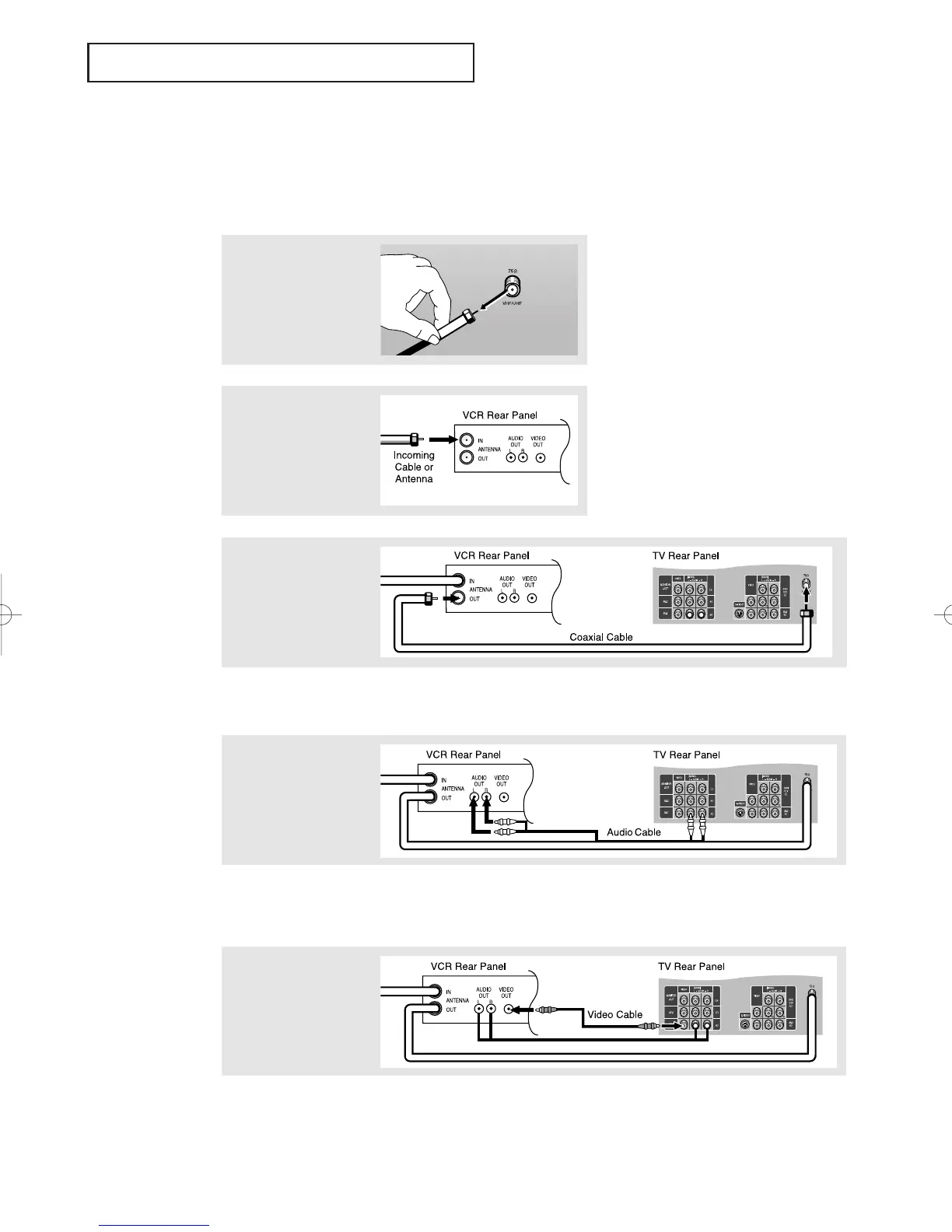
Connect a coaxial cable
between the ANTENNA
OUT terminal on the
VCR and the antenna
terminal on the TV.
4
Connect a set of audio
cables between the
AUDIO OUT jacks on the
VCR and the AUDIO
jacks on the TV.
5
Connect a video cable
between the VIDEO OUT
jack on the VCR and the
VIDEO jack on the TV.
Follow the instructions in “Viewing a VCR or Camcorder Tape” to view your VCR tape.
A coaxial cable is usually included with a VCR. (If not, check your local electronics
store).
If you have a “mono” (non-stereo) VCR, use the Y-connector (not supplied) to hook up
to the left and right audio input jacks of the TV. If your VCR is stereo, you must con-
nect two cables.
Connecting a VCR
These instructions assume that you have already connected your TV to an antenna or a cable
TV system (according to the instructions on pages 2.1-2.3). Skip step 1 if you have not yet
connected to an antenna or a cable system.
1
Unplug the cable or
antenna from the back
of the TV.
2
Connect the cable or
antenna to the
ANTENNA IN terminal
on the back of the VCR.
01066D(E)-CHAPTER 2 4/12/05 9:24 AM Page 5



 To Next Page