CHAPTER FOUR:SPECIAL FEATURES 4.12 4
SPECIAL FEATURES
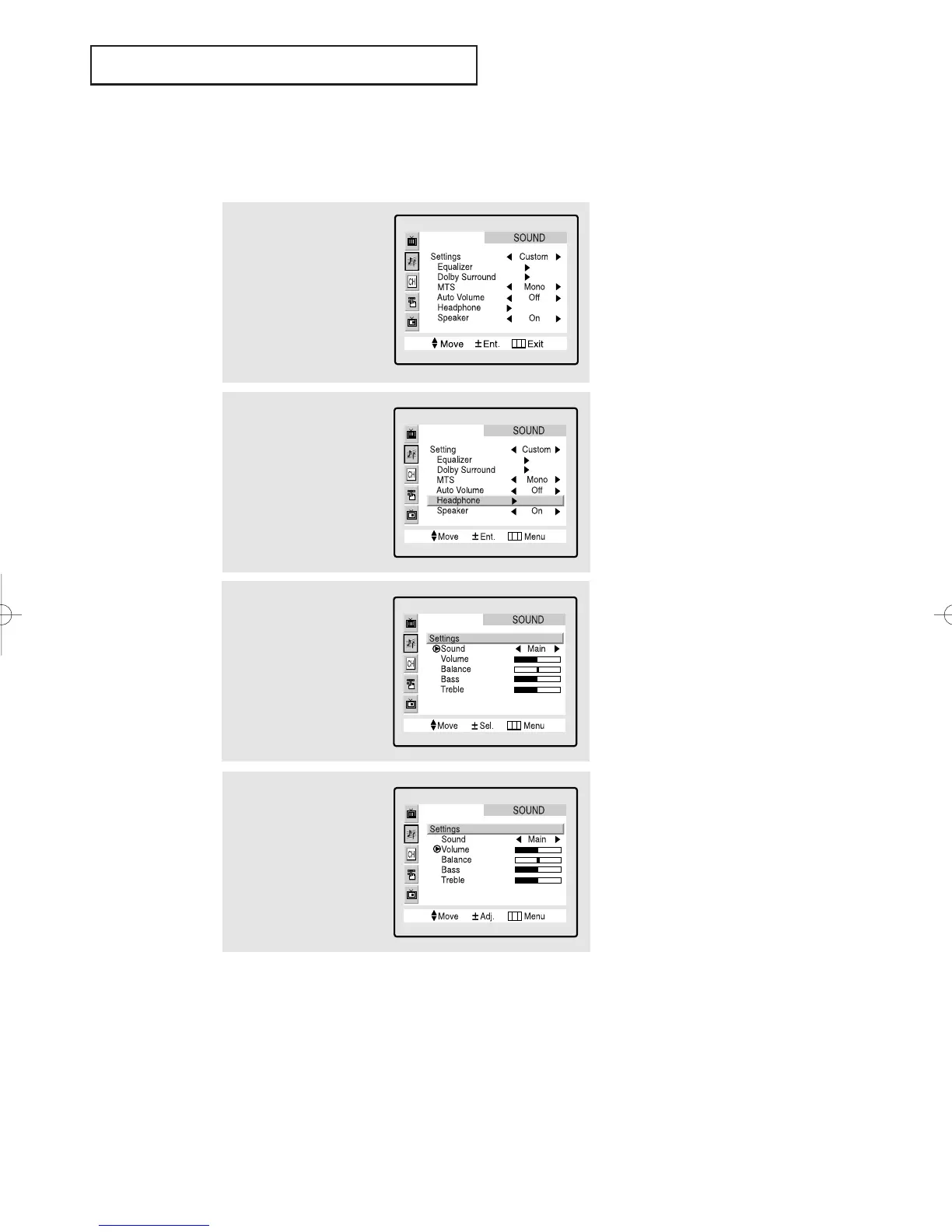
Adjusting the Headphone Sound
The headphone option is especially useful when simultaneously watching the main
screen and the PIP window.
1
Press the Menu button
to display the menu.
Press the CH▼ button
once to highlight
“SOUND” and press the
VOL+ button.
2
Press the CH▼ button
five times to select the
“Headphone” and press
the VOL+ button.
▼
Note: Headphones must
be purchased separately.
3
Press the VOL+ or VOL-
buttons to select “Main”
or “Sub”.
▼
Note: You can select either
Main or Sub during PIP On.
4
Press the CH▲ or CH▼
button to select the partic-
ular item to be changed.
Press the VOL+ or VOL-
buttons to increase or
decrease the value of a
particular item.
▼
Note: When you want to
listen to TV with headphones
only, press the MUTE or VOL-
button on the remote control
to set the TV speaker volume
to zero(0).
01066D(E)-CHAPTER 4 4/12/05 9:29 AM Page 12



 To Next Page