EasyManua.ls Logo

Samsung Tantus TSK 3092WF - Option 2: Using the Local PBS Channel to Automatically Set the TV Clock

Samsung Tantus TSK 3092WF
65 pages
Print Icon
To Next Page IconTo Next Page
To Previous Page IconTo Previous Page
Loading...
CHAPTER THREE: TV OPERATION 3.11
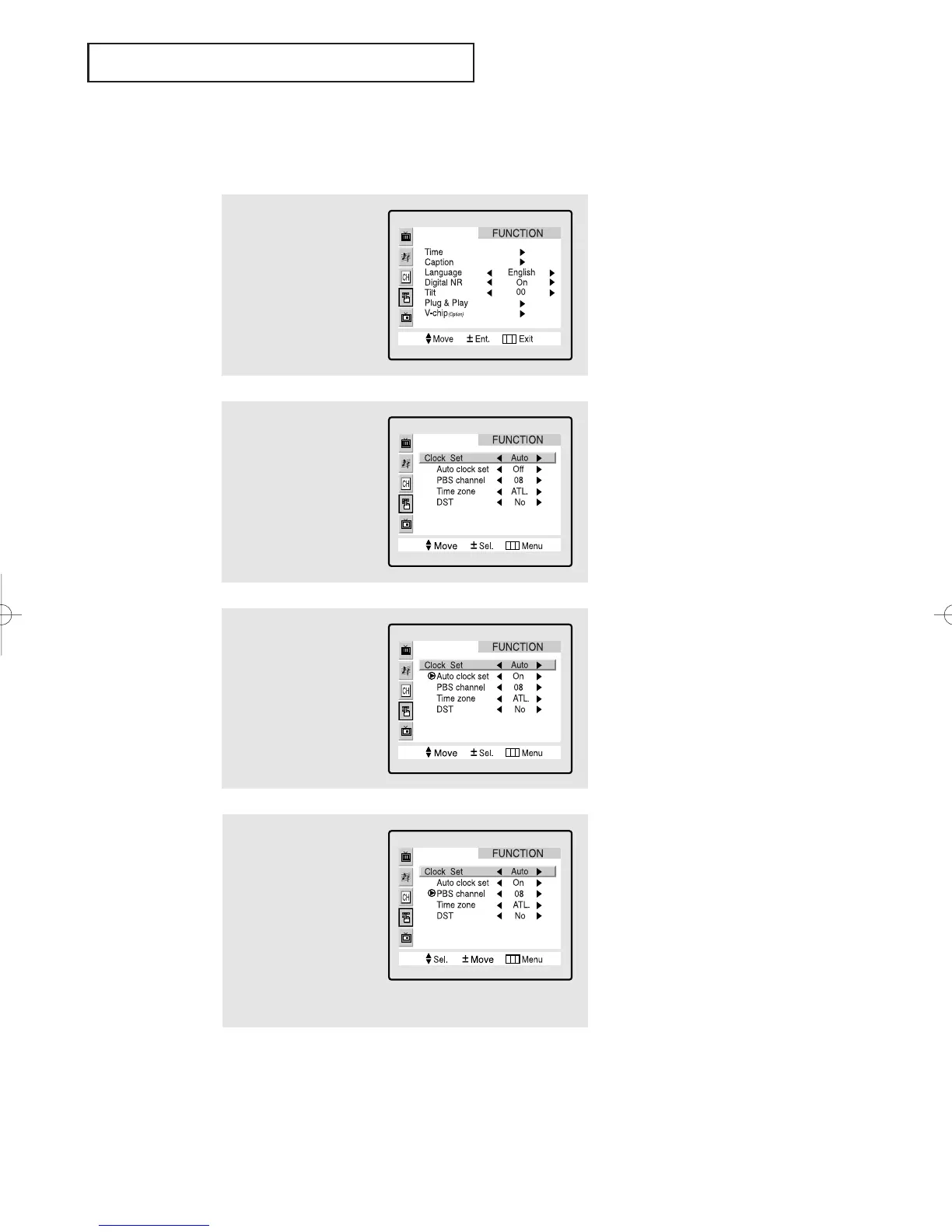
Option 2: Using the Local PBS Channel to Automatically Set the
TV Clock
1
Press the Menu button
to display the menu.
Press the CH button
three times to highlight
FUNCTION.
Press the VOL + button.
2
Press the VOL + button
to select Clock set
Auto.
3
Press the CH button
to select Auto clock
set and press the VOL +
button to select Auto
clock set On.
4
Press the CH button to
select PBS channel.
While PBS channel is
selected, press the VOL +
button.
Press the
CH button to
select your local PBS
channel.
Press the VOL + button to
set.
continued...
OPERATION
01066D(E)-CHAPTER 3 4/12/05 9:26 AM Page 11

Table of Contents

Related product manuals