0 4.21 CHAPTER FOUR:SPECIAL FEATURES
How to Set up Restrictions Using the “TV guidelines”
First, set up a personal identification number (PIN), and enable the V-Chip. (See previous
section.) Parental restrictions can be set up using either of two methods: The TV guide-
lines or the MPAA rating.
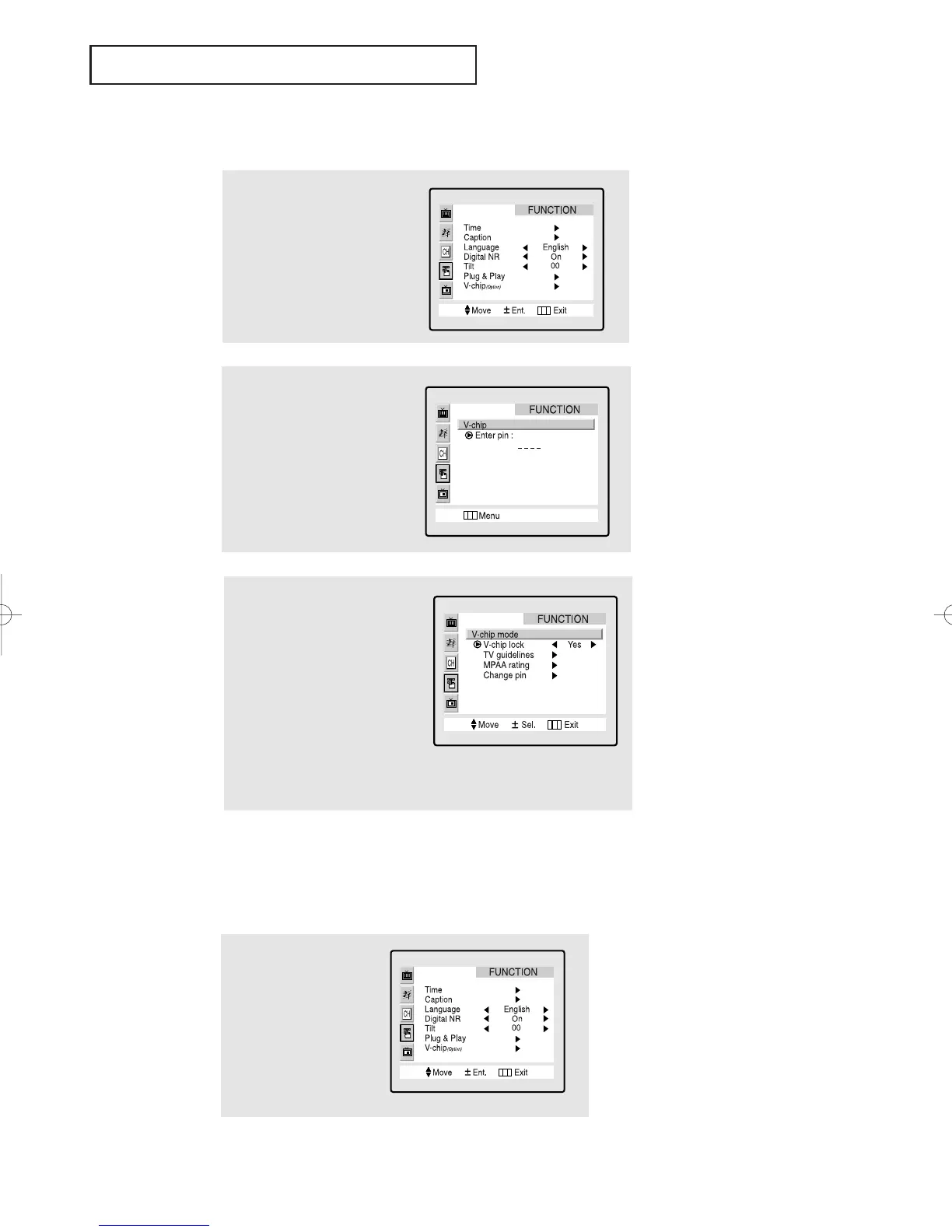
How to Enable/Disable the V-Chip
1
Press the Menu button.
Press the CH ▼ button
three times to select the
“FUNCTION” menu.
Press the VOL + button.
2
Press the CH ▼ button
six times to highlight the
“V-chip” menu.
Press the VOL+ button.
The “Enter pin” screen
will appear. Enter your
4-digit PIN number.
3
The “V-Chip mode” screen
will appear, and “V-Chip lock”
will be highlighted (turns blue
color).
To enable the V-Chip feature,
press the VOL+ button so that
the “V-Chip lock” field is YES.
(Pressing the VOL+ button will
alternate between YES and
NO.)
1
Press the Menu button
to display the menu.
Press the CH ▼ button
two times to highlight
the “FUNCTION” menu.
Press the VOL + button.
SPECIAL FEATURES
01066D(E)-CHAPTER 4 4/12/05 9:29 AM Page 21



 To Next Page