CHAPTER FOUR:SPECIAL FEATURES 4.22 4
2
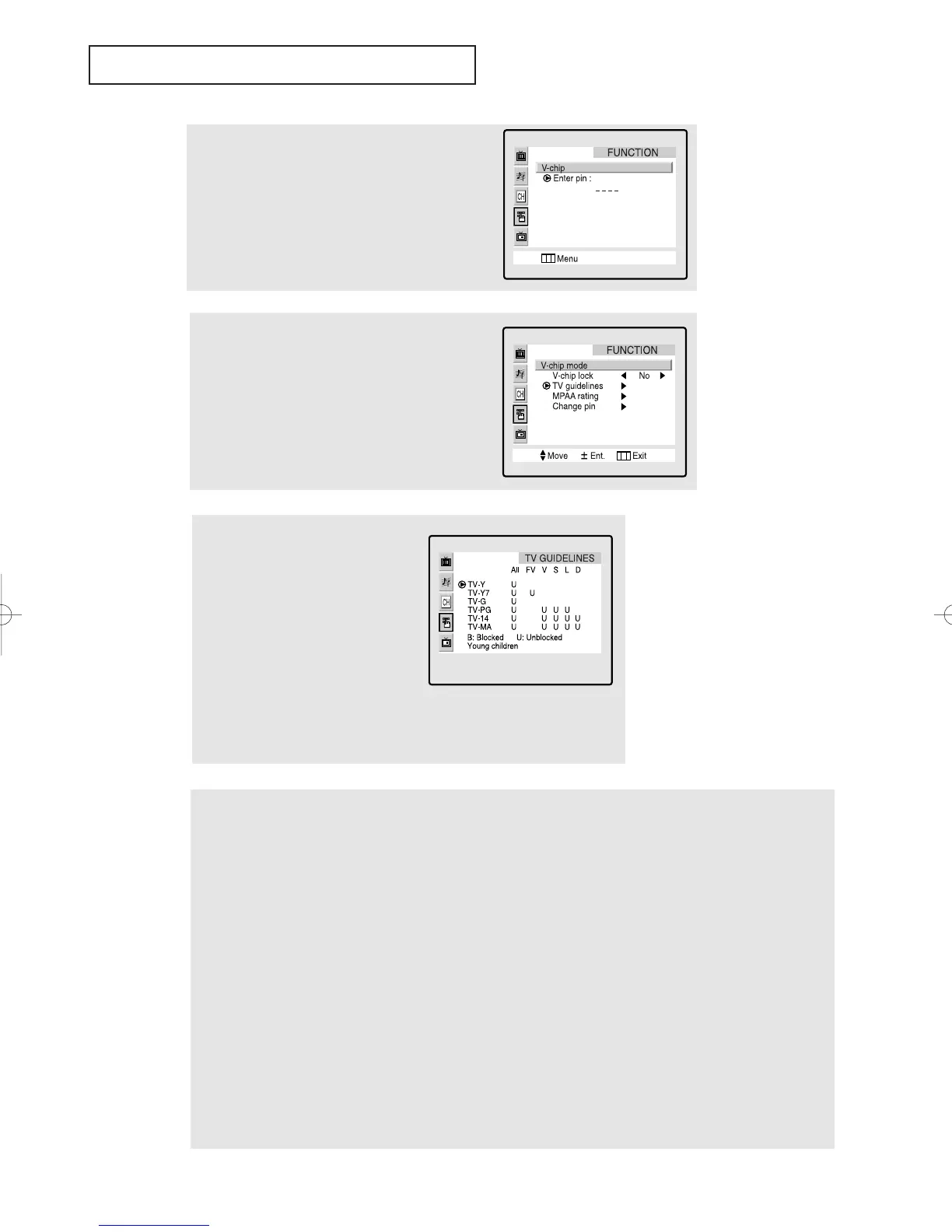
Press the CH ▼ button six times to highlight the
“V-chip” menu.
Press the VOL+ button.
The “Enter pin” screen will appear. Enter your 4-
digit PIN number.
3
The “V-chip mode” screen will appear. Press the
CH ▼ button, and highlight the field for “TV
Guidelines.”
4
Press the VOL+ button. The “TV
guidelines” screen will appear. Press
the the CH ▲, CH ▼ buttons to high-
light one of the six age-based cate-
gories:
TV-Y Young children
TV-Y7 Children 7 and over
--------------------------------------
TV-G General audience
TV-PG Parental guidance
TV-14 Viewers 14 and over
TV-MA Mature audience
5
At this point, one of the TV-Ratings is highlighted.
Press the VOL + button: Depending on your existing setup, a letter “U” or “B” will start blinking.
(U= Unblocked, B= Blocked)
While the “U” or ”B” is blinking, press the CH ▲ or CH ▼ buttons to block or unblock the category.
Press the Menu button once to save the TV guidelines. A TV-Rating will be highlighted, and no letters will blink. To
exit this screen, press the Menu again. To select a different TV-Rating, press the CH ▲ or CH ▼ buttons and then
repeat the process.
Note 1: The TV-Y7, TV-PG, TV-14 and TV-MA have additional options. See the next step to change
any of the following sub-ratings:
FV: Fantasy violence
D: Dialog
L: L
S: Sexual situation
V: Violence
Note 2: The V-Chip will automatically block certain categories that are “more restrictive.” For example, if you block
“TV-Y” category, then TV-Y7 will automatically be blocked. Similarly, if you block the TV-G category, then all the cate-
gories in the “young adult” group will be blocked (TV-G, TV-PG, TV-14 and TV-MA). The sub-ratings (D, L, S, V) work
together similarly. (See next section.)
Note: These categories consist of
two separate groups: TV-Y and TV-Y7
(young children through age 7), and
TV-G through TV-MA (everybody
else).
The restrictions for these two groups
work independently: If a household
includes very young children as well
as young adults, the TV guidelines
must be set up separately for each age
group. (See next step.)
▼
SPECIAL FEATURES
01066D(E)-CHAPTER 4 4/12/05 9:29 AM Page 22



 To Next Page