CHAPTER THREE: TV OPERATION 3.17
OPERATION
2
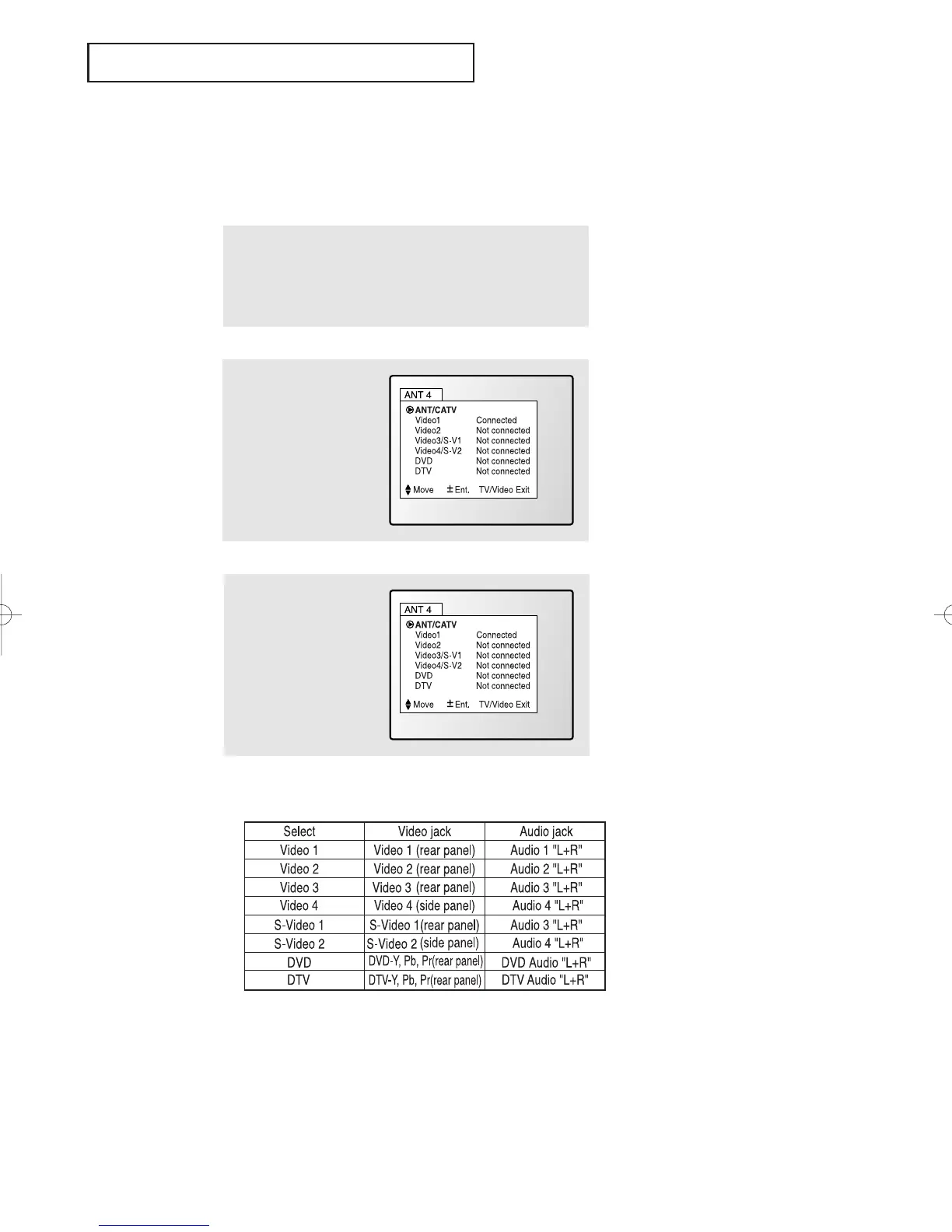
Press the TV/Video but-
ton on the remote con-
trol, and the following
on-screen menu will
appear:
1
Make sure that the remote control is controlling the TV set.
(Press the MODE button and make sure that the “TV” LED is
illuminated.)
Viewing a VCR or Camcorder Tape
You must select the appropriate mode in order to view the VCR or
Camcorder signal on the TV.
When you press the TV/Video button, the on-screen display identifies all the
active video sources (and their corresponding input jacks):
Notes:
DVD menu mode selection- Intended for standard interlaced source material at 480i
such as a DVD Player (Non Progressive Scan).
DTV menu mode selection- Intended for 480p or 1080i source material. Use this
menu option for a Progressive Scan DVD Player that
outputs 480p.
3
Use the CH▲ or CH▼
button to highlight a par-
ticular signal source,
and then press the VOL+
button to activate it.
Press the TV/Video but-
ton to exit.
”
01066D(E)-CHAPTER 3 4/12/05 9:26 AM Page 17



 To Next Page