CHAPTER FOUR:SPECIAL FEATURES 4.4 4
SPECIAL FEATURES
Fine Tuning Channels
Use fine tuning to manually adjust a particular channel for optimal reception.
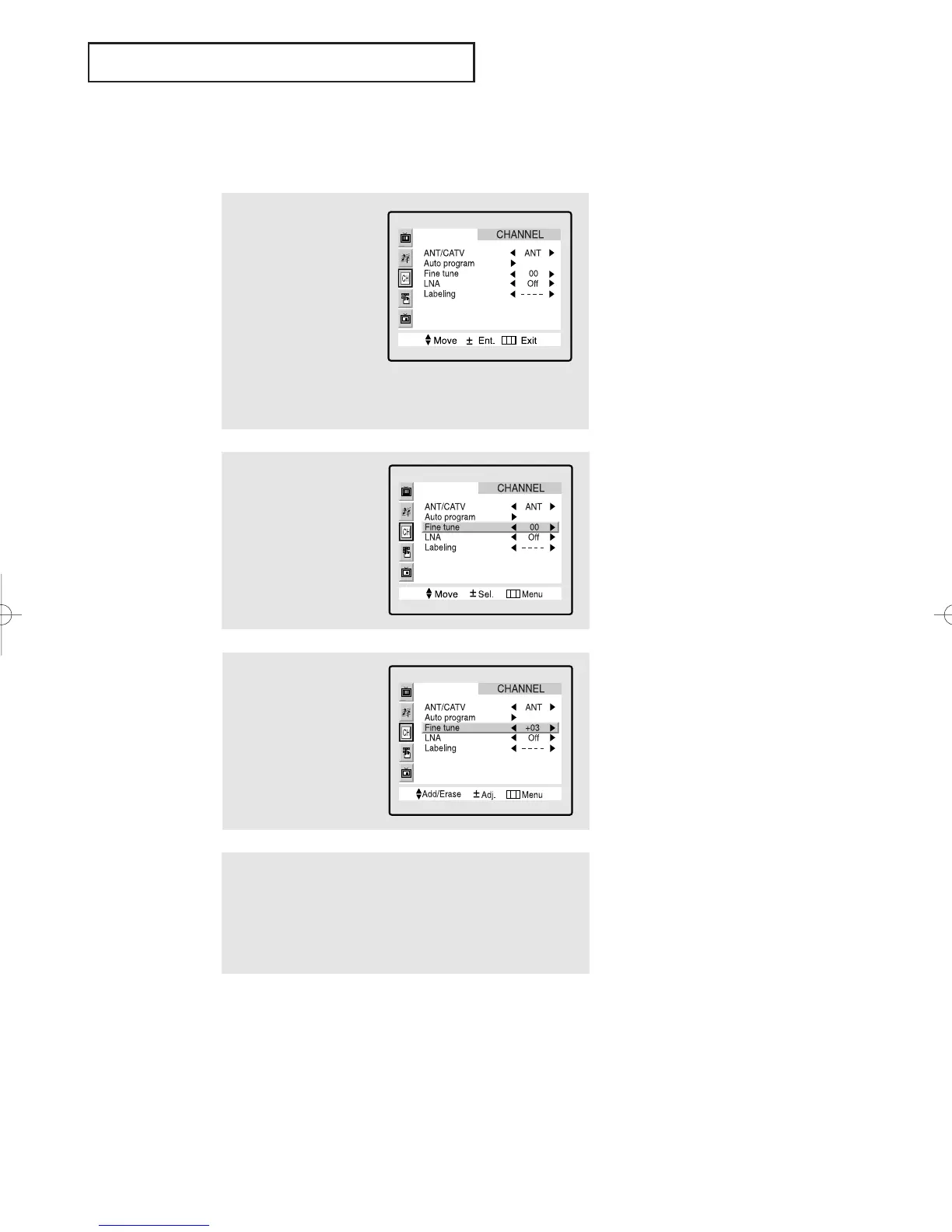
1
Select the appropriate
channel.
2
Press the MENU button
to display the menu.
Press the CH ▼ button
twice to highlight
“CHANNEL.”
3
Press the VOL + button to
select CHANNEL menu.
Press the CH ▼ button
twice to select “Fine
tune.”
▼
4
Press the VOL – and VOL
+ buttons to adjust the
fine tuning.
After you adjust the fine tuning,
the “heart icon” will appear when
you press Display while watching
this channel.
▼
5
To store the fine tuning setting in the TV’s memory, press the
CH ▲ button. (A heart icon will appear.)
To reset the fine tuning to “00,”press the CH ▼ button.
Press the Menu button to
resume normal viewing.
01066D(E)-CHAPTER 4 4/12/05 9:29 AM Page 4



 To Next Page