CHAPTER TWO: INSTALLATION 2.9
2
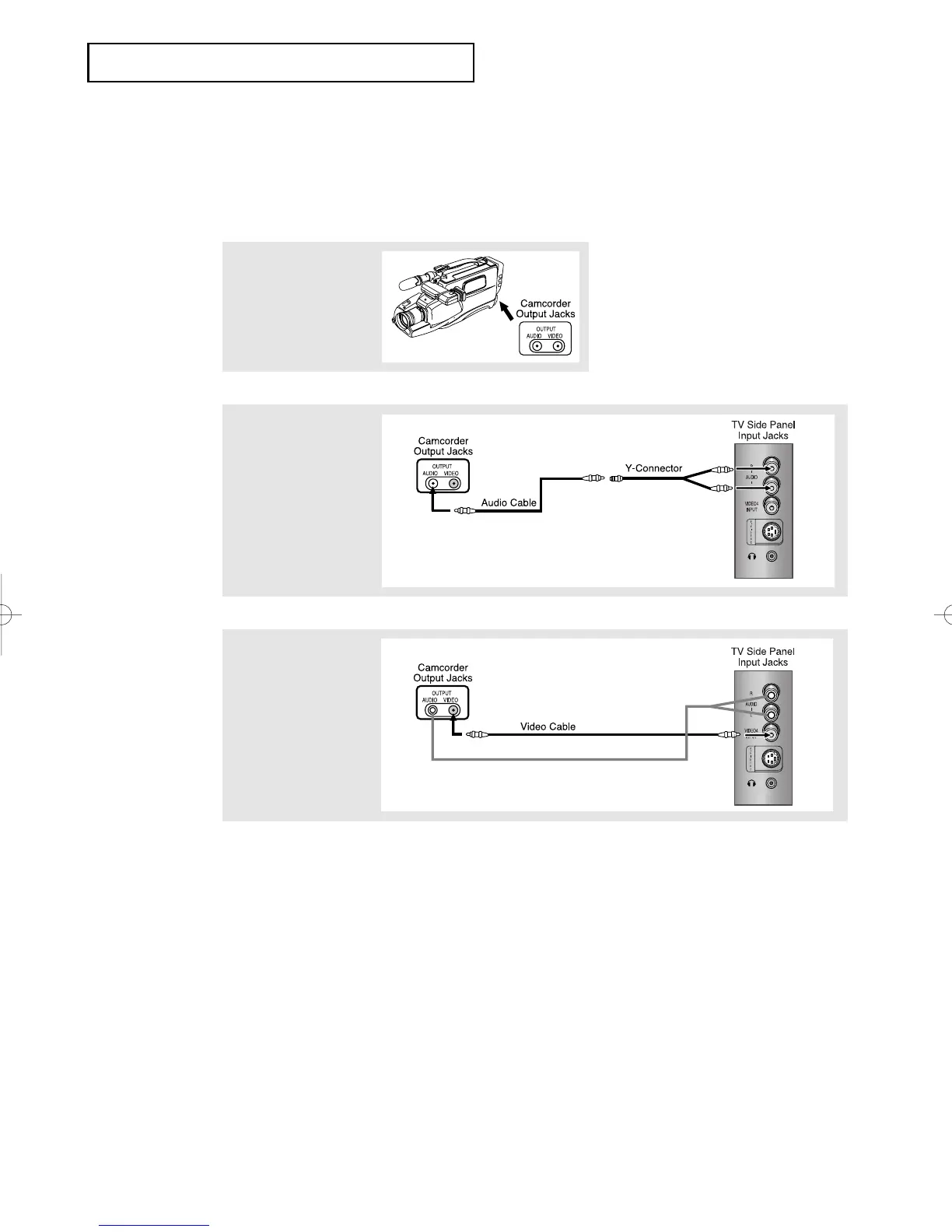
Connect an audio cable
between the AUDIO
OUTPUT jack on the
camcorder and the
AUDIO terminals on the
side of the TV.
3
Connect a video cable
between the VIDEO
OUTPUT jack on the
camcorder and the
VIDEO terminal on the
side of the TV.
1
Locate the A/V output
jacks on the camcorder.
They are usually found
on the side or back of
the camcorder.
Connecting a Camcorder
The side panel jacks on your TV make it easy to connect a camcorder to your TV. They allow
you to view the camcorder tapes without using a VCR. (Also see “Viewing a VCR or
Camcorder Tape” on page 3.17)
The audio-video cables shown here are usually included with a Camcorder. (If not, check
your local electronics store.) If your camcorder is stereo, you need to connect a set of two
cables.
INSTALLATION
01066D(E)-CHAPTER 2 4/12/05 9:24 AM Page 9



 To Next Page