Installation
16
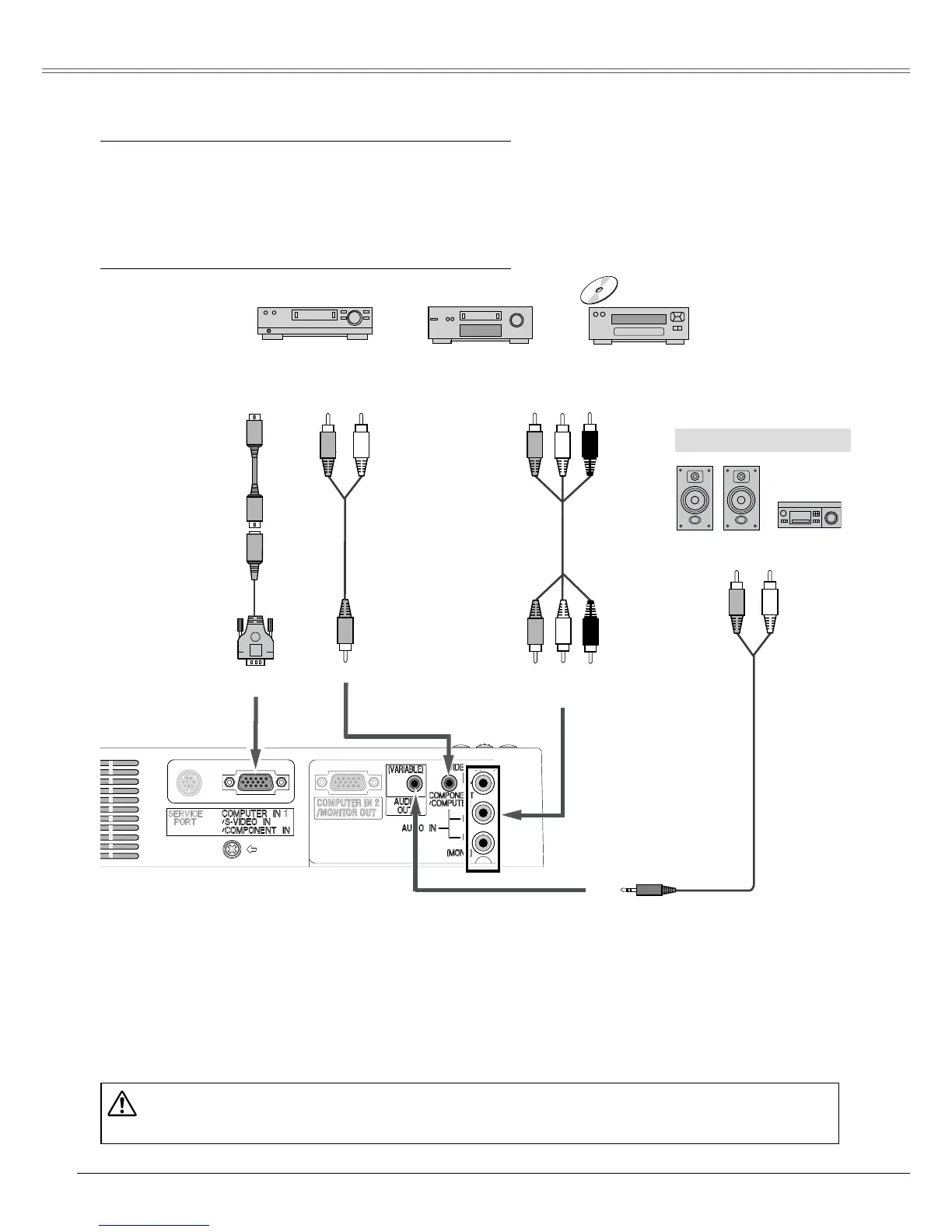
Connecting to Video Equipment
Cables used for connection
• Video and Audio Cable (RCA x 3)
• S-Video Cable
• S-Video-VGA Cable
• Audio Cables (Mini Plug: stereo)
( Not all the cables are supplied with this projector.)
Note:
• When the AUDIO OUT is plugged-in, the projector's built-in speaker is not available.
• See page 63 for ordering optional
cables.
Unplug the power cords of both the projector and external equipment from the AC outlet
before connecting cables.
External Audio Equipment
VIDEO IN
S-VIDEO
S-Video-VGA cable
Video and
Audio cable
Composite Video and Audio Output
S-Video Output
AUDIO IN
Audio Input
AUDIO IN
(stereo)
(R) (L)
(R) (L)
(Video)
(Video)
S-Video cable
Audio cable
(R) (L)
Audio cable
AUDIO OUT
(stereo)


 To Next Page