SARTORIUS RC/MC-Balances
5
RC-A-02.TIF
RC-A-25/PF-01/T-F1.TIF
RC-A-25/PF-01/T-F2.TIF
RC-A-27/PF-01/T-F2.TIF
RC-A-28/PF-01/T-F1.TIF
Brief Operation
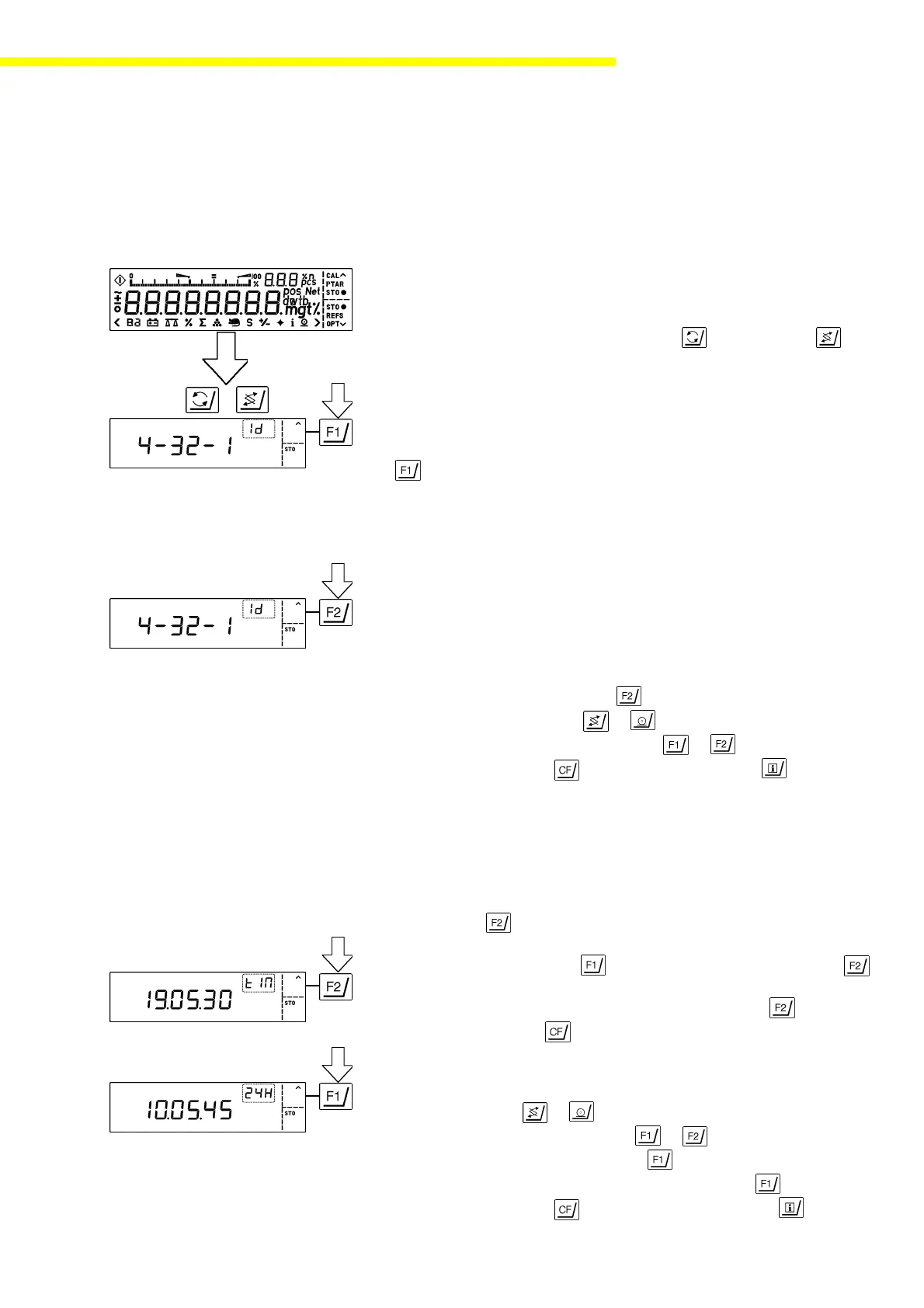
Setting the ID Code /Time/Date
– Turn the balance off
– Turn the balance back on
– While all segments are displayed, press the key (MC) or the key
(RC) briefly
– Toggle between ID code “id,” time “tIM,” and date “dAt” by pressing the
key (only MC)
ID Code for a GLP/GMP-compliant Record
The maximum 8-digit ID code can comprise the numbers 0 to 9 and the “.”
symbol. Zeros at the beginning are not displayed.
– Enter ID code, e.g. 4 - 32 - 1
MC: – Enter code using the numeric keys
– Confirm by pressing STO -
RC: – Select decimals using or
– Enter numbers (0 ... 9) or "-" using or
– Store setting with or change Date/Time with
Time
MC: – Separate hours, minutes and seconds by pressing the “.” key;
e.g., 1 0 . 2 4 . 3 5
– Set the time to be synchronous with the reference clock by pressing
STO –
– For times between 0 and 12, select the 12-hour display “A” (a.m.)
or “P” (p.m.) with the key and confirm by pressing STO –
or
– Use the 24-hour display by simply pressing STO –
– Exit by pressing
RC: – Select between hours, minutes, seconds or 12-hour / 24-hour
display with or
– Enter hours and minutes using or
– Reset the seconds to zero using
– Select between 12 hour / 24 hour display with
– Store setting with or change to Date/Time with



 To Next Page