5 Commisioning
Operating Manual 90° ACTUSAFE CMF(S)QT
OM-ENGLISH-Failsafe-QT-16xx-V2.00-2022.03.01
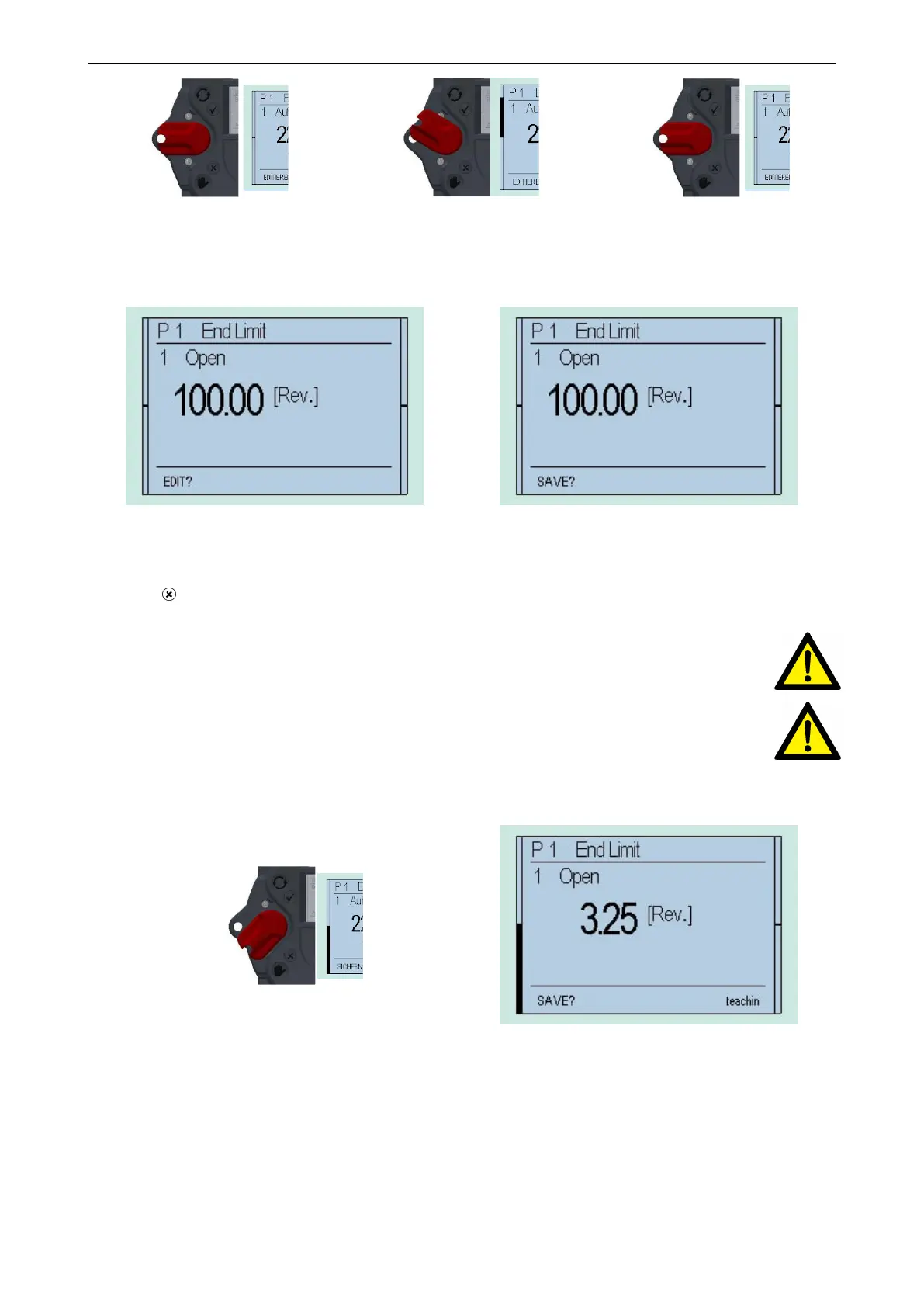
Figure 28
⇒
Figure 29
⇒
Figure 30
This changes the bottom line of the display from "EDIT?" to "SAVE?"
Figure 31 Figure 32
Then, push down the selector switch until it snaps into place. In doing so, the bottom right now on the display will show
"TEACHIN"
CAUTION: Once the display shows "TEACHIN", use the operating switch (black switch) to start the motorised
operation of the actuator. In this mode, no travel-dependent switch off occurs in the end position.
CAUTION: Please note that, during motor operation, only torque monitoring remains active, as travel adjust-
ment will happen subsequently. Therefore, please check beforehand whether the maximum torque has been
already parameterised.
Absolute and relative values on the display will change continuously along with position changes.
Figure 33
Figure 34
Manually move the actuator with the handwheel (see section 2.1, page 23, or section 2.6, page 24) or by motor via the
operating switch (black switch) to the end position OPEN of the valve.
• Absolute value: Absolute value of the position feedback
• Relative value: The value to the other end postion
34



 To Next Page