6 Control Unit
Operating Manual 90° ACTUSAFE CMF(S)QT
OM-ENGLISH-Failsafe-QT-16xx-V2.00-2022.03.01
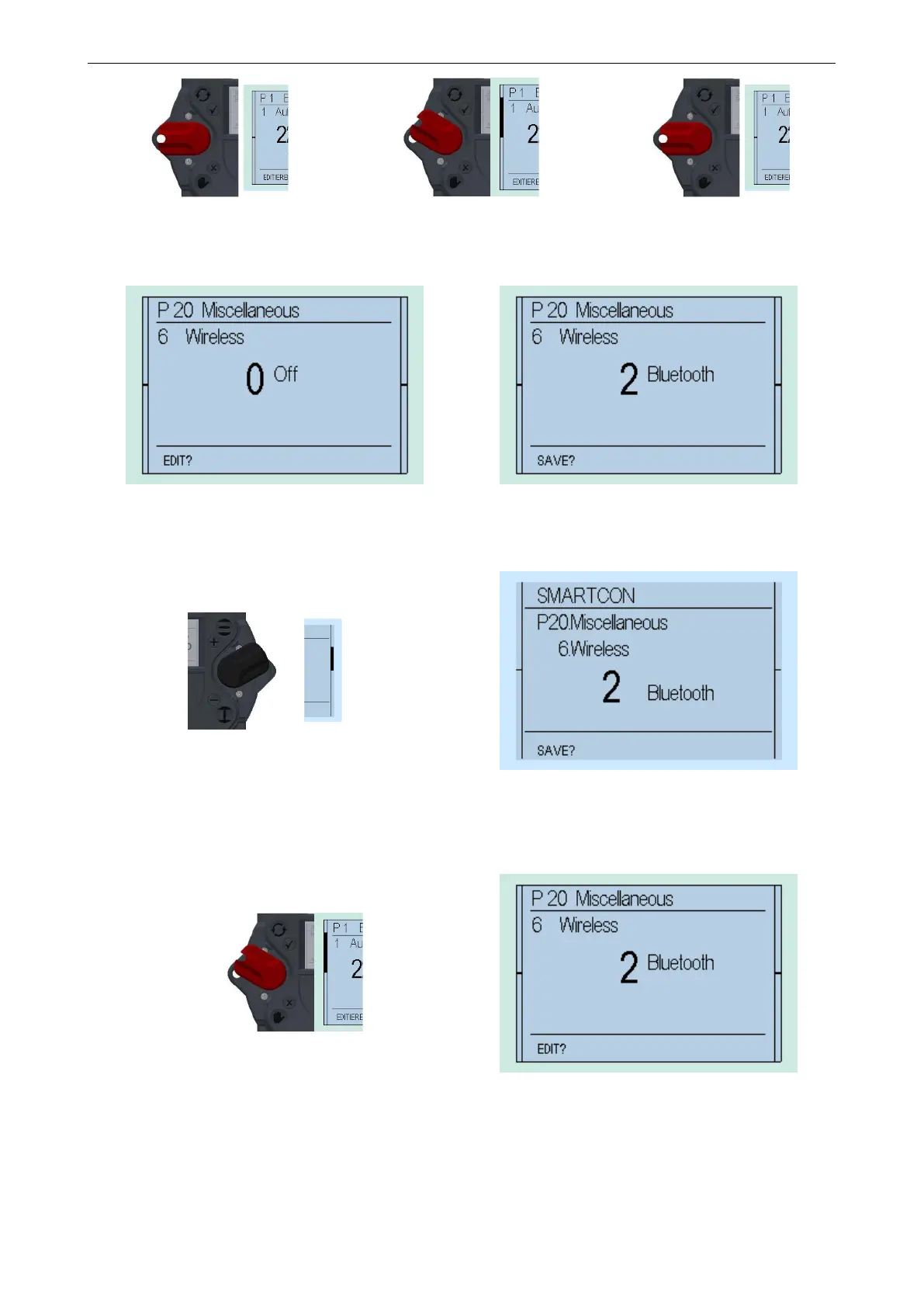
Figure 58
⇒
Figure 59
⇒
Figure 60
This changes the bottom line of the display from "EDIT?" to "SAVE?"
Figure 61 Figure 62
Thereafter, flip up the control switch (toward ) to change the value from 0 (off) to 2 (Bluetooth)
Figure 63
Figure 64
If the value changes to 1, confirm the selection by flipping halfway up the selector switch (towards) and letting it snap back
to its neutral position (see Figure 58 til Figure 60).
Figure 65
Figure 66
This changes the bottom line of the display from "SAVE?" to "EDIT?" and the parameter is stored.
6.4.4 „TEACHIN“
Furthermore, certain parameters (end positions, intermediate positions).can be set using "TEACHIN". Thus, their configu-
ration is greatly simplified.
42



 To Next Page