10 • Schlage • WPR400 user guide
Test mode
L Disconnect the batteries from the WPR400 while conguring this mode.
(See steps 1 and 2 under Batteries on page 13.)
If the wireless portable reader was ordered as WPR400 x DT, the unit is shipped in
test mode.
A credential reader is not required to operate the WPR400 in test mode.
The PIM400 should be in link mode prior to operation of the WPR400 in test mode.
See Set link mode on the PIM400 on page 11.
To select test mode:
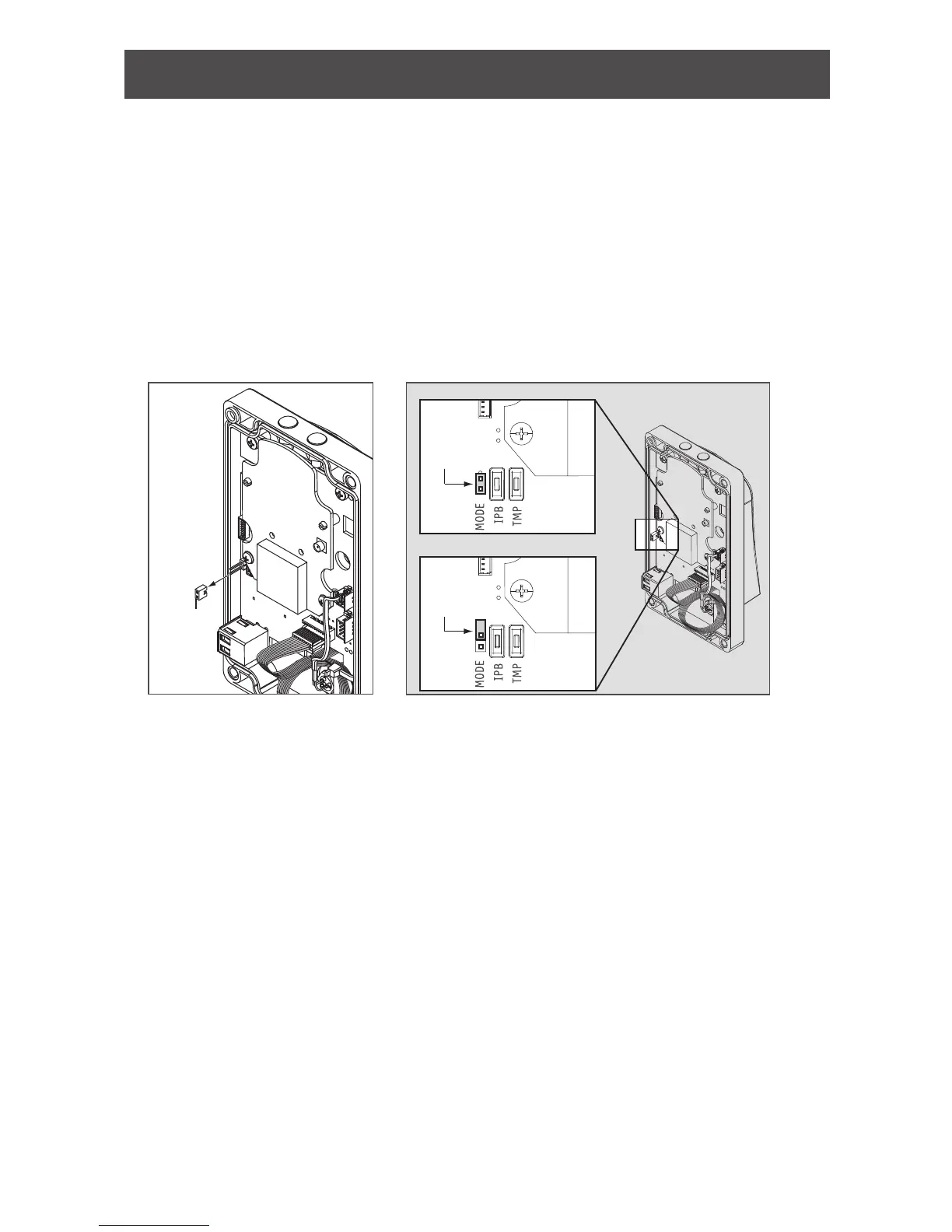
1. Loosen the four screws and remove the WPR400 cover.
2. Place a jumper across the two pins of the “Mode” connector on the main circuit board.
Jumper
LINK MODE
Jumper
Jumper
3. Reassemble the WPR400 before powering on.
When powered on, the WPR400 will automatically enter test mode and test the quality of the
RF link.
If the RF link fails, the Schlage button will blink red three (3) times and ve (5) short beeps
will sound. Repeat the link attempt by either of the following methods (the PIM400 will remain
in link mode):
- without a reader attached, cycle the WPR400 power switch, or,
- with a reader attached, present any credential OR press any number key on the
keypad.
If the link problem continues, See WPR400 range on page 4 for more information and
steps to correct the problem.


 To Next Page