5 • Schlage • CO-200 user guide
Construction access mode
Construction access mode is used to allow access before the
lock has been programmed, and for testing purposes.
• Enabled by default.
• The lock will remain in construction access mode until
the mode is cancelled as described below.
• No audits are captured while lock is in construction
access mode.
Create the master construction credential - locks with
card readers
1. Press and hold the Schlage button while presenting a
credential.
2. This credential becomes the master construction
credential, and is used to program construction access.
3. The Schlage button will blink green on the left and right
as conrmation.
After you have created the master construction credential,
you can then use that card to add construction access mode
user credentials.
L The master construction credential will not grant
access. It is used only to add additional credentials.
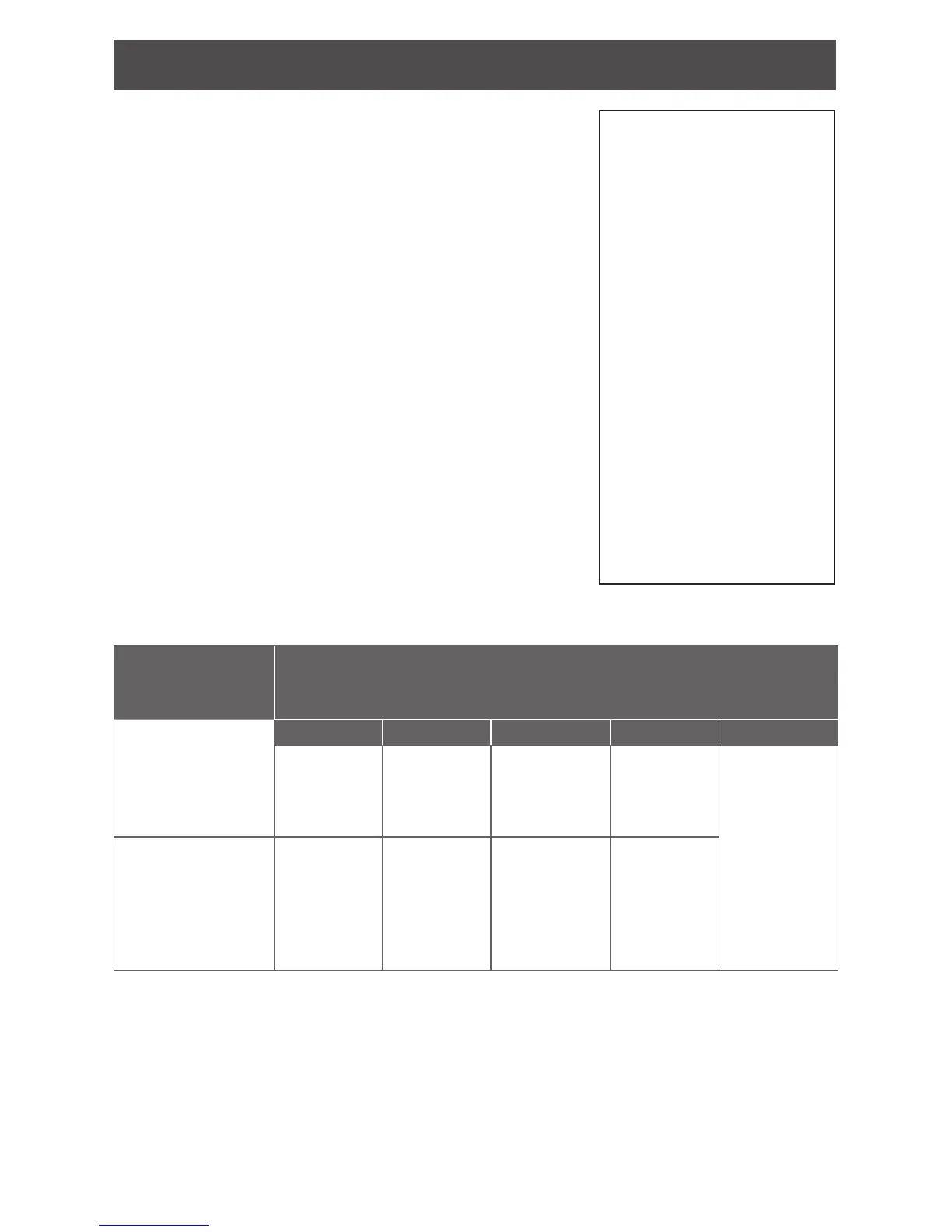
Locks with card readers – Add construction access mode user credentials
Construction
access mode
credential type
Steps to add construction access mode user credentials
Normal use
construction
credential
Unlocks the lock for
relock delay period
1 2 3 4 5
Present
master
construction
credential to
reader
Green LEDs
blink
Present user
credential
within 20
seconds
Green LEDs
blink and
credential is
added
Repeat steps
3 and 4 for
additional
credentials.
Credentials
added with
the master
construction
credential will
have 24/7
access.
Toggle
construction
credential
Changes the state
of lock from locked
to unlocked or vice
versa
Present
master
construction
credential to
reader
Green LEDs
blink
Press and
hold Schlage
button while
presenting
user credential
within 20
seconds
Green LEDs
blink, 2
beeps will
sound and
credential is
added
Cancel construction access mode
Construction access mode may be cancelled by one of the following methods:
• load a door le using the SUS
• reset the lock to factory settings (see Reset to factory defaults on page 15 for more
information).
When construction mode is cancelled, the master construction credential and all other
credentials added using the master construction credential will no longer function.
TIP
Use the same master
construction credential for
all the locks in the facility.
If you present the rst card
to a new lock to create
the master construction
credential and the card is
not accepted, the lock has
either been programmed
or already has a master
construction credential.
If the master construction
credential cannot be
located, or to put the lock
back into construction
access mode, reset the
lock to factory settings. See
Reset to factory defaults
on page 15 for more
information.


 To Next Page