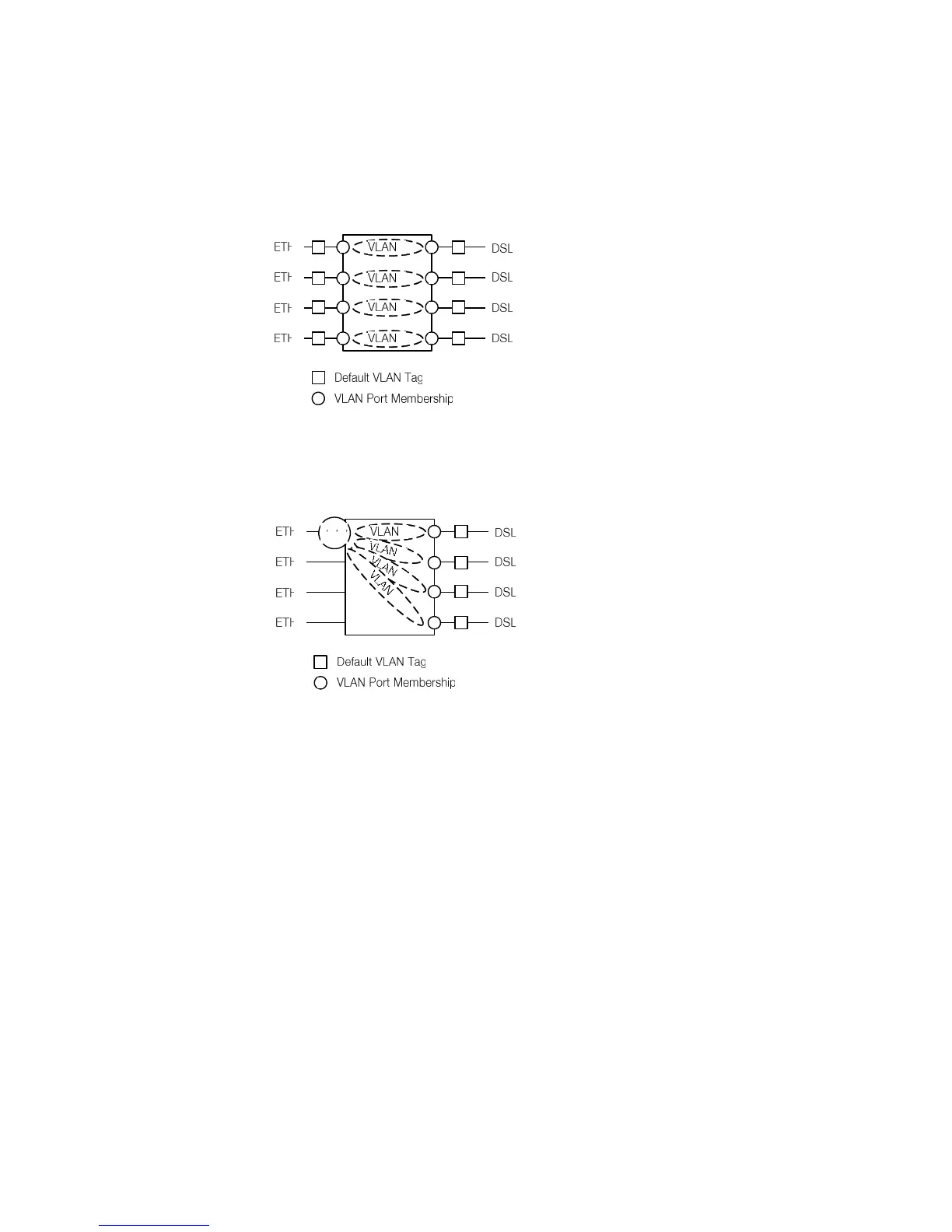
necting ETH1 to DSL1, ETH2 to DSL2 etc. while blocking all traffic between
Ethernet ports and between DSL spans. The VLAN configuration of Figure 3-6 is
automatically activated when issuing the DEFAULT 2 Monitor command.
Figure 3-6: Simple VLAN Example
Figure 3-7 shows how the VLAN switching function can be used for traffic con-
centration:
Figure 3-7: VLAN configuration for traffic concentration
In this example four independent DSL customers are concentrated to a single
Ethernet trunk interface. On the DSL lines untagged packets are used. Upon in-
gress into the Watson Ethernet plug-in the packets get a default VLAN tag be-
tween 1 and 4 based on their ingress port. All traffic is switched to port ETH1
which is member of all four VLANs. The packets egress the Watson Ethernet
plug-in with VLAN tags, allowing to separate traffic streams from the four DSL
spans different customers. Ports ETH2 .. ETH4 are unused in this scenario.



 To Next Page