INCU-SHAKE Compact Stackable shaking Incubator Manual V2023.1
18
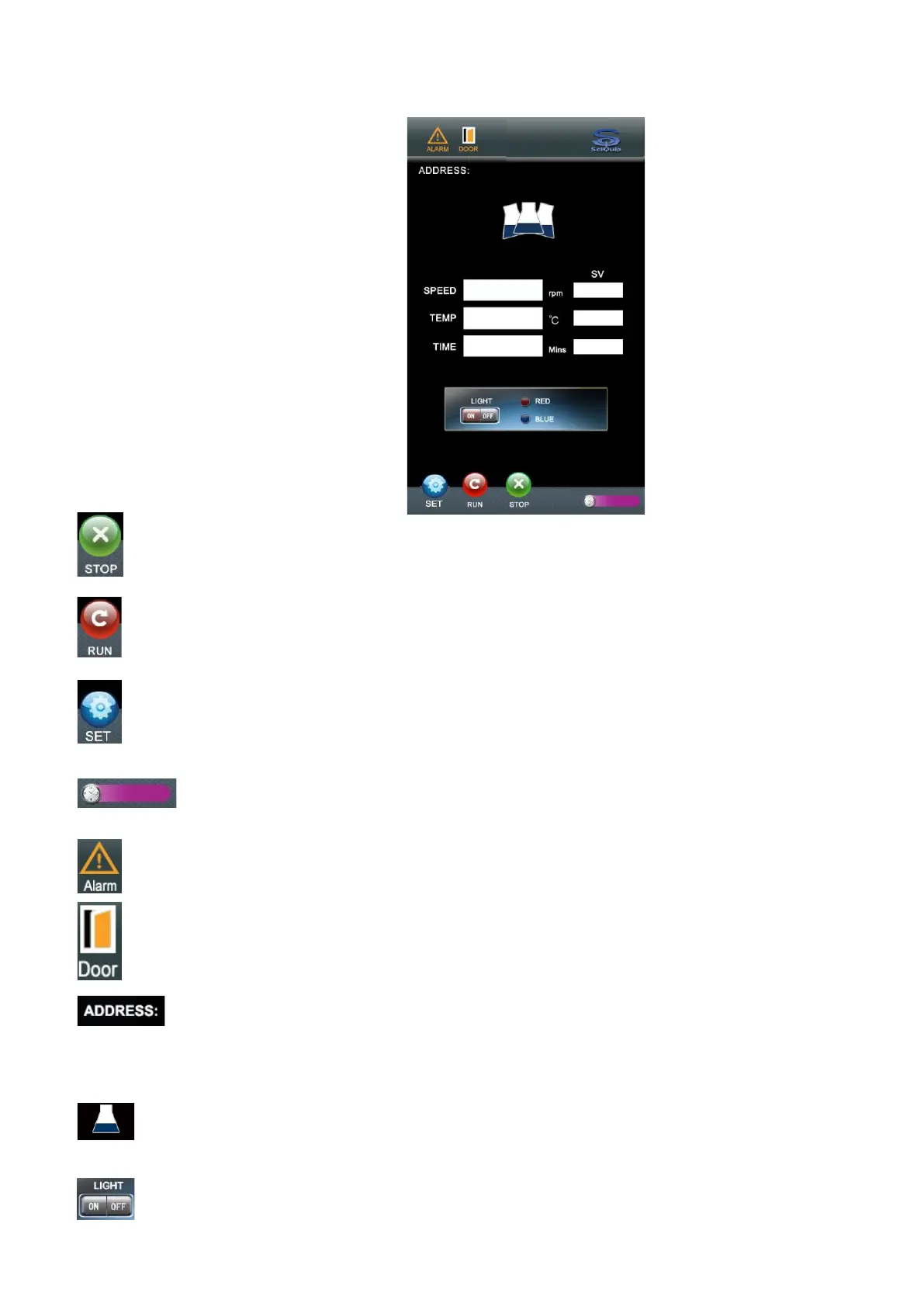
6.1 Home Page Summary
“Stop” button:
Press this to stop the operation. When the incubator is in operation, press
this button to pause. Press it again, to stop the current operation.
“Run” button:
Press this button to start the operation. When the unit is paused, this will
twinkle; press it again to resume the operation.
“Set” Button:
Press it to enter the Set Menu page Settings.
“Clock Time” Display:
It displays the actual clock time.
“Alarm” Status:
Once the conditions of alarms are fulfilled, the alarm is declared, and
indicator will be lighted.
“Door” Status:
This indicator will be lighted if door is opened or closed improperly.
"Address" Status:
This indicates the current serial address when the incubator is connected
to any communication protocols, e.g. RS-485.
“Shaking Flask” Status:
The illustration of “flask” indicates the status of the unit; the flask remains
still when unit is stopped; or keeps swinging when it’s shaking.
Photosynthetic Lighting Switch:


 To Next Page