Overview • 15
17-10-01-266-002a/07-2018B
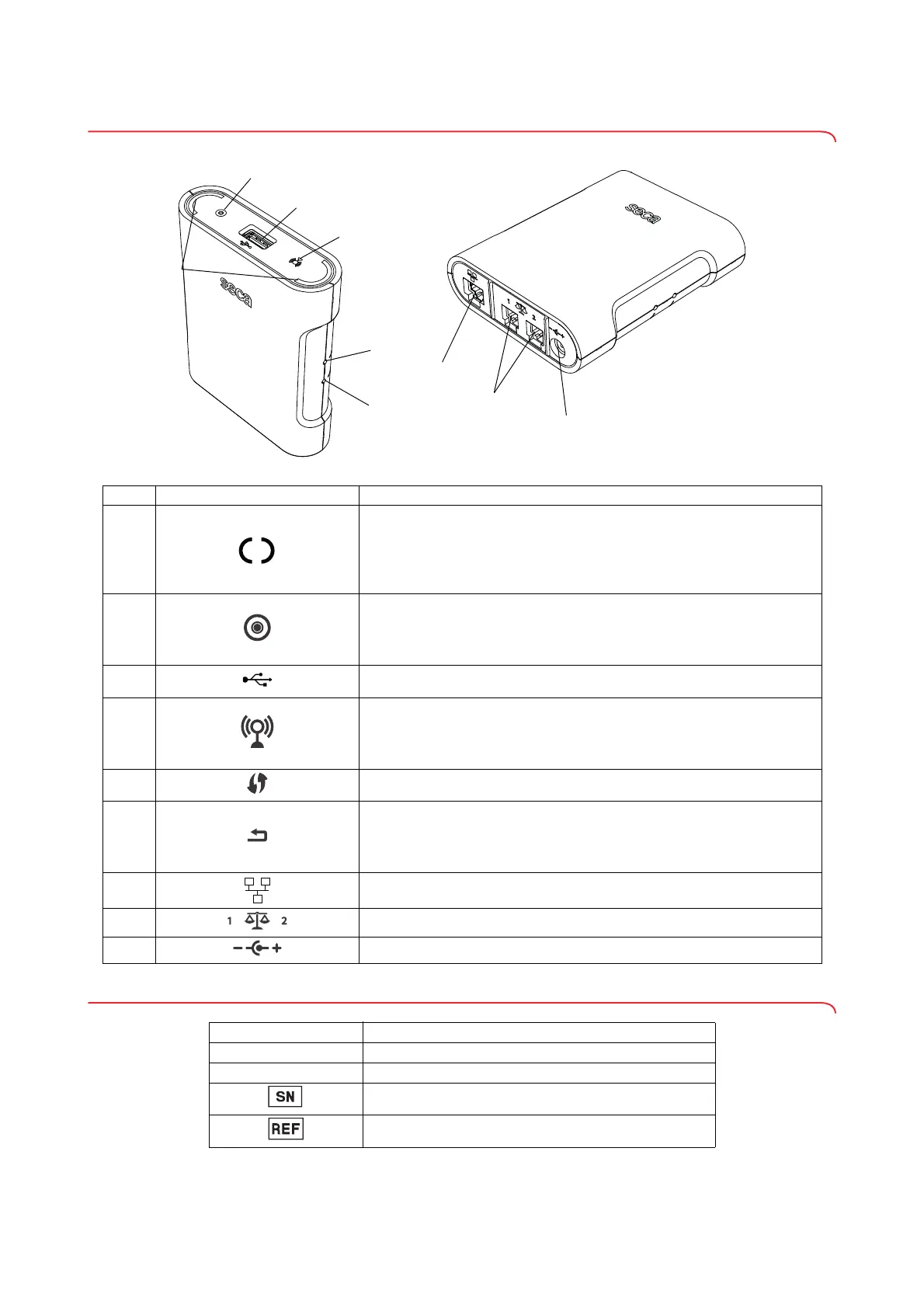
3.2 Controls for seca 452 interface module
3.3 Markings on the type plate (seca 452 interface module)
No. Symbol Function
A
Workflow LED
• Turns green: Measurement procedure is active
• Flashes green: Data being transmitted
• Turns green for approx. 5 seconds: Data successfully transmitted
• Turns red: Error in data transmission
B
Power LED
• Turns green: Device is ready for use
• Turns red: Device is defective
• Flashes green: Device is active as access point
C USB interface (only for medical devices)
D
Network LED
• Flashes green: WiFi connection being set up
• Turns green: WiFi connection is set up
• Turns red: WiFi connection is defective
E WPS button: Establish WiFi connection via WPS
F
Reset button
• Press and hold (approx. 8 seconds): Reset settings
• Press shortly (approx. 1 second): Activate/deactivate access point
function
G Ethernet interface
H Interface for seca products
I Power supply connection
Symbol Meaning
ProdID
Product identification number, consecutive
Mat. no.
Variant number
Serial number, consecutive
Model number



 To Next Page