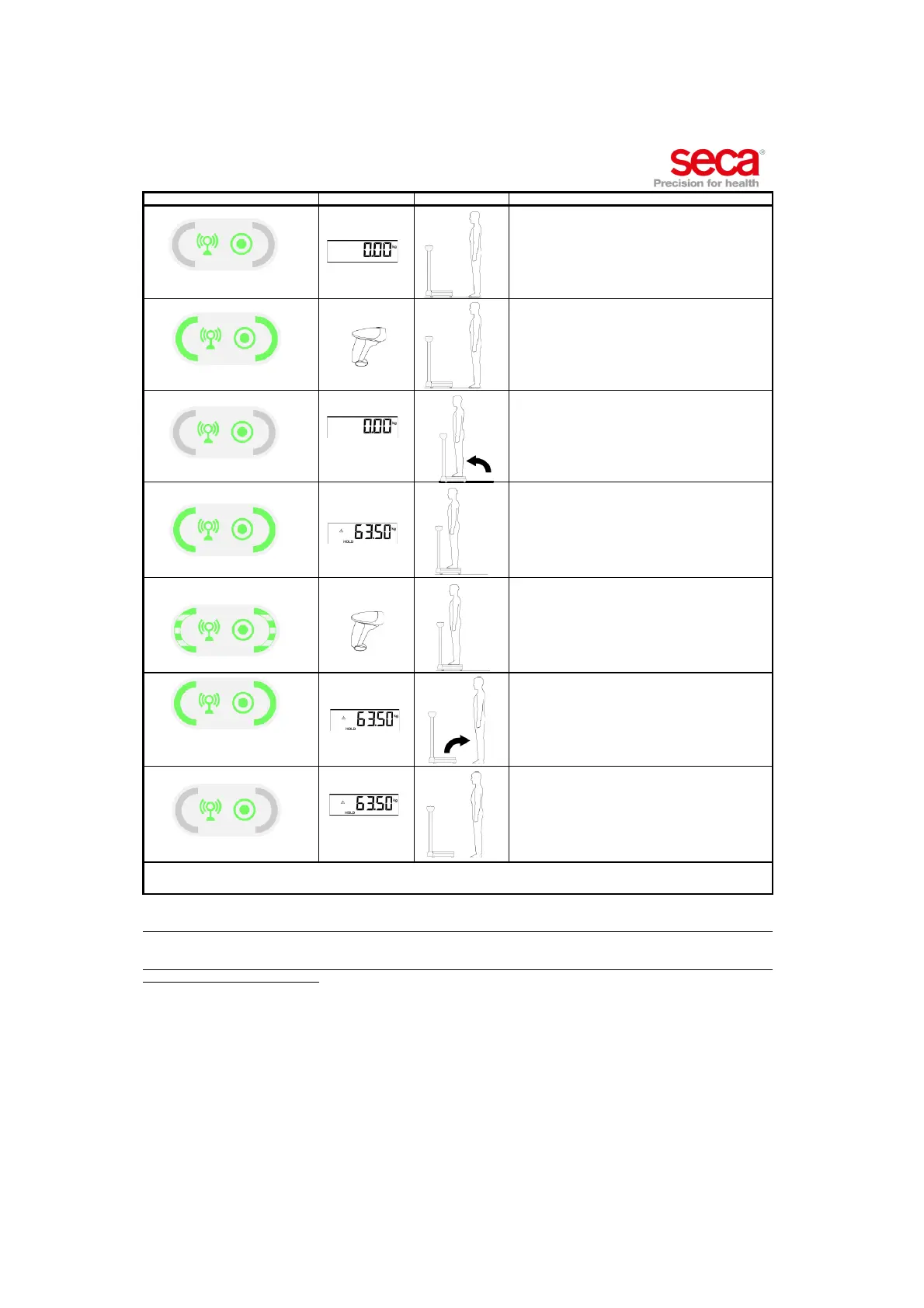
Annex: Quick reference: Measurement procedure • 83
17-10-01-266-002a/07-2018B
Integration module Device Patient User
Network or Power LED solid green
• Make sure device is switched on.
• Make sure power and network LEDs are solid green.
Workflow LEDs solid green
Enter ID(s) as stated in "Device settings".
Network or Power LED solid green
Ask patient to step on device.
Workflow LEDs solid green
Wait till display shows result permanently.
Workflow LEDs flashing green
Scan "confirm" bar code if device is set accordingly (see
"Device settings").
Workflow LEDs solid green for
approx. 5 seconds
• Wait till workflow LED is solid green.
• Ask patient to step off device.
Network or Power LED solid green
• Wait till workflow LED goes out.
• Measurement result remains in display.
• Device is ready for new measurement procedure.
seca Version 6, July 2/2018
Page 2/2
NOTE
If result seems implausible go through COMPLETE measuring procedure again.



 To Next Page