4-2
4.1. LCD Area
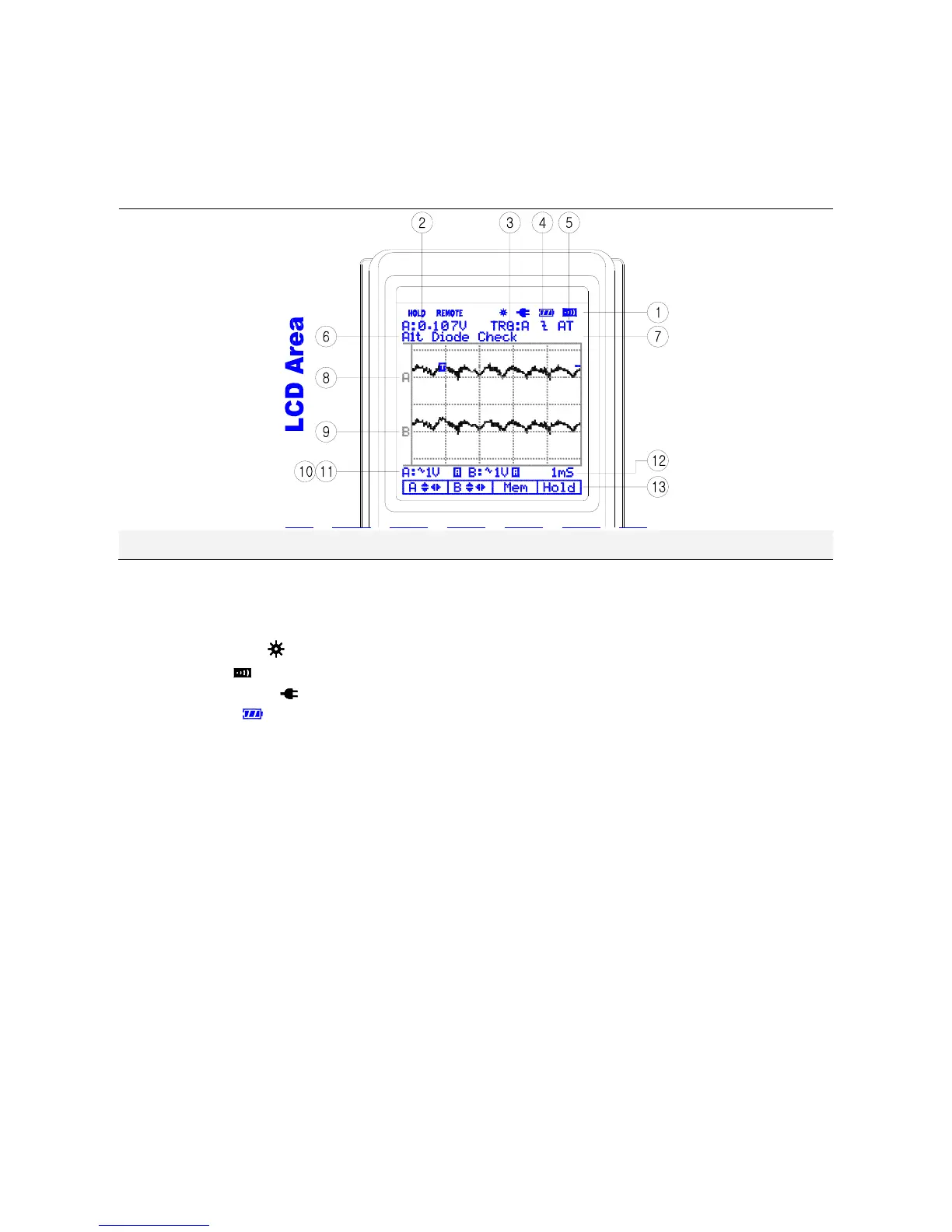
The screen is divided into five areas: Indicator area, Reading area, Waveform area, Setting area
and Menu area. Refer to Figure below.
[LCD Display]
1) Indicator
▪ HOLD: Freezes display in the LCD
▪ REMOTE: RS232 or USB Output indicator
▪ BACK LIGHT(
): Back light indicator
▪ BUZZER(
): Buzzer indicator
▪ Charging LINE(
): Charging Battery indicator
▪ BATTERY(
): Low battery indicator
2) Primary Numerical Field (DMM Function)
Displays the numerical readings. Because only input A is on, you will see the input A readings
only.
3) Trigger selection
▪ Channel A, B and External
3-1) Trigger level indicator
3-2) Trigger Cursor
4) Trigger Slope
▪ Rising or Falling edge
5) Trigger mode: Normal or AUTO
6) Automotive Function
▪ Sensor
▪ Actuator
▪ Ignition
▪ Electrical


 To Next Page