5-3
Now, you will see only CHA on the screen.
Key:
Î Î Î Î
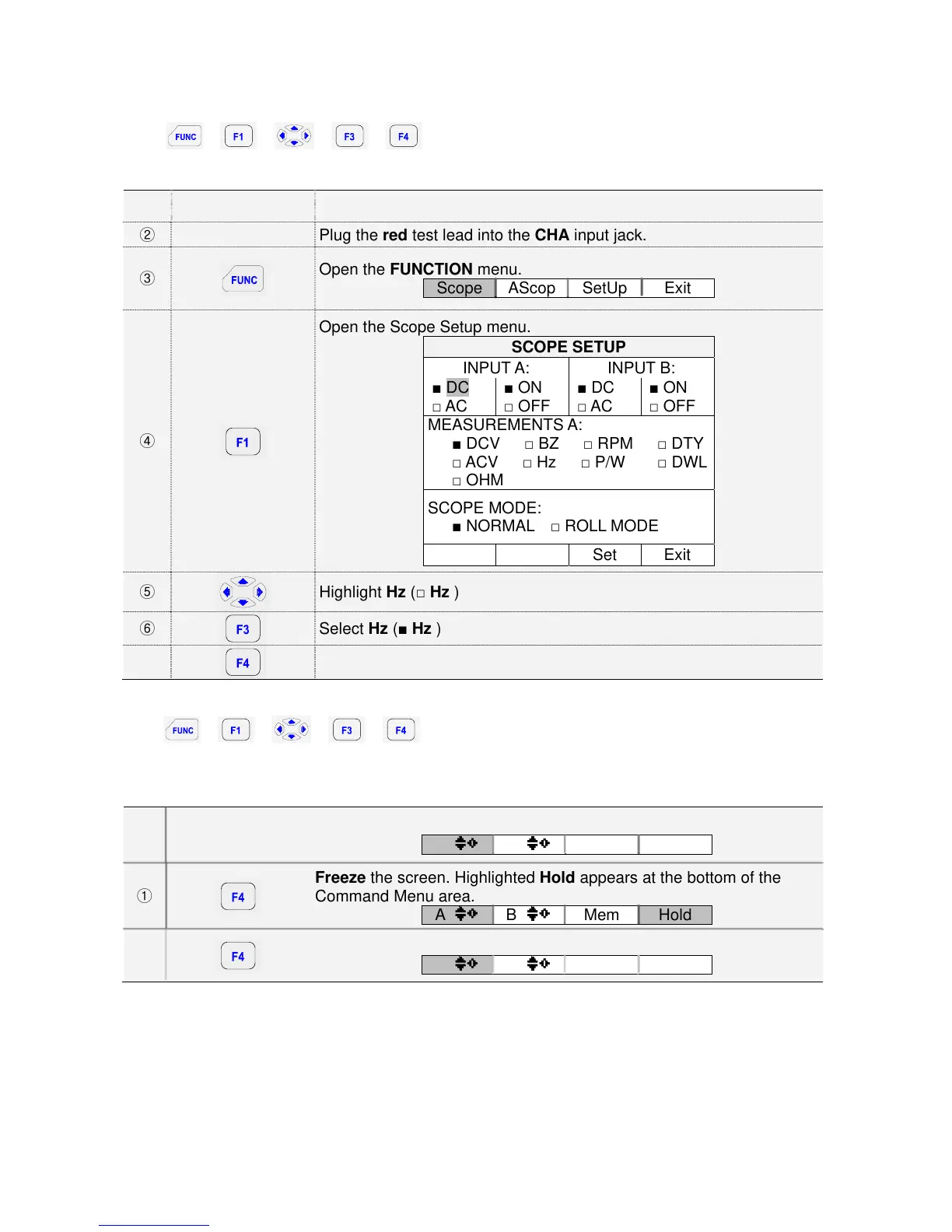
1) To choose a Frequency measurement for CHA, do the following:
① Plug the black test lead into the COM input jack.
② Plug the red test lead into the CHA input jack.
③
Open the FUNCTION menu.
Scope AScop SetUp Exit
④
Open the Scope Setup menu.
SCOPE SETUP
INPUT A: INPUT B:
■ DC
□ AC
■ ON
□ OFF
■ DC
□ AC
■ ON
□ OFF
MEASUREMENTS A:
■ DCV □ BZ □ RPM □ DTY
□ ACV □ Hz □ P/W □ DWL
□ OHM
SCOPE MODE:
■ NORMAL □ ROLL MODE
Set Exit
⑤
Highlight Hz (□ Hz )
⑥
Select Hz (■ Hz )
⑦
Exit.
Observe that Hz is now the main reading.
Key:
Î Î Î Î
5.1.7. Freezing the screen
You can freeze the screen (all readings and waveforms) at any time.
Default (Command Menu) Display:
A B Mem Hold
①
Freeze the screen. Highlighted Hold appears at the bottom of the
Command Menu area.
A B Mem Hold
②
Resume your measurement
A B Mem Hold



 To Next Page