5-2
5.1.5. Making Selections in a Menu
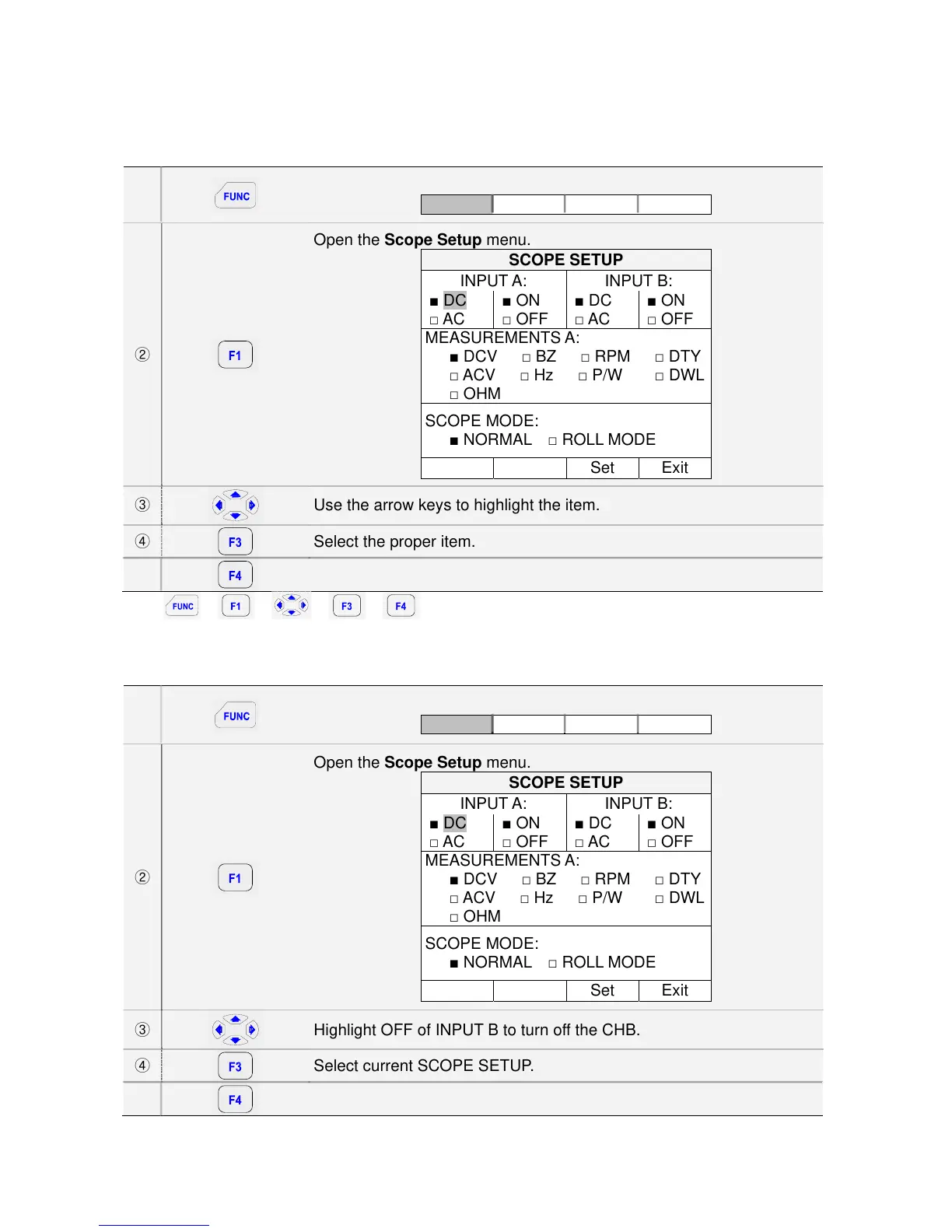
Subsequently follow steps ① to ⑤ to open a menu and to choose an item.
①
Open the FUNCTION menu.
Scope AScop SetUp Exit
②
Open the Scope Setup menu.
SCOPE SETUP
INPUT A: INPUT B:
■ DC
□ AC
■ ON
□ OFF
■ DC
□ AC
■ ON
□ OFF
MEASUREMENTS A:
■ DCV □ BZ □ RPM □ DTY
□ ACV □ Hz □ P/W □ DWL
□ OHM
SCOPE MODE:
■ NORMAL □ ROLL MODE
Set Exit
③
Use the arrow keys to highlight the item.
④
Select the proper item.
⑤
Exit.
Key: Î Î Î Î
5.1.6. Displaying only CHA
Subsequently follow steps ① to ⑤ to open a menu and to choose an item.
①
Open the FUNCTION menu.
Scope AScop SetUp Exit
②
Open the Scope Setup menu.
SCOPE SETUP
INPUT A: INPUT B:
■ DC
□ AC
■ ON
□ OFF
■ DC
□ AC
■ ON
□ OFF
MEASUREMENTS A:
■ DCV □ BZ □ RPM □ DTY
□ ACV □ Hz □ P/W □ DWL
□ OHM
SCOPE MODE:
■ NORMAL □ ROLL MODE
Set Exit
③
Highlight OFF of INPUT B to turn off the CHB.
④
Select current SCOPE SETUP.
⑤
Exit.



 To Next Page