6-2
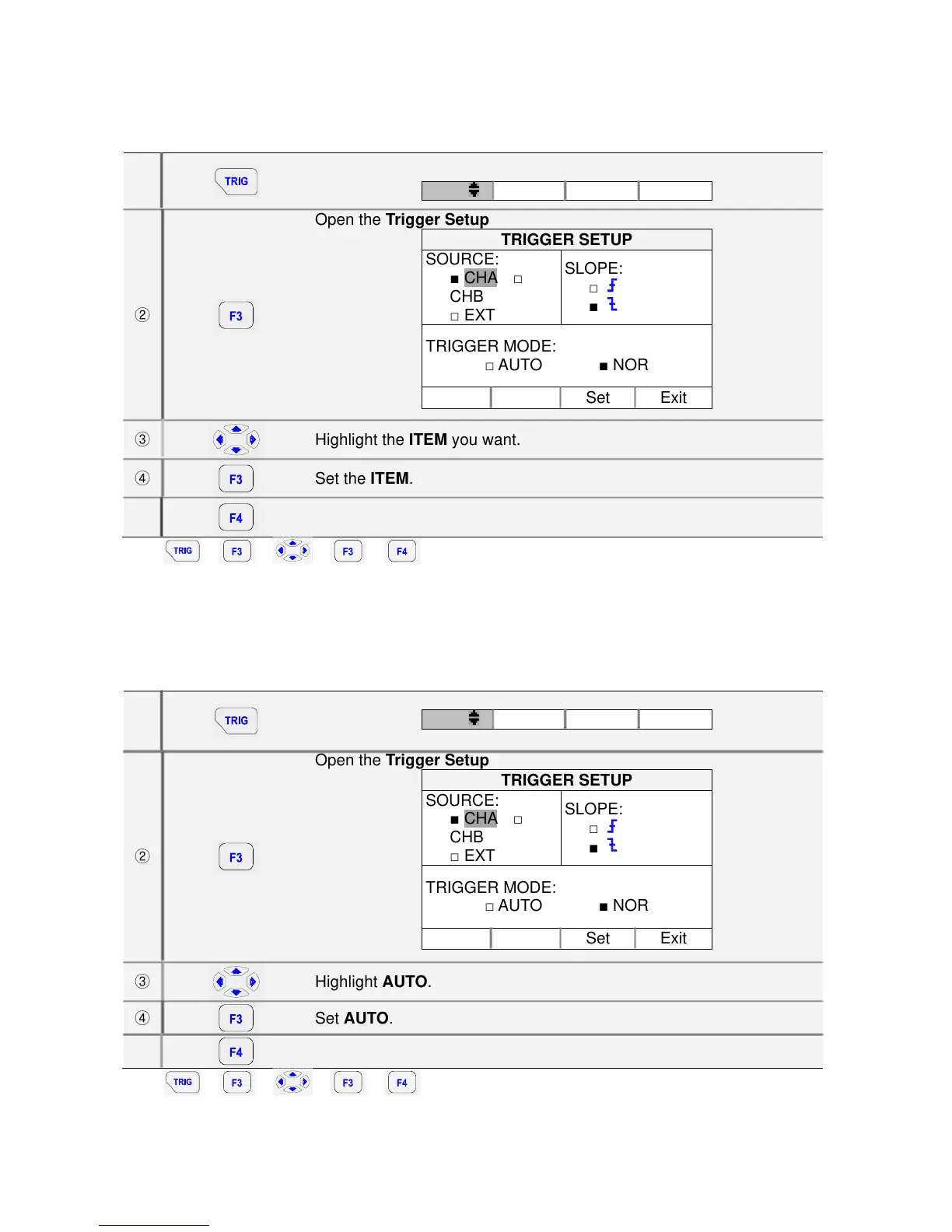
6.3. Setting Trigger mode (Tmode)
①
Open the Trigger menu
Tlvl
Singl Tmode Exit
②
Open the Trigger Setup
TRIGGER SETUP
SOURCE:
■ CHA □
CHB
□ EXT
SLOPE:
□
■
TRIGGER MODE:
□ AUTO ■ NOR
Set Exit
③
Highlight the ITEM you want.
④
Set the ITEM.
⑤
Exit.
Key: Î Î Î Î
6.4. Setting AUTO Trigger Level
For quick operation, use the AUTO trigger mode to trigger on nearly all signals automatically. To
optimize trigger slope manually, do the following:
①
Open the Trigger menu
Tlvl
Singl Tmode Exit
②
Open the Trigger Setup
TRIGGER SETUP
SOURCE:
■ CHA □
CHB
□ EXT
SLOPE:
□
■
TRIGGER MODE:
□ AUTO ■ NOR
Set Exit
③
Highlight AUTO.
④
Set AUTO.
⑤
Exit.
Key: Î Î Î Î



 To Next Page