SELECT GATE SG-1A V1.X INSTALLATION AND USER GUIDE
26
5 3
24
1
65
4.2.21 CALL FORWARD TONE (Function 61)
This feature permits remote control of the call forward number to forward a call to some
location other than the house or residence. This feature is controlled by programming from a
Touch-Tone™ phone either at the house, or from an outside line.
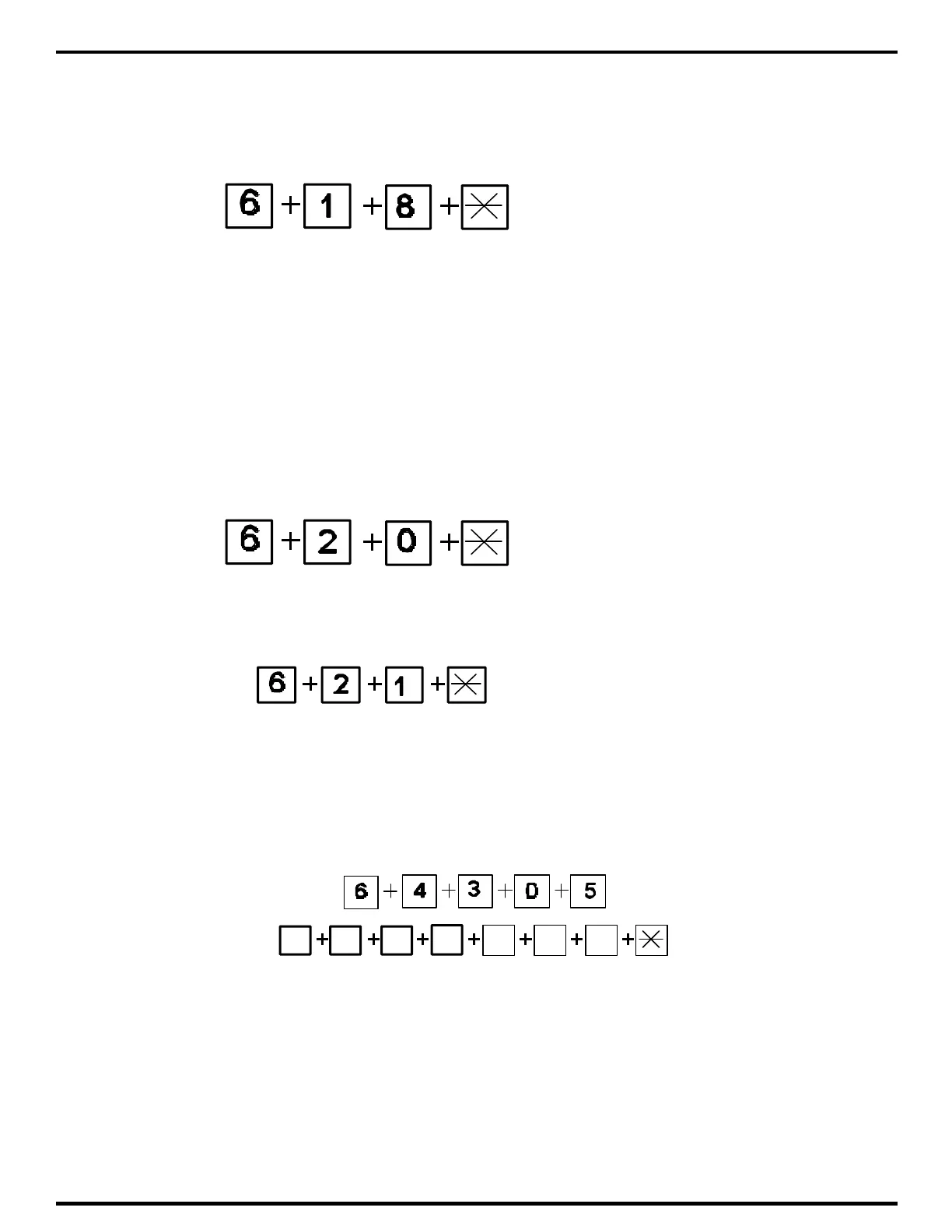
To change call forwarding tone from 0 (disabled)to another tone (ex. 8):
4.2.22 CALL FORWARD TYPE (Function 62)
When this feature is enabled, it dials a previously programmed number to forward a call to
some location other than the house or residence. This feature is controlled by programming from
a Touch-Tone™ phone either at the house, or from an outside line. Depending on how Select
Gate is programmed, it will send a one ring notification of call forwarding to the house, or it will
forward the call without notification.
To set call forwarding to forward without notification:
To set call forwarding to forward with notification:
4.2.23 CALL FORWARD NUMBER (Function 64)
The number to dial when the call forward feature is enabled, can be from 1 to 16 digits.
To add a number to call forward (we will use as an example, a 10 digit phone number:
305-565-4321):



 To Next Page