English 11
DISPLAY FOR HELP, NOTIFICATIONS AND ERRORS
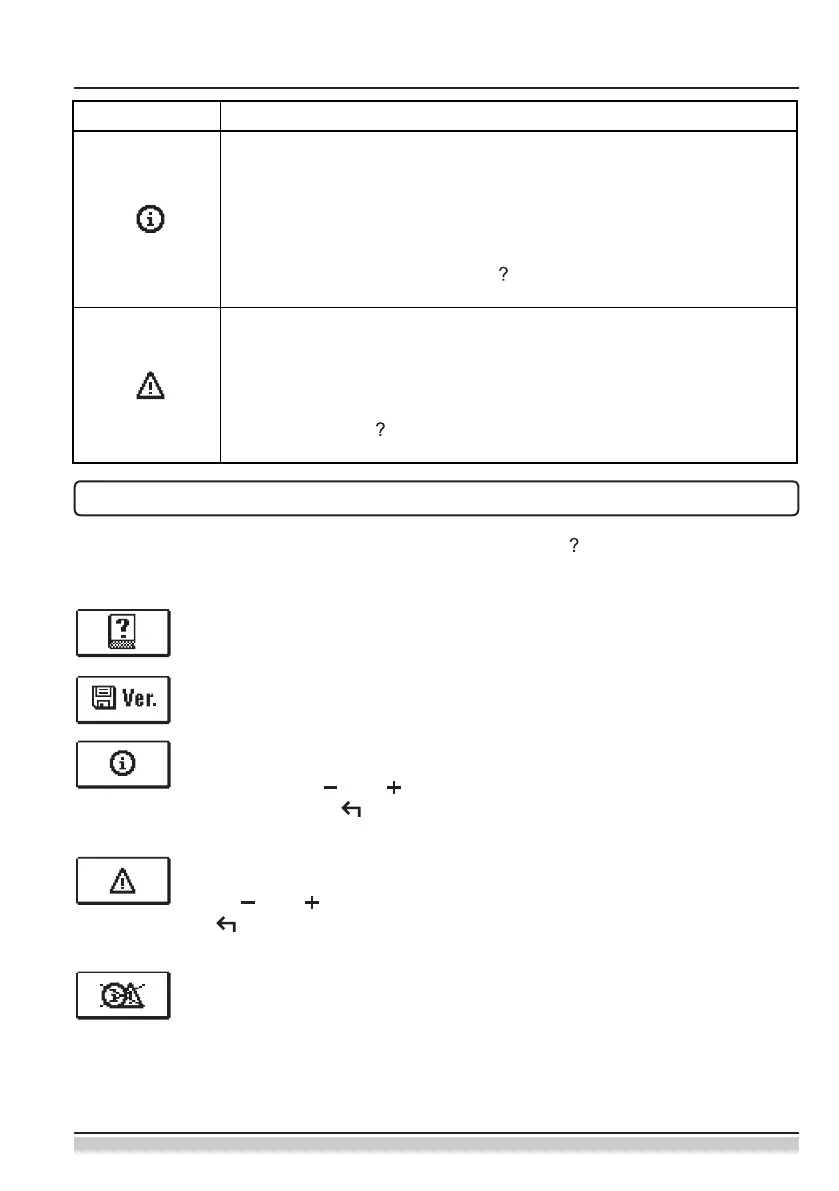
Recall the display for help, notications and error by pressing . The display oers the
following options:
Brief instructions
Brief instructions for use of the controller.
Controller version
Display of the controller type and software version.
Notications
List of transgressions of maximum temperatures and activation of protection
functions. Press and to can move through the list of notications. Exit
the list by pressing .
Errors
List of errors of sensors and other assemblies.
Press and to can move through the list of errors. Exit the list by press-
ing .
Deleting notications and errors
List of notications and errors shall be deleted.
Caution: Sensor errors that are essential for controller operation cannot be
deleted.
Symbol Description
Notications
In case of a transgression of the maximum temperature or activation
of the protection function, the controller will trigger a warning with
ashing of the symbol on the display. If the maximum temperature is
no longer exceeded or if the protection function is already switched
o, the lit-up symbol will indicate a recent event. Recall the display for
the review of the list by pressing . After reviewing the list of notica-
tions, the notication symbol disappears.
Errors
In case of a failure of sensors or communication connections, the
controller will trigger a warning with ashing of the symbol on the
display. If the error is eliminated or no longer present, a non-ashing
symbol will indicate a recent event. Recall the display for error list re-
view by pressing . After reviewing the list of errors, the error symbol
disappears.
SYMBOLS FOR NOTIFICATIONS AND WARNINGS


 To Next Page