22 English
CONTROLLER PARAMETERS
INSTRUCTIONS FOR SERVICE SETTINGS
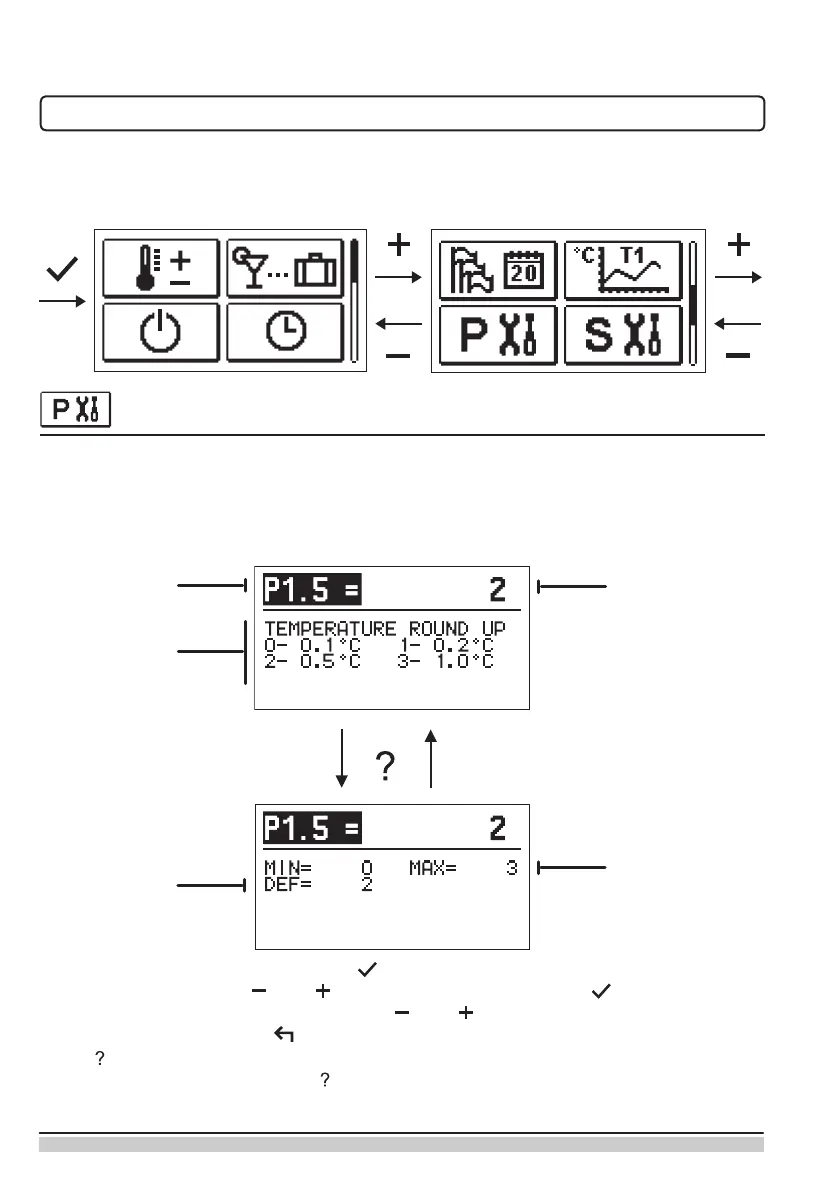
All additional settings and adjustments of the controller operation shall be executed using
parameters. User, service and special parameters are located on the second and third
displays of the menu.
USER PARAMETERS
User parameters are arranged in groups P1 – general settings, P2 – heating circuit settings
and P3 – settings for boiler or heat source.
If the preferred group of parameters in the menu is selected, a new display will open up:
Parameter
code
Parameter
description
Current parameter
value
Factory
value
Setup
range
The setup can be changed by pressing . The setup value becomes colour-lit and can
be changed with the keys and . Conrm the setup by pressing . It is now possible
to move to another parameter with the keys and and repeat the process. Exit the
parameter setup by pressing .
Press to review the range of the parameter setup and its default value. Return to the
parameter description by pressing again.


 To Next Page