English 17
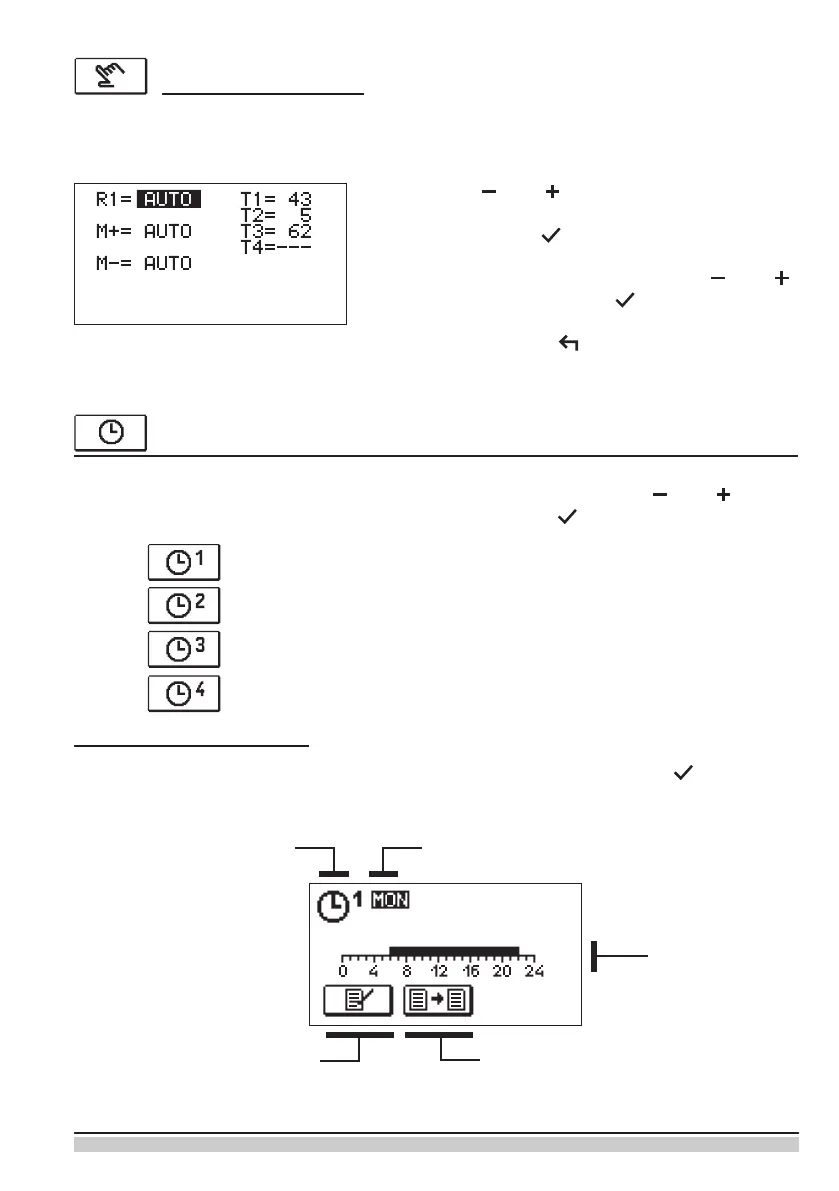
Use the keys and , to move among individual
outputs R1, M+ or M-. Select the output to change the
status of by pressing .
The value ON, OFF or AUTO starts to ash. Now the
output status can be changed by pressing and .
Conrm the setup by pressing .
Exit the list by pressing .
This mode is used for testing the control system or in the event of a failure. The control
output can be manually switched on, switched o or automatic operation can be selected.
Manual operating mode
SELECTION AND SETUP OF TIME PROGRAMS
Weekly time programs enable automatic switching between the preferred day and night-
time temperature. There are four time programs available. Use the keys and to
select the preferred time program and conrm it by pressing .
The selected time program can be changed by re-conrming it by pressing . A new
display will open up:
Changing the time program
First time program
Second time program
Third time program
Fourth time program
Time axis
Copying the time programEditing of the time program
Number of time program Selected day


 To Next Page