18 English
With the keys , and , select the day to change the course of the program for or
the one to copy in other days. With the keys , and select the icon for edit-
ing and or the icon for copying the time program.
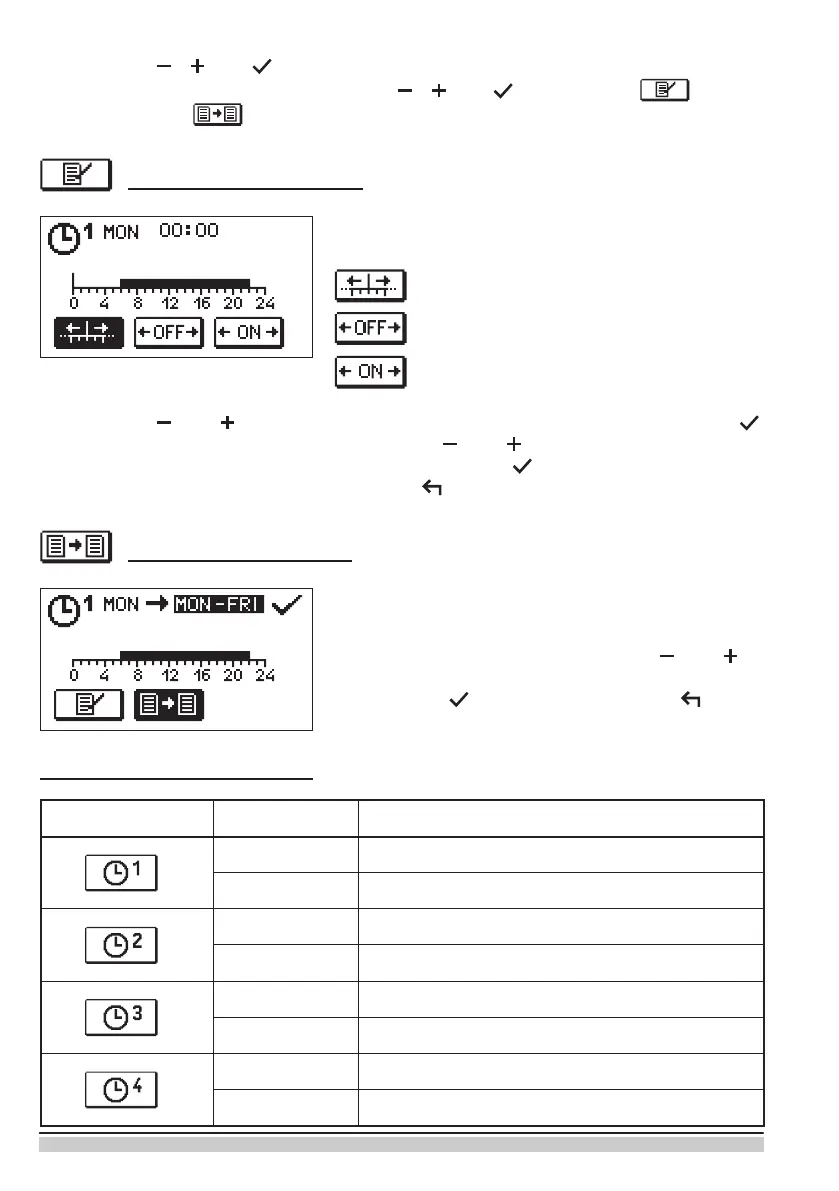
Editing of the time program
A new display will open up showing the time program
and three icons for changing the program.
With the keys and select the preferred command icon and conrm it by pressing
. A cursor appears on the time axis. With the keys and draw the preferred course of
the time interval. Finish drawing the interval by re-pressing .
Exit the editing of the time program by pressing .
- Free moving of the cursor.
- Drawing of the switch-o interval or night
temperature.
- Drawing of the switch-on interval or day
temperature.
Copying the time program
A new display will open up showing the time program
for the selected day. At the top of the display there is
a eld for the selection of the day or group of days to
copy the time program in. With the keys and
the day or group of days can be selected. For copying
press the key . Exit copying by pressing .
Initial settings of time programs
Time program Day Switch-on interval
MON–FRI 6am–10pm
SAT–SUN 7am–10pm
MON–FRI 5am–7.30am, 1.30pm–10pm
SAT–SUN 7am–10pm
MON–FRI 6am–8.30am, 11am–1.30pm, 4pm–10pm
SAT–SUN 7am–10pm
MON–FRI 2pm–10pm
SAT–SUN 7am–10pm


 To Next Page