12 English
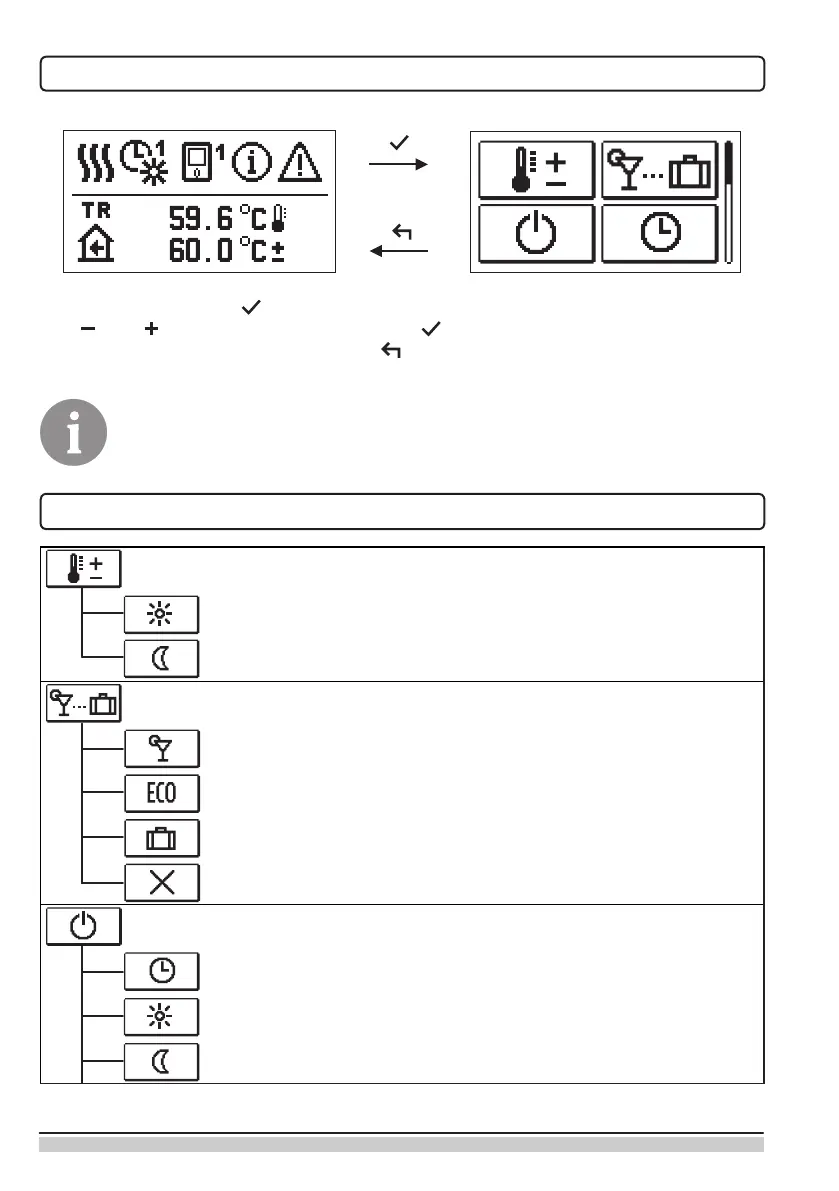
MENU ENTRY AND NAVIGATION
To enter the menu press .
Use and to move around the menu, and to conrm your selection.
Return to the previous display by pressing .
If no key is pressed for 15 seconds, the display becomes dimmed. After the
delay of the display switch-o, the display will switch o. The time can be set
up in the menu Basic settings, Display settings.
BUILDING AND MENU DESCRIPTION
TEMPERATURE SETUP
Day-time temperature
Night-time temperature
USER FUNCTIONS
PARTY operating mode
ECO operating mode
Vacation operating mode
Function switch-off
OPERATING MODE SELECTION
Operation based on the selected time program
Operation based on the daily temperature
Operation based on the night-time temperature


 To Next Page