14 English
TEMPERATURE SETUP
The menu displays temperatures that can be set up as preferred in the selected hydraulic
schematic.
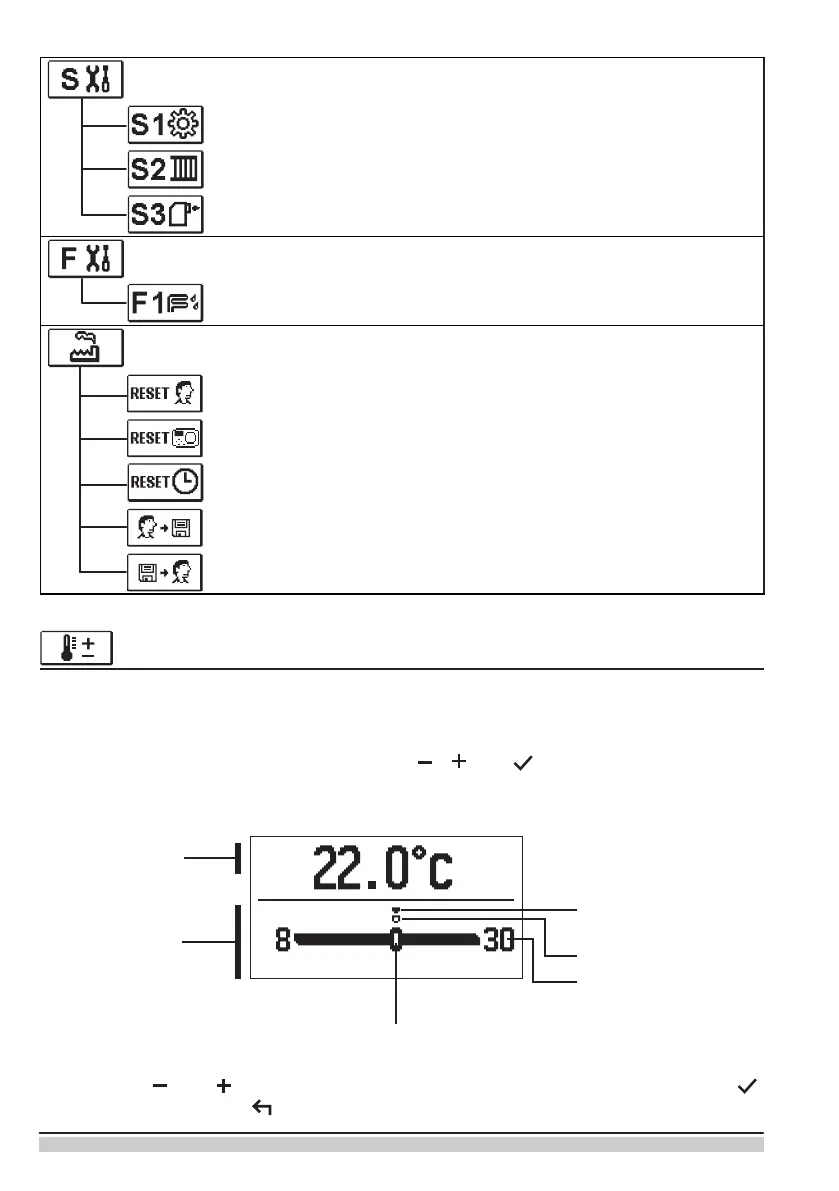
Select the preferred temperature with the keys , and . The display for the tem-
perature setup opens up:
Use the keys and to set up the preferred temperature and conrm it by pressing .
Exit the setup by pressing .
Factory value
Graphic
display of the
setup
Setup range
The last conrmed setup
value
Current value of the
preferred tem-
perature (numeric
display)
Current value of the
preferred temperature
SERVICE PARAMETERS
General service settings
Service settings for the heating circuit
Service settings for energy sources
SPECIAL PARAMETERS
Parameters for oor foundation drying
FACTORY SETTINGS
Reset of the controller parameters
Reset of the controller and restart of the rst setup
Reset of time programs
Save user settings
Load user settings


 To Next Page