20S
11
English
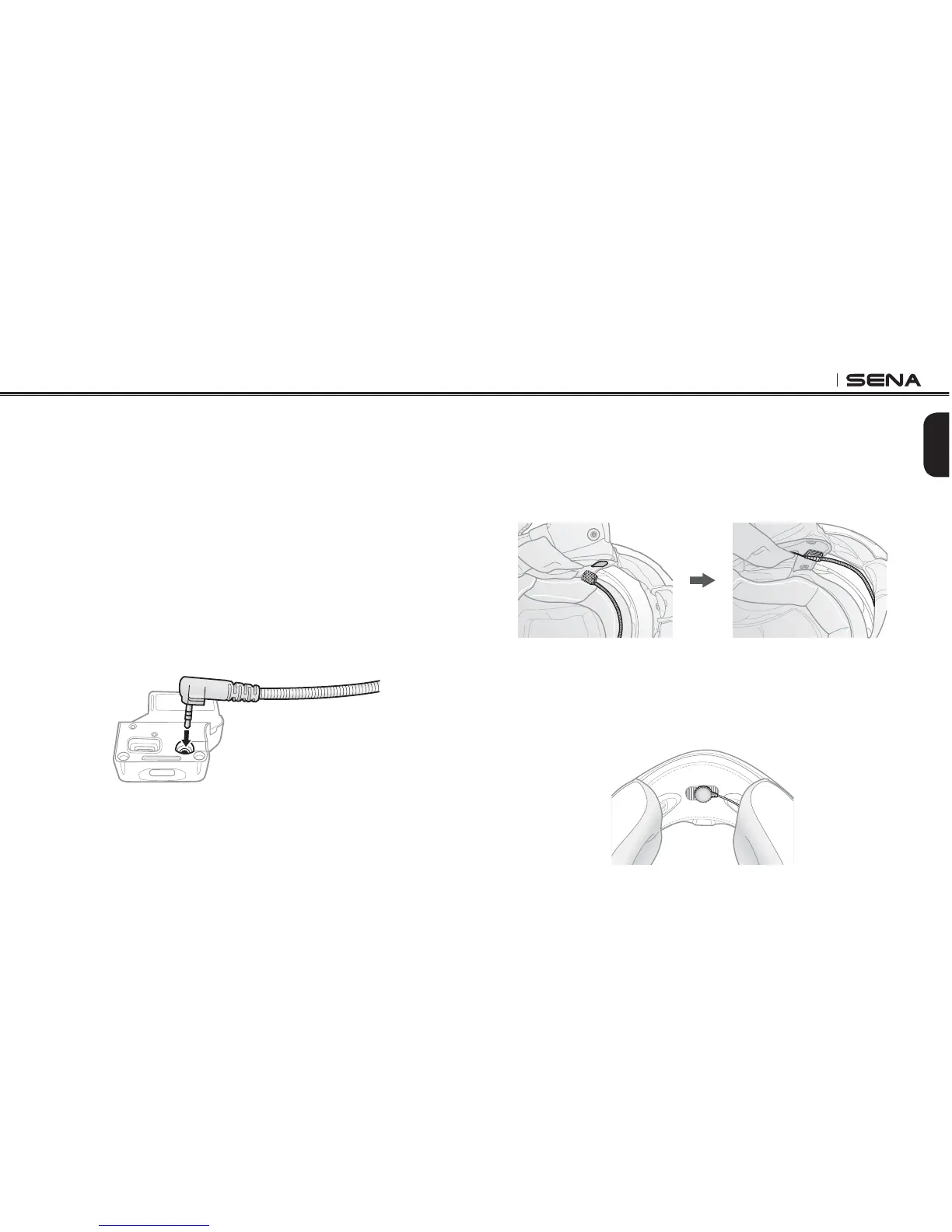
3.3 Switching the Microphone
If you want to use a different microphone instead of the static boom
microphone, please refer to the following steps.
1. Remove the back plate of the clamp unit by loosening the two
screws with the enclosed allen wrench.
2. If you look into the back side of the clamp, the left port is for
speakers and the right port is for microphone.
3. Two extra microphones are provided, a wired boom microphone
and a wired microphone. Connect the one you need according to
your helmet type.
4. Reattach the back plate to cover the microphone and the speaker
port.
5. Follow Steps in section 3.1, “Helmet Installation” to complete the
clamp installation.
3.3.1 Wired Boom Microphone
When installing the included wired boom microphone, place the hook
and loop fastener end of the boom microphone between the internal
helmet cheek pad and the internal wall of the helmet shell. The boom
microphone should be mounted so it is facing close to your mouth when
you wear the helmet.
3.3.2 Wired Microphone
In case of the wired microphone, attach the enclosed hook and loop
fastener for the wired microphone to the inside of the chin guard for
full-face helmets. Place the wired microphone on the hook and loop
fastener and connect it to the connector of the clamp unit.



 To Next Page