20S
28
13 VOICE COMMAND
The voice command of the 20S allows you to operate certain operations
by simply using your voice. You can control the 20S completely
handsfree using the voice recognition. The voice command function
works only with English commands.
Voice Command Procedure:
1. There are three ways to enter the voice command mode. The simplest
way is to tap once on the Ambient Mode Button. Another way is to
double tap the surface of the 20S or the helmet surrounding the 20S.
Be careful not to press the Jog Dial during this process. Lastly, you
can say, “Hello Sena” during standby mode.
3PEAKAVOICECOMMANDFROMTHETABLEBELOW
12 AMBIENT MODE
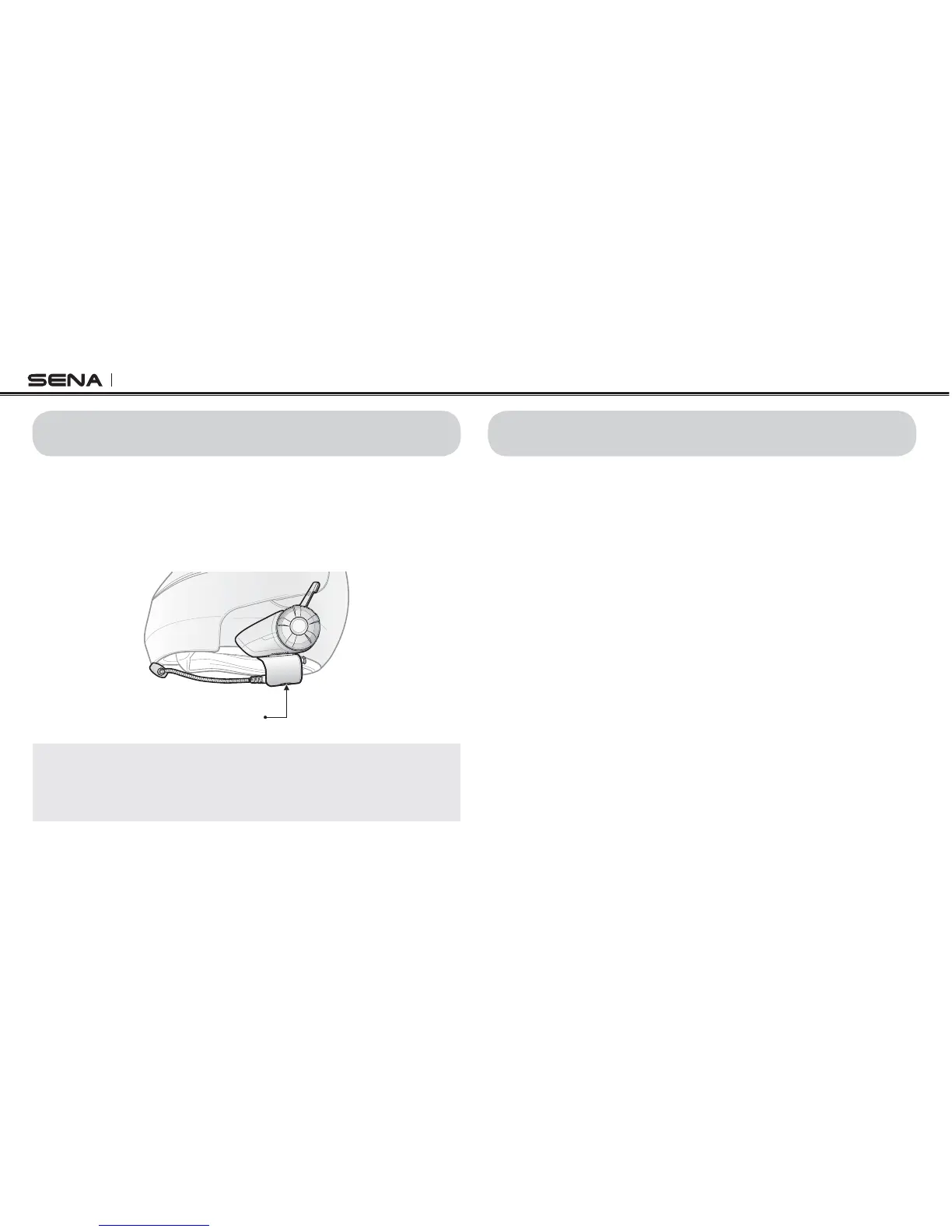
You can hear the ambient sound outside of your helmet by activating
the Ambient Mode. To activate the Ambient Mode, press twice the
Ambient Mode Button which is placed on the bottom of the clamp
unit. To deactivate the Ambient Mode, press twice the Ambient Mode
Button again.
Ambient Mode Button
Note:
The ambient mode has higher priority than mobile phone, so you cannot
make or answer phone call, listen to music, or have an intercom conversation
if the Ambient Mode is activated.



 To Next Page