45
LC-32LB261U Sharp 32" LED TV
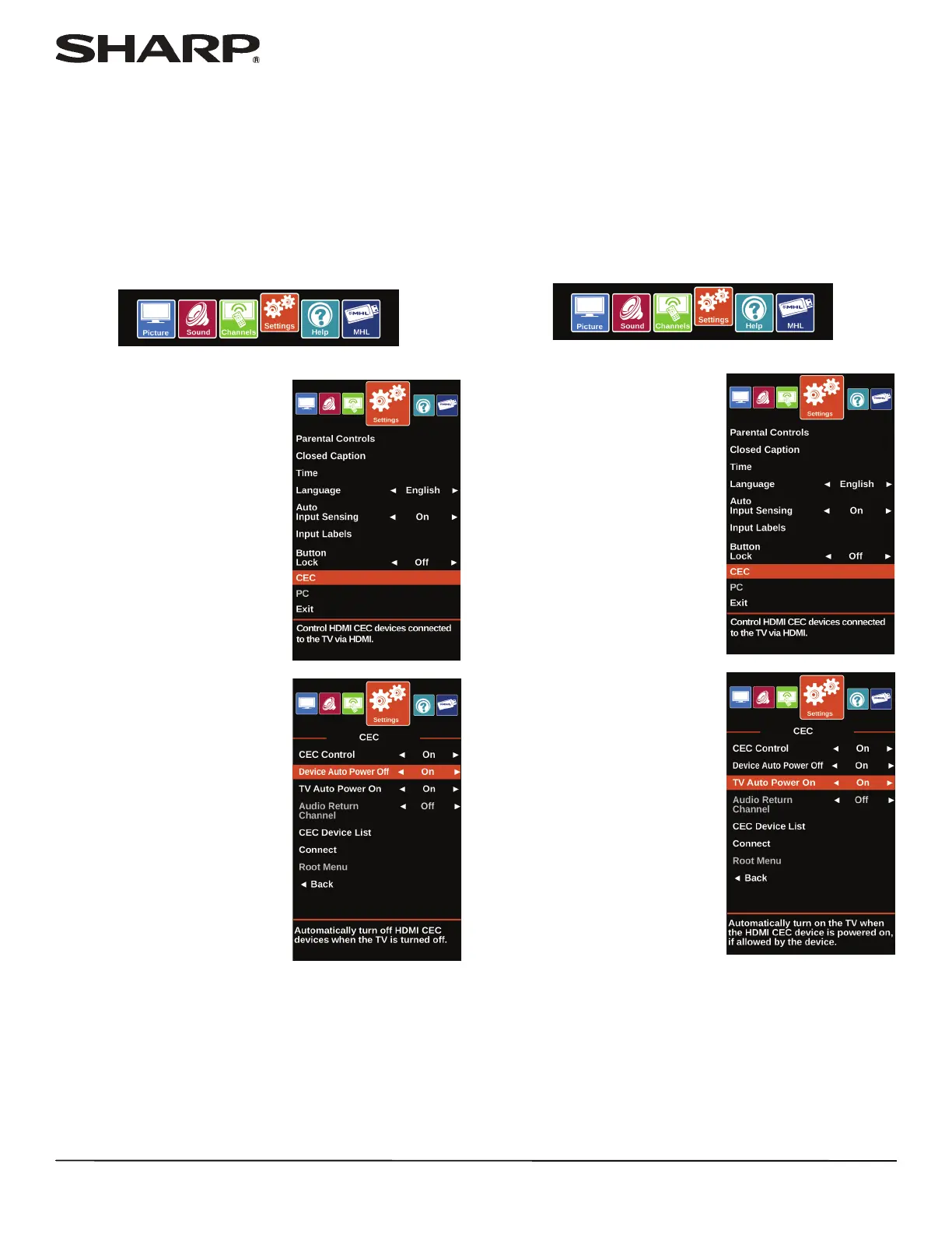
4 Press S or T to highlight CEC Control, then press ENTER or
X to access the option.
5 Press
W or X to highlight On or Off, then press ENTER.
6 Press MENU to return to the previous menu, or press EXIT
to close the menu.
Turning Device Auto Power Off on or off
When CEC Control is set to On, Device Auto Power Off
automatically turns off HDMI CEC devices when you turn off
your TV.
1 Press MENU.
2 Press
W or X to highlight
Settings, then press ENTER.
3 Press
S or T to highlight CEC,
then press ENTER.
4 Make sure that the CEC Control option is turned on. See
“Turning CEC Control on or off” on page 44.
5 On the Settings · CEC menu, press
S or T to highlight
Device Auto Power Off, then press ENTER or X to access
the option.
6 Press
W or X to highlight On (turns off the connected
devices when you turn off your TV) or Off (does not turn off
the connected devices when you turn off your TV), then
press ENTER.
7 Press MENU to return to the previous menu, or press EXIT
to close the menu.
Turning TV Auto Power On on or off
TV Auto Power On automatically turns on your TV when an
HDMI CEC device is turned on, if the device has this feature.
1 Press MENU.
2 Press
W or X to highlight
Settings, then press ENTER.
3 Press
S or T to highlight CEC,
then press ENTER.
4 Make sure that the CEC Control option is turned on. See
“Turning CEC Control on or off” on page 44.
5 On the Settings · CEC menu, press
S or T to highlight TV
Auto Power On, then press ENTER or
X to access the
option.













 To Next Page