62
LC-32LB261U Sharp 32" LED TV
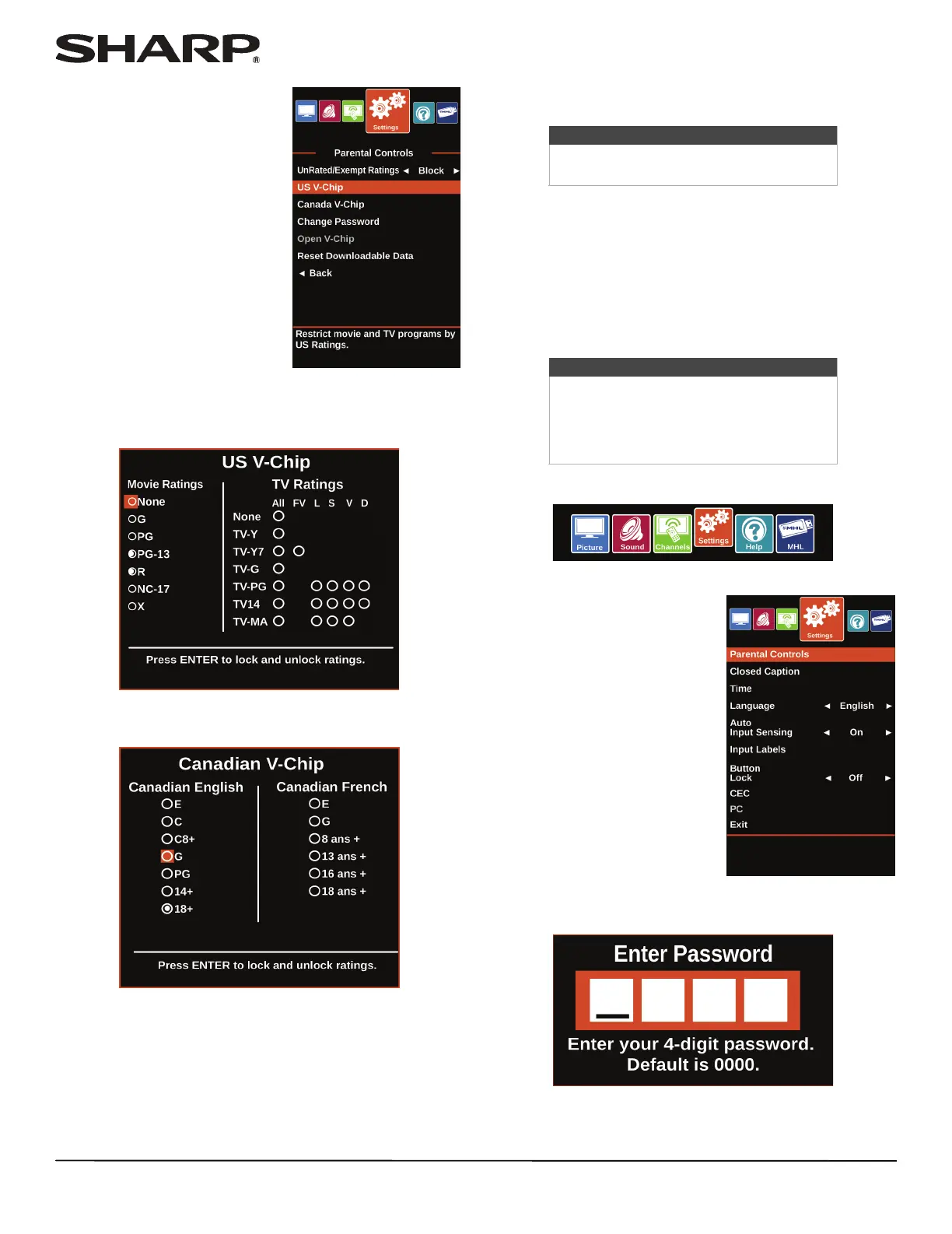
4 Press the number buttons to
enter the four-digit password.
5 Press
S or T to highlight US V-Chip, then press ENTER. (To
set Canadian ratings, select Canadian V-Chip.)
US V-Chip
Canadian V-Chip
6 Press
W or X to highlight:
• Movie Ratings or TV Ratings for USA ratings.
• Canadian English or Canadian French for Canadian
ratings.
7 Press
S or T to select the rating. If a rating has sub-ratings,
press W or X to highlight a sub-rating.
8 Press ENTER to confirm. A lock symbol appears when a
rating is blocked.
9 Press MENU to return to the previous menu, or press EXIT
to close the menu.
Downloading rating information
If the program you are viewing has downloadable rating
information, you can download the information to use when
setting parental controls.
1 Press MENU.
2 Press
W or X to highlight
Settings, then press ENTER.
3 Press
S or T to highlight Parental Controls, then press
ENTER.
Note
When you block a rating, that rating and
all higher ratings are blocked.
Note
If the program you are viewing does not
have V-Chip rating information,
Open V-CHIP is grayed on the
Settings · Parental Controls menu and
cannot be selected.













 To Next Page